This time we’re going bigger than ever. Fabric, Power BI, SQL, AI and more. We're covering it all. You won't want to miss it.
Learn moreDid you hear? There's a new SQL AI Developer certification (DP-800). Start preparing now and be one of the first to get certified. Register now
I have a table with two columns: User and Delegate. Each column contains ID-type values. I'm trying to figure which Users are also Delegates. Here is how I would do it in SQL:
SELECT DISTINCT
u.[User],
d.Delegate
FROM [Sheet1$] u
INNER JOIN [Sheet1$] d
ON u.[User] = d.Delegate
I'm new to Power BI and DAX, so I have no idea how to accomplish this goal using those tools. All I know is Power BI/DAX does not support self joins.
What approach should I take?
Solved! Go to Solution.
Hi @imani_tech,
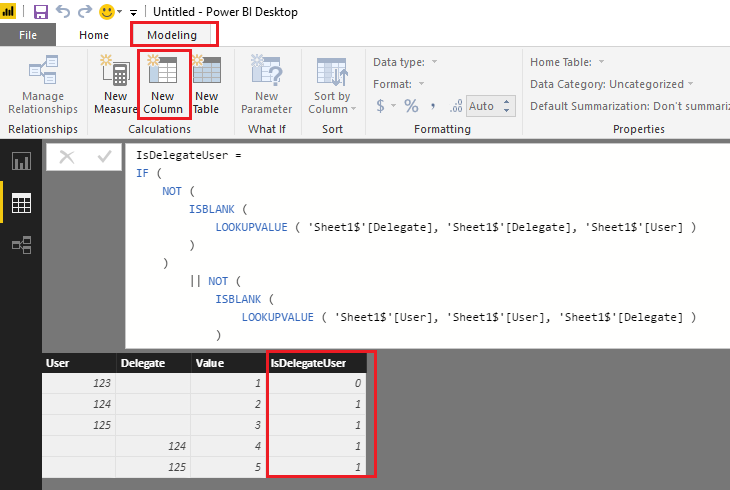
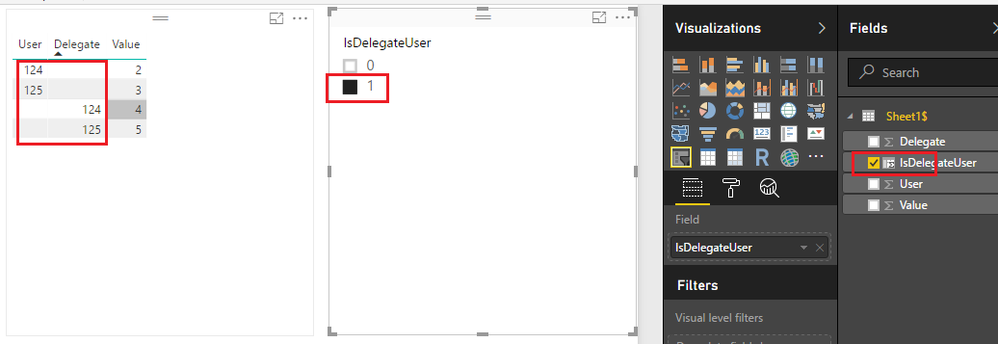
If I understand you correctly, you should also be able to use DAX to create a calculate column in your 'Sheet1$' table to indicate if the User/Delegate are both User and Delegate. Then you can use the new created calculate column as Slicers or Visual/Page/Report level filters on your report. The formula below is for your reference. ![]()
IsDelegateUser =
IF (
NOT (
ISBLANK (
LOOKUPVALUE ( 'Sheet1$'[Delegate], 'Sheet1$'[Delegate], 'Sheet1$'[User] )
)
)
|| NOT (
ISBLANK (
LOOKUPVALUE ( 'Sheet1$'[User], 'Sheet1$'[User], 'Sheet1$'[Delegate] )
)
),
1,
0
)
Regards
Hi @imani_tech,
If I understand you correctly, you should also be able to use DAX to create a calculate column in your 'Sheet1$' table to indicate if the User/Delegate are both User and Delegate. Then you can use the new created calculate column as Slicers or Visual/Page/Report level filters on your report. The formula below is for your reference. ![]()
IsDelegateUser =
IF (
NOT (
ISBLANK (
LOOKUPVALUE ( 'Sheet1$'[Delegate], 'Sheet1$'[Delegate], 'Sheet1$'[User] )
)
)
|| NOT (
ISBLANK (
LOOKUPVALUE ( 'Sheet1$'[User], 'Sheet1$'[User], 'Sheet1$'[Delegate] )
)
),
1,
0
)
Regards
Thank you so much!!!
Sure it does.
let
Source = Table.NestedJoin(Table5,{"User"},Table5,{"Delegate"},"Table5",JoinKind.Inner),
#"Removed Columns" = Table.RemoveColumns(Source,{"Delegate", "Table5"})
in
#"Removed Columns"
Check out the April 2026 Power BI update to learn about new features.
Sign up to receive a private message when registration opens and key events begin.
If you have recently started exploring Fabric, we'd love to hear how it's going. Your feedback can help with product improvements.
| User | Count |
|---|---|
| 35 | |
| 32 | |
| 25 | |
| 23 | |
| 16 |
| User | Count |
|---|---|
| 65 | |
| 50 | |
| 30 | |
| 24 | |
| 23 |