This time we’re going bigger than ever. Fabric, Power BI, SQL, AI and more. We're covering it all. You won't want to miss it.
Learn moreDid you hear? There's a new SQL AI Developer certification (DP-800). Start preparing now and be one of the first to get certified. Register now
I have a table with two columns: User and Delegate. Each column contains ID-type values. I'm trying to figure which Users are also Delegates. Here is how I would do it in SQL:
SELECT DISTINCT
u.[User],
d.Delegate
FROM [Sheet1$] u
INNER JOIN [Sheet1$] d
ON u.[User] = d.Delegate
I'm new to Power BI and DAX, so I have no idea how to accomplish this goal using those tools. All I know is Power BI/DAX does not support self joins.
What approach should I take?
Solved! Go to Solution.
Hi @imani_tech,
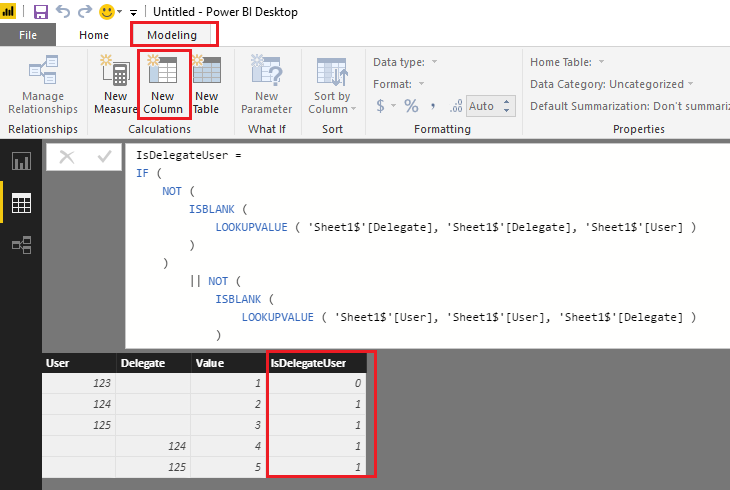
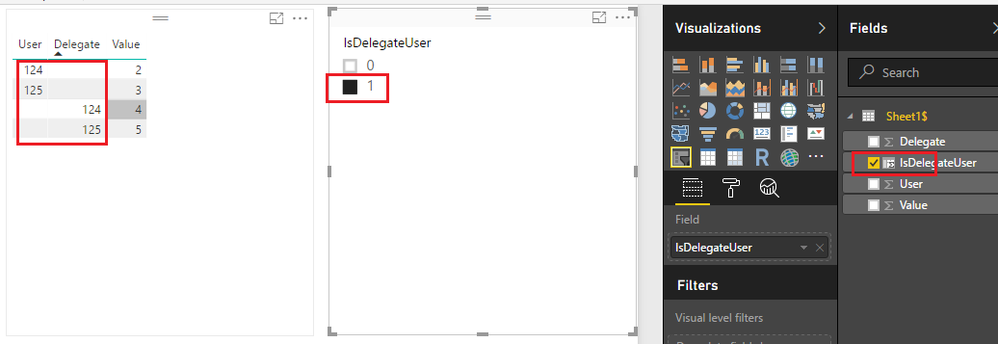
If I understand you correctly, you should also be able to use DAX to create a calculate column in your 'Sheet1$' table to indicate if the User/Delegate are both User and Delegate. Then you can use the new created calculate column as Slicers or Visual/Page/Report level filters on your report. The formula below is for your reference. ![]()
IsDelegateUser =
IF (
NOT (
ISBLANK (
LOOKUPVALUE ( 'Sheet1$'[Delegate], 'Sheet1$'[Delegate], 'Sheet1$'[User] )
)
)
|| NOT (
ISBLANK (
LOOKUPVALUE ( 'Sheet1$'[User], 'Sheet1$'[User], 'Sheet1$'[Delegate] )
)
),
1,
0
)
Regards
Hi @imani_tech,
If I understand you correctly, you should also be able to use DAX to create a calculate column in your 'Sheet1$' table to indicate if the User/Delegate are both User and Delegate. Then you can use the new created calculate column as Slicers or Visual/Page/Report level filters on your report. The formula below is for your reference. ![]()
IsDelegateUser =
IF (
NOT (
ISBLANK (
LOOKUPVALUE ( 'Sheet1$'[Delegate], 'Sheet1$'[Delegate], 'Sheet1$'[User] )
)
)
|| NOT (
ISBLANK (
LOOKUPVALUE ( 'Sheet1$'[User], 'Sheet1$'[User], 'Sheet1$'[Delegate] )
)
),
1,
0
)
Regards
Thank you so much!!!
Sure it does.
let
Source = Table.NestedJoin(Table5,{"User"},Table5,{"Delegate"},"Table5",JoinKind.Inner),
#"Removed Columns" = Table.RemoveColumns(Source,{"Delegate", "Table5"})
in
#"Removed Columns"
Check out the April 2026 Power BI update to learn about new features.
If you have recently started exploring Fabric, we'd love to hear how it's going. Your feedback can help with product improvements.
| User | Count |
|---|---|
| 36 | |
| 32 | |
| 31 | |
| 21 | |
| 15 |
| User | Count |
|---|---|
| 66 | |
| 56 | |
| 31 | |
| 27 | |
| 22 |