Join us in Barcelona for FabCon and SQLCon, September 28 - October 1, 2026.
This is best Fabric, Power BI, SQL and AI community event. How do we know? The last event sold out! Save €200 with code FABCMTY200.
Register now- Power BI forums
- Get Help with Power BI
- Desktop
- Service
- Report Server
- Power Query
- Mobile Apps
- Developer
- DAX Commands and Tips
- Custom Visuals Development Discussion
- Health and Life Sciences
- Power BI Spanish forums
- Translated Spanish Desktop
- Training and Consulting
- Instructor Led Training
- Dashboard in a Day for Women, by Women
- Galleries
- Data Stories Gallery
- Themes Gallery
- Contests Gallery
- QuickViz Gallery
- Quick Measures Gallery
- Visual Calculations Gallery
- Fabric Apps Gallery
- Notebook Gallery
- Translytical Task Flow Gallery
- TMDL Gallery
- R Script Showcase
- Webinars and Video Gallery
- Ideas
- Custom Visuals Ideas (read-only)
- Issues
- Issues
- Events
- Upcoming Events
July 28 - August 9 | Final Round of the Power BI Dataviz World Championships. This is your chance. Learn more
- Power BI forums
- Forums
- Get Help with Power BI
- Desktop
- Re: Use table values as a parameter
- Subscribe to RSS Feed
- Mark Topic as New
- Mark Topic as Read
- Float this Topic for Current User
- Bookmark
- Subscribe
- Printer Friendly Page


- Mark as New
- Bookmark
- Subscribe
- Mute
- Subscribe to RSS Feed
- Permalink
- Report Inappropriate Content
Use table values as a parameter
Hi,
I'm trying to add months to my date column. But at this moment it is static
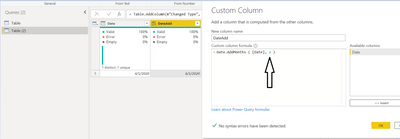
I want that to come from my table called 'Table' and column called Dealy Factor.
So if delay factor is changed to 3 then this will add 3 months to my date

FYI : My delay factor comes from my sharepoint list where the users input the delay factor as a parameter
In my actual dataset this table contains a lot of parameters but for simplicity I have included just the 'Delay Factor'
Find the link of file here
Solved! Go to Solution.


- Mark as New
- Bookmark
- Subscribe
- Mute
- Subscribe to RSS Feed
- Permalink
- Report Inappropriate Content
Hello @klehar ,
you didn't say they are in one table 😉
You can just do the drill down for each parameter in the second query.
For your example, I added 2 more columns:
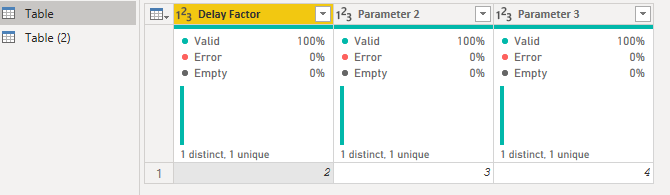
In the "Table (2)" query you can add the drilldown as an own variable, like that:
ParameterDelayFactor = Table{0}[Delay Factor],
Or if you need the Parameter 3:
ParameterParameter3 = Table{0}[Parameter 3],
Then you can add it to your normal query of "Table (2)":
let
    ParameterDelayFactor = Table{0}[Delay Factor],
    Source = Table.FromRows(Json.Document(Binary.Decompress(Binary.FromText("i45WMtE31DcyMDJQio0FAA==", BinaryEncoding.Base64), Compression.Deflate)), let _t = ((type nullable text) meta [Serialized.Text = true]) in type table [Date = _t]),
    #"Changed Type" = Table.TransformColumnTypes(Source,{{"Date", type date}}),
    #"Added Custom" = Table.AddColumn(#"Changed Type", "DateAdd", each Date.AddMonths ( [Date], ParameterDelayFactor )),
    #"Changed Type1" = Table.TransformColumnTypes(#"Added Custom",{{"DateAdd", type date}})
in
    #"Changed Type1"
- Mark as New
- Bookmark
- Subscribe
- Mute
- Subscribe to RSS Feed
- Permalink
- Report Inappropriate Content
Hey @klehar ,
you can do that in 2 steps:
1. Go to your "Table", do a right click on your number and chose drill down:
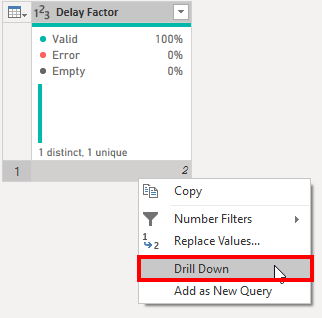
2. Instead of a table this query will show a number, also the symbol will change:

3. Then go to your second "Table (2)" and change the fixed number "2" to "Table":
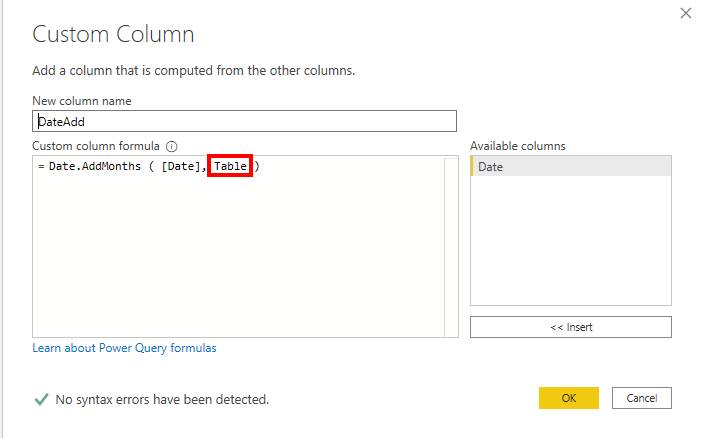
Congratulations, your added date is now dynamically, based on the result of another query 😊
- Mark as New
- Bookmark
- Subscribe
- Mute
- Subscribe to RSS Feed
- Permalink
- Report Inappropriate Content
@selimovd thanks for the quick reply
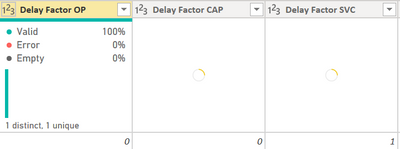
However as I told you my parameter table has multiple columns with single row
Drilling it down will create a list and not a table
I guess i have to use list functions to fetch some values from each column but not sure how
- Mark as New
- Bookmark
- Subscribe
- Mute
- Subscribe to RSS Feed
- Permalink
- Report Inappropriate Content
Hello @klehar ,
you didn't say they are in one table 😉
You can just do the drill down for each parameter in the second query.
For your example, I added 2 more columns:
In the "Table (2)" query you can add the drilldown as an own variable, like that:
ParameterDelayFactor = Table{0}[Delay Factor],
Or if you need the Parameter 3:
ParameterParameter3 = Table{0}[Parameter 3],
Then you can add it to your normal query of "Table (2)":
let
    ParameterDelayFactor = Table{0}[Delay Factor],
    Source = Table.FromRows(Json.Document(Binary.Decompress(Binary.FromText("i45WMtE31DcyMDJQio0FAA==", BinaryEncoding.Base64), Compression.Deflate)), let _t = ((type nullable text) meta [Serialized.Text = true]) in type table [Date = _t]),
    #"Changed Type" = Table.TransformColumnTypes(Source,{{"Date", type date}}),
    #"Added Custom" = Table.AddColumn(#"Changed Type", "DateAdd", each Date.AddMonths ( [Date], ParameterDelayFactor )),
    #"Changed Type1" = Table.TransformColumnTypes(#"Added Custom",{{"DateAdd", type date}})
in
    #"Changed Type1"
- Mark as New
- Bookmark
- Subscribe
- Mute
- Subscribe to RSS Feed
- Permalink
- Report Inappropriate Content
You saved my day Thank you
- Mark as New
- Bookmark
- Subscribe
- Mute
- Subscribe to RSS Feed
- Permalink
- Report Inappropriate Content
- Mark as New
- Bookmark
- Subscribe
- Mute
- Subscribe to RSS Feed
- Permalink
- Report Inappropriate Content
Sure, here you go:
https://www.swisstransfer.com/d/57685d34-a1b8-4533-81e8-d1359c818e16

Helpful resources

FabCon & SQLCon – Barcelona 2026
Join us in Barcelona for FabCon and SQLCon, the Fabric, Power BI, SQL, and AI community event. Save €200 with code FABCMTY200.

Fabric Community Sticker Challenge - Barcelona 2026
If you love stickers, then you will definitely want to check out our community sticker challenge, Barcelona edition!

Power BI Monthly Update - July 2026
Check out the July 2026 Power BI update to learn about new features.

Power BI DataViz World Championships - June 2026
A new Power BI DataViz World Championship is coming this June! Don't miss out on submitting your entry.

| User | Count |
|---|---|
| 25 | |
| 23 | |
| 19 | |
| 17 | |
| 14 |


| User | Count |
|---|---|
| 24 | |
| 20 | |
| 20 | |
| 19 | |
| 19 |


