cancel
Showing results for 
Search instead for 
Did you mean: 

The Power BI Data Visualization World Championships is back! Get ahead of the game and start preparing now! Learn more

Reply
Denis_Slav
Helper III
Helper III

Use slicer to switch Columns in Matrix

Hi All, 

Maybe is there any way to resolve next issue without bookmarks?

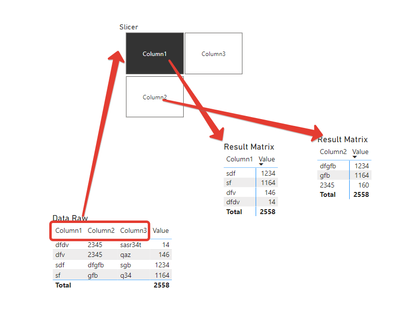
I've got a tble with the set of columns. I'd like to use slicer to switch them in a matrix. 

Denis_Slav_1-1650036395057.png


I already tryied SWITCH, but I couldn't use this measure as column or rows.

1 ACCEPTED SOLUTION
Denis_Slav
Helper III
Helper III

@Samarth_18 @v-henryk-mstf Thanks, but it's not what i'm looking for. 


I found solution to do what I want:

https://www.youtube.com/watch?v=dYmzb5UMkXw 

View solution in original post

3 REPLIES 3
Denis_Slav
Helper III
Helper III

@Samarth_18 @v-henryk-mstf Thanks, but it's not what i'm looking for. 


I found solution to do what I want:

https://www.youtube.com/watch?v=dYmzb5UMkXw 

v-henryk-mstf
Community Support
Community Support

Hi @Denis_Slav ,


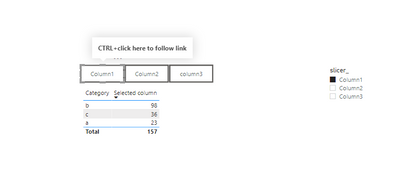
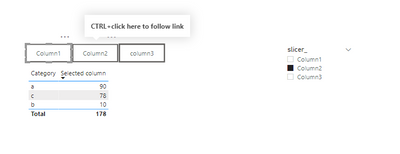
Generally speaking, slicer as a filter to filter the object is row, can not dynamically filter column, but I think you can create a button, combined with the function of bookmark, display the same effect, reference the following:

vhenrykmstf_0-1650437839534.png

vhenrykmstf_1-1650437858186.png

Selected column = 
SWITCH(
  SELECTEDVALUE(Slicer_column[slicer_])
   ,"Column1",SUM(Sales[Column1])
   ,"Column2",SUM(Sales[Column2])
   ,"Column3",Sum(Sales[Column3])
   ,BLANK()
)

click button1

vhenrykmstf_2-1650437904935.png

click button2

vhenrykmstf_3-1650437923857.png


If the problem is still not resolved, please provide detailed error information and let me know immediately. Looking forward to your reply.


Best Regards,
Henry


If this post helps, then please consider Accept it as the solution to help the other members find it more quickly.

Samarth_18
Community Champion
Community Champion

Hi @Denis_Slav ,


You could refer to below article.


https://exceleratorbi.com.au/show-or-hide-a-power-bi-visual-based-on-selection/#:~:text=Click%20on%2... 


Thanks,

Samarth


Best Regards,
Samarth

If this post helps, please consider accepting it as the solution to help the other members find it more quickly.
Appreciate your Kudos!!
Connect on Linkedin

Helpful resources

Announcements
Power BI DataViz World Championships

Power BI Dataviz World Championships

The Power BI Data Visualization World Championships is back! Get ahead of the game and start preparing now!

December 2025 Power BI Update Carousel

Power BI Monthly Update - December 2025

Check out the December 2025 Power BI Holiday Recap!

FabCon Atlanta 2026 carousel

FabCon Atlanta 2026

Join us at FabCon Atlanta, March 16-20, for the ultimate Fabric, Power BI, AI and SQL community-led event. Save $200 with code FABCOMM.