Join us at FabCon Atlanta from March 16 - 20, 2026, for the ultimate Fabric, Power BI, AI and SQL community-led event. Save $200 with code FABCOMM.
Register now!The Power BI Data Visualization World Championships is back! It's time to submit your entry. Live now!
Dear communitiy,
I've created a new report. As Datasource I've used an existing Dataset with role security.
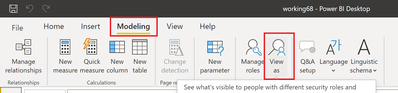
Now I would like to test my report with the "View as" function.
But neither in Desktop, nor in Service I found a way to do so.
Any help is very much appreciated.
Thank you
Solved! Go to Solution.
@IcingOnTheCake In Desktop
If you are using a Live connection I do not believe you can use it, it will be greyed out. You need to test roles in the dataset, not a live connection to the dataset.
@IcingOnTheCake In Desktop
If you are using a Live connection I do not believe you can use it, it will be greyed out. You need to test roles in the dataset, not a live connection to the dataset.
@IcingOnTheCake , In desktop you have option view as roles , you need to use that
refer
https://docs.microsoft.com/en-us/power-bi/admin/service-admin-rls
Thanks. I am aware of this function and I always use it. But it is inactive/greyed out, as soon as you use an existing dataset with RLS.
The Power BI Data Visualization World Championships is back! It's time to submit your entry.
| User | Count |
|---|---|
| 50 | |
| 43 | |
| 36 | |
| 33 | |
| 30 |
| User | Count |
|---|---|
| 138 | |
| 120 | |
| 60 | |
| 59 | |
| 56 |