Get certified for free when you join Fabric Data Days 2026 and dive into Fabric, Power BI, SQL, AI, and other essential data skills.
Join nowData Days is here! Join us now for 60+ days of learning, challenges, and connection. Learn more
Dear communitiy,
I've created a new report. As Datasource I've used an existing Dataset with role security.
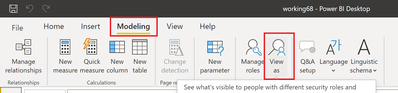
Now I would like to test my report with the "View as" function.
But neither in Desktop, nor in Service I found a way to do so.
Any help is very much appreciated.
Thank you
Solved! Go to Solution.
@IcingOnTheCake In Desktop
If you are using a Live connection I do not believe you can use it, it will be greyed out. You need to test roles in the dataset, not a live connection to the dataset.
@IcingOnTheCake In Desktop
If you are using a Live connection I do not believe you can use it, it will be greyed out. You need to test roles in the dataset, not a live connection to the dataset.
@IcingOnTheCake , In desktop you have option view as roles , you need to use that
refer
https://docs.microsoft.com/en-us/power-bi/admin/service-admin-rls
Thanks. I am aware of this function and I always use it. But it is inactive/greyed out, as soon as you use an existing dataset with RLS.
Don't miss out on Data Days, June 15 through August 7. Learn Fabric, Power BI, SQL, AI and more.
Check out the May 2026 Power BI update to learn about new features.
| User | Count |
|---|---|
| 23 | |
| 21 | |
| 20 | |
| 17 | |
| 13 |
| User | Count |
|---|---|
| 58 | |
| 51 | |
| 37 | |
| 30 | |
| 26 |