This time we’re going bigger than ever. Fabric, Power BI, SQL, AI and more. We're covering it all. You won't want to miss it.
Learn moreJoin the FabCon + SQLCon recap series. Up next: Power BI, Real-Time Intelligence, IQ and AI, and Data Factory take center stage. All sessions are available on-demand after the live show. Register now
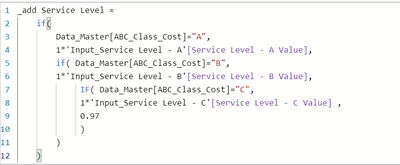
When I first created 3 Parameter. Service Level for A class I set up at 0.97, and B class at 0.95 and Class at 0.93.
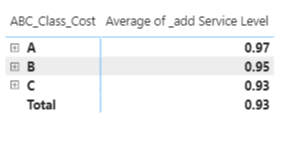
Then I created a calculated coloumn call "Service Level" based on the parameter user input. (Pic 1 & 2)
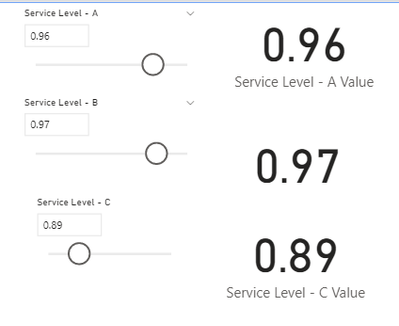
But the Parameter is not working. As you can see in Pic 3, i change the parameter on the slicer, but in Pic 2 the value still stay the same...
Where did i do wrong? Help please!
orking.
Solved! Go to Solution.
Hey @chutli ,
that was a little trick, but try the following measure. I guess you have to adapt it to your tables:
ServiceLevel =
VAR vClassA = SELECTEDVALUE('Input_Service Level - A'[A Value], 1) -- Name of your Slicer table and column
VAR vClassB = SELECTEDVALUE('Input_Service Level - B'[B Value], 1)
VAR vClassC = SELECTEDVALUE('Input_Service Level - C'[C Value], 1)
VAR vAverage =
AVERAGEX(
Data_Master,
VAR vRowClass = Data_Master[ABC_Class_Cost]
RETURN
SWITCH(
vRowClass,
"A", vClassA,
"B", vClassB,
"C", vClassC
) * 1
)
RETURN
vAverage
Hey @chutli ,
a calculated column is always static. After the file is loaded the values are not gonna change anymore.
So you have to solve that with a measure.
If you help me to understand a little better how the result should look like I can also help you.
Hey @chutli ,
that was a little trick, but try the following measure. I guess you have to adapt it to your tables:
ServiceLevel =
VAR vClassA = SELECTEDVALUE('Input_Service Level - A'[A Value], 1) -- Name of your Slicer table and column
VAR vClassB = SELECTEDVALUE('Input_Service Level - B'[B Value], 1)
VAR vClassC = SELECTEDVALUE('Input_Service Level - C'[C Value], 1)
VAR vAverage =
AVERAGEX(
Data_Master,
VAR vRowClass = Data_Master[ABC_Class_Cost]
RETURN
SWITCH(
vRowClass,
"A", vClassA,
"B", vClassB,
"C", vClassC
) * 1
)
RETURN
vAverage
@selimovd Thank you for the effort, much appriciated it. unfortunately.. i think i need that to be a calculated column.
Because the Service level column also is used for other calcuations like Safety stock level.. and it's setting on each item level instead of any aggregated group level.
can you help me to brainstrome a bit if theres any work around?
Thank you.
oh never mind. i will just do measurea to all of them... that should works..
Check out the April 2026 Power BI update to learn about new features.
If you have recently started exploring Fabric, we'd love to hear how it's going. Your feedback can help with product improvements.
A new Power BI DataViz World Championship is coming this June! Don't miss out on submitting your entry.
| User | Count |
|---|---|
| 40 | |
| 37 | |
| 31 | |
| 23 | |
| 15 |
| User | Count |
|---|---|
| 76 | |
| 59 | |
| 31 | |
| 31 | |
| 25 |