cancel
Showing results for 
Search instead for 
Did you mean: 

Learn from the best! Meet the four finalists headed to the FINALS of the Power BI Dataviz World Championships! Register now

Reply
Katalo
Frequent Visitor

Use open API with JSON question

Hello! 

Im trying to use Power BI to use an open API from out national Statistics Service in Sweden, but I only get syntax errors with the genereated JSON code from the website. Here is the code I use in the Advanced Editor. Can anyone point me in the right direction?


let
    Source = "http://api.scb.se/OV0104/v1/doris/sv/ssd/START/BE/BE0101/BE0101A/BefolkningNy"
in
  Source = {
  "query": [
    {
      "code": "Region",
      "selection": {
        "filter": "vs:RegionLän07",
        "values": [
          "10"
        ]
      }
    },
    {
      "code": "Alder",
      "selection": {
        "filter": "vs:Ålder1årA",
        "values": [
          "0",
          "1",
          "2",
          "3",
          "4",
          "5",
          "6",
          "7",
          "8",
          "9",
          "10",
          "11",
          "12",
          "13",
          "14",
          "15",
          "16",
          "17",
          "18",
          "19",
          "20",
          "21",
          "22",
          "23",
          "24",
          "25",
          "26",
          "27",
          "28",
          "29",
          "30",
          "31",
          "32",
          "33",
          "34",
          "35",
          "36",
          "37",
          "38",
          "39",
          "40",
          "41",
          "42",
          "43",
          "44",
          "45",
          "46",
          "47",
          "48",
          "49",
          "50",
          "51",
          "52",
          "53",
          "54",
          "55",
          "56",
          "57",
          "58",
          "59",
          "60",
          "61",
          "62",
          "63",
          "64",
          "65",
          "66",
          "67",
          "68",
          "69",
          "70",
          "71",
          "72",
          "73",
          "74",
          "75",
          "76",
          "77",
          "78",
          "79",
          "80",
          "81",
          "82",
          "83",
          "84",
          "85",
          "86",
          "87",
          "88",
          "89",
          "90",
          "91",
          "92",
          "93",
          "94",
          "95",
          "96",
          "97",
          "98",
          "99",
          "100+"
        ]
      }
    },
    {
      "code": "ContentsCode",
      "selection": {
        "filter": "item",
        "values": [
          "BE0101N1"
        ]
      }
    },
    {
      "code": "Tid",
      "selection": {
        "filter": "item",
        "values": [
          "2017"
        ]
      }
    }
  ],
  "response": {
    "format": "px"
  }
}
1 ACCEPTED SOLUTION
Anonymous
Not applicable

@Katalo,

I don't think that you can use the query part as shown above as the query code is invaild Power Query code. You can contact the product's support to check if it is possible to add filters in the URL.

Regards,
Lydia


View solution in original post

3 REPLIES 3
Anonymous
Not applicable

@Katalo,

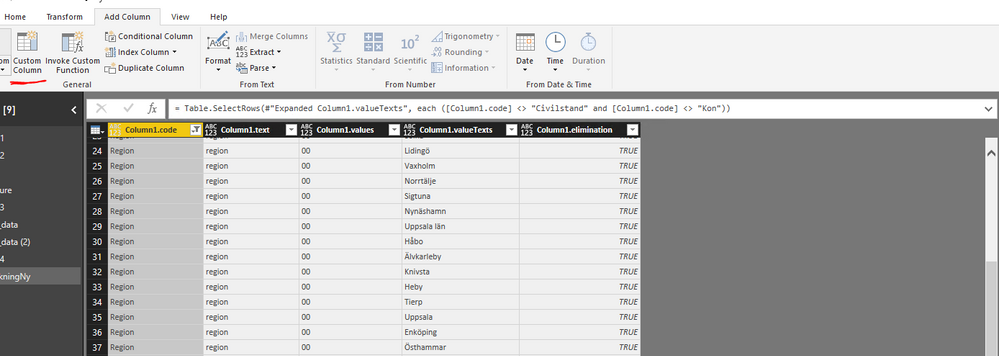
Please add a blank query in Power BI Desktop, then paste the following code into Advanced Editor of the blank query. Then you can filter the required code in this query.

let
    Source = Json.Document(Web.Contents("http://api.scb.se/OV0104/v1/doris/sv/ssd/START/BE/BE0101/BE0101A/BefolkningNy")),
    #"Converted to Table" = Record.ToTable(Source),
    Value = #"Converted to Table"{1}[Value],
    #"Converted to Table1" = Table.FromList(Value, Splitter.SplitByNothing(), null, null, ExtraValues.Error),
    #"Expanded Column1" = Table.ExpandRecordColumn(#"Converted to Table1", "Column1", {"code", "text", "values", "valueTexts", "elimination"}, {"Column1.code", "Column1.text", "Column1.values", "Column1.valueTexts", "Column1.elimination"}),
    #"Expanded Column1.values" = Table.ExpandListColumn(#"Expanded Column1", "Column1.values"),
    #"Expanded Column1.valueTexts" = Table.ExpandListColumn(#"Expanded Column1.values", "Column1.valueTexts")
in
    #"Expanded Column1.valueTexts"

1.PNG

Also you can add a custom column to flag the rows you need, then filter all the required rows . If you have any questions about the custom column, please share your logic here so that we can provide you appropriate formula.

1.PNG

Regards,
Lydia

Hello Lydia, and thank you for your response!

I have tried using your solution, however does that give me the expected result. I think I need to use the "query"-code to get the correct data from the API. The result Im looking for is a table with ages 0-100+ (Alder=Age). But when I use the "query" part of the code it gives me syntax errors. 

Anonymous
Not applicable

@Katalo,

I don't think that you can use the query part as shown above as the query code is invaild Power Query code. You can contact the product's support to check if it is possible to add filters in the URL.

Regards,
Lydia


Helpful resources

Announcements
Join our Fabric User Panel

Join our Fabric User Panel

Share feedback directly with Fabric product managers, participate in targeted research studies and influence the Fabric roadmap.

February Power BI Update Carousel

Power BI Monthly Update - February 2026

Check out the February 2026 Power BI update to learn about new features.

FabCon Atlanta 2026 carousel

FabCon Atlanta 2026

Join us at FabCon Atlanta, March 16-20, for the ultimate Fabric, Power BI, AI and SQL community-led event. Save $200 with code FABCOMM.