cancel
Showing results for 
Search instead for 
Did you mean: 

The Power BI Data Visualization World Championships is back! Get ahead of the game and start preparing now! Learn more

Reply
clubspec
Helper III
Helper III

Use inactive relationship for slicer

Hi Gurus,

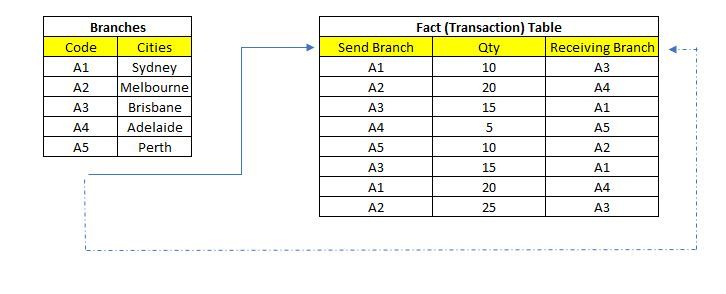
Let's say I have two tables, one is the Branch Table, another one is the Fact Table.

I created two relationships to connect Cities code, Active one connected to the sending Branch, Inactive one connected to the receiving branch.

I want to create two tabs to show the transactions on Fact Table.

First tab for Receiving Branch and it has a slicer for showing the transactions from the Sending Cities (no problem for this as the relationship is active).

Second tab for Sending Branch and it has a slicer for showing the transactions to the Receiving Cities.  Now this is the problem because it uses the relationship that is inactive.

How can I get the second tab working.

Thank you all in advance.

Relationship.JPG

1 ACCEPTED SOLUTION
Pragati11
Super User
Super User

Hi @clubspec ,


There is an existing thread for this. Chek it:

https://community.powerbi.com/t5/Desktop/Filter-Slicer-with-inactive-relationship/m-p/644640


Also, there is a way to use Inactive relationship as an Active one by using USERRELATIONSIP function. Check the thread here:

https://community.powerbi.com/t5/Desktop/using-inactive-relationship/m-p/1195011

There is also a blog on this:

https://hatfullofdata.blog/power-bi-using-inactive-relationships-in-a-measure/


Thanks,

Pragati

Best Regards,

Pragati Jain


MVP logo


LinkedIn | Twitter | Blog YouTube 

Did I answer your question? Mark my post as a solution! This will help others on the forum!

Appreciate your Kudos!!

Proud to be a Super User!!

View solution in original post

4 REPLIES 4
amitchandak
Super User
Super User

@clubspec , refer if my blog can help how use userelation

https://community.powerbi.com/t5/Community-Blog/HR-Analytics-Active-Employee-Hire-and-Termination-tr...

Share with Power BI Enthusiasts: Full Power BI Video (20 Hours) YouTube
Microsoft Fabric Series 60+ Videos YouTube
Microsoft Fabric Hindi End to End YouTube
Pragati11
Super User
Super User

Hi @clubspec ,


There is an existing thread for this. Chek it:

https://community.powerbi.com/t5/Desktop/Filter-Slicer-with-inactive-relationship/m-p/644640


Also, there is a way to use Inactive relationship as an Active one by using USERRELATIONSIP function. Check the thread here:

https://community.powerbi.com/t5/Desktop/using-inactive-relationship/m-p/1195011

There is also a blog on this:

https://hatfullofdata.blog/power-bi-using-inactive-relationships-in-a-measure/


Thanks,

Pragati

Best Regards,

Pragati Jain


MVP logo


LinkedIn | Twitter | Blog YouTube 

Did I answer your question? Mark my post as a solution! This will help others on the forum!

Appreciate your Kudos!!

Proud to be a Super User!!

Hi @Pragati11 

So must either use the measure method you mentioned or create a measure but filter with USERELATIONSHIP?

I hope there is something more simple (the trouble is I have to recreate lots of measures with USERELATIONSHIP)
If Power BI slicer can have a feature by nominating a relationship that would be awesome.

Thanks for your help anyway.

Hi @clubspec ,


I think you should use the approach mentioned in this thread for your scenario:

https://community.powerbi.com/t5/Desktop/Filter-Slicer-with-inactive-relationship/m-p/644640


Sometimes you have to come up with a workaround to achieve the result, as there are always limitations on a tool.


Thanks,

Pragati

Best Regards,

Pragati Jain


MVP logo


LinkedIn | Twitter | Blog YouTube 

Did I answer your question? Mark my post as a solution! This will help others on the forum!

Appreciate your Kudos!!

Proud to be a Super User!!

Helpful resources

Announcements
Power BI DataViz World Championships

Power BI Dataviz World Championships

The Power BI Data Visualization World Championships is back! Get ahead of the game and start preparing now!

December 2025 Power BI Update Carousel

Power BI Monthly Update - December 2025

Check out the December 2025 Power BI Holiday Recap!

FabCon Atlanta 2026 carousel

FabCon Atlanta 2026

Join us at FabCon Atlanta, March 16-20, for the ultimate Fabric, Power BI, AI and SQL community-led event. Save $200 with code FABCOMM.