Join us at FabCon Atlanta from March 16 - 20, 2026, for the ultimate Fabric, Power BI, AI and SQL community-led event. Save $200 with code FABCOMM.
Register now!The Power BI Data Visualization World Championships is back! Get ahead of the game and start preparing now! Learn more
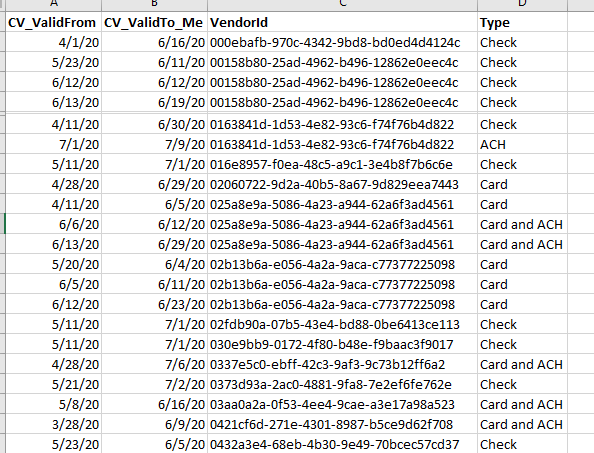
I've built a Slowly Change Dimension (sample below) that I use for various things.
I'd like to utilize this table, to allow a user in Power BI to select 2 dates, and and have it show the Type, for each VendorID, circa the 2 dates chosen.
So say the user chooses:
Date 1: 4/15/20
Date 2: 7/5/2020
000ebafb-970c-4342-9bd8-bd0ed4d4124c would show Check on both dates
00158b80-25ad-4962-b496-12862e0eec4c would show Check on both dates
0163841d-1d53-4e82-93c6-f74f76b4d822 would show Check on Date 1, and ACH on Date 2.
I've done something similar before, with 2 harverster date tables, but that was to sum up a value based on a user chosen month. I'm not quite sure how to do a "return the row, for a given VendorID, closest to, but not beyond the data selected"...
Thoughts?
@mmace1 , You might have use a independent date slicer means not join to your table or use crossfilter to remove join
measure =
var _min = minx(allselected(Date),Date[Date])
var _max = maxx(allselected(Date),Date[Date])
return
calculate(count(Table[vendorId]), filter(Table, Table[CM_validfrom]>=_min && Table[CM_validtoMe] <=_max))
or
measure =
var _min = minx(allselected(Date),Date[Date])
var _max = maxx(allselected(Date),Date[Date])
return
calculate(count(Table[vendorId]), filter(allselected(Table), Table[CM_validfrom]>=_min && Table[CM_validtoMe] <=_max))
Use of crossJoin - https://community.powerbi.com/t5/Community-Blog/HR-Analytics-Active-Employee-Hire-and-Termination-tr...
Thanks. Wouldn't that return a count of rows, as opposed to the data from a certain row, though?
The Power BI Data Visualization World Championships is back! Get ahead of the game and start preparing now!
Check out the November 2025 Power BI update to learn about new features.
| User | Count |
|---|---|
| 59 | |
| 46 | |
| 42 | |
| 23 | |
| 18 |
| User | Count |
|---|---|
| 193 | |
| 123 | |
| 99 | |
| 67 | |
| 49 |