Get certified for free when you join Fabric Data Days 2026 and dive into Fabric, Power BI, SQL, AI, and other essential data skills.
Join nowJuly 7 - July 17 | Round 2 of the Power BI Dataviz World Championships. Don't miss your chance! Learn more
I have an Azure SQL file that lists mobile devices. One field is the DeviceOS, which is formated as follows:
Android 8.0.0
iOS 12.4.0
Android 7.1.2
and so on.
I created a new column with the following DAX formula:
Solved! Go to Solution.
Hi @bschmiedeler,
My suggestion is:
1) Using PowerQuery;
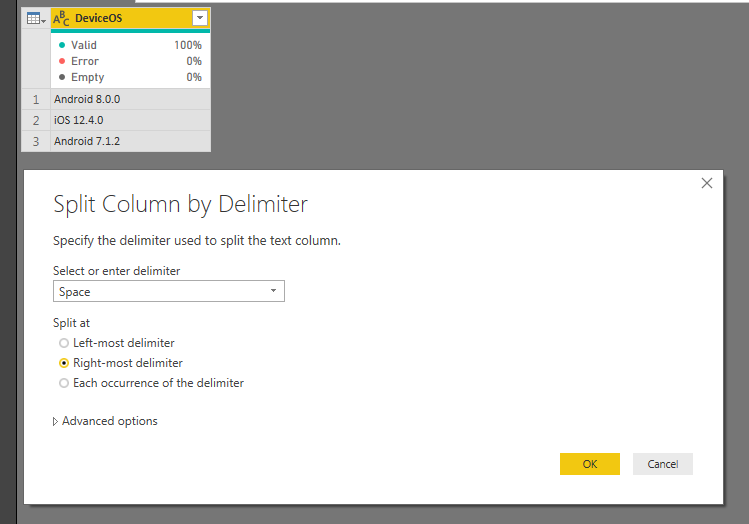
2) Split column "DeviceOS" by Delimeter;
3) Select "Space" as delimiter;
4) Split at Right-most delimiter;
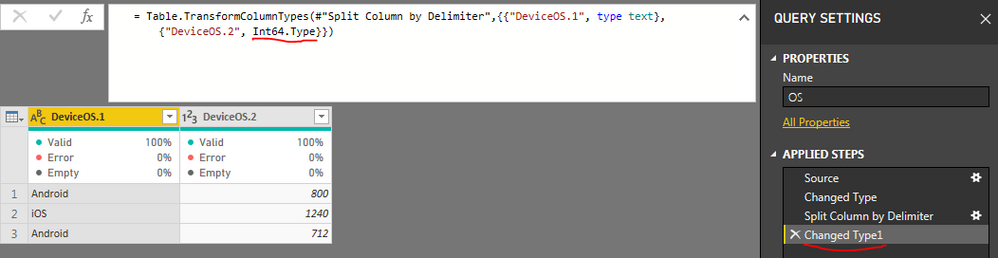
5) Change the second column type, from "Int64.Type" to "type text"
From:
To:
Hi @bschmiedeler,
My suggestion is:
1) Using PowerQuery;
2) Split column "DeviceOS" by Delimeter;
3) Select "Space" as delimiter;
4) Split at Right-most delimiter;
5) Change the second column type, from "Int64.Type" to "type text"
From:
To:
Join us in Barcelona for FabCon and SQLCon, the Fabric, Power BI, SQL, and AI community event. Save €200 with code FABCMTY200.
Join Data Days 2026: 60 days of free live/on-demand sessions, challenges, study groups, and certification opportunities.
| User | Count |
|---|---|
| 29 | |
| 27 | |
| 26 | |
| 23 | |
| 16 |
| User | Count |
|---|---|
| 53 | |
| 46 | |
| 38 | |
| 30 | |
| 21 |