Join the Fabric User Panel to shape the future of Fabric.
Share feedback directly with Fabric product managers, participate in targeted research studies and influence the Fabric roadmap.
Sign up now- Power BI forums
- Get Help with Power BI
- Desktop
- Service
- Report Server
- Power Query
- Mobile Apps
- Developer
- DAX Commands and Tips
- Custom Visuals Development Discussion
- Health and Life Sciences
- Power BI Spanish forums
- Translated Spanish Desktop
- Training and Consulting
- Instructor Led Training
- Dashboard in a Day for Women, by Women
- Galleries
- Data Stories Gallery
- Themes Gallery
- Contests Gallery
- QuickViz Gallery
- Quick Measures Gallery
- Visual Calculations Gallery
- Notebook Gallery
- Translytical Task Flow Gallery
- TMDL Gallery
- R Script Showcase
- Webinars and Video Gallery
- Ideas
- Custom Visuals Ideas (read-only)
- Issues
- Issues
- Events
- Upcoming Events
Get Fabric certified for FREE! Don't miss your chance! Learn more
- Power BI forums
- Forums
- Get Help with Power BI
- Desktop
- Re: Use Count as a filter to exclude from database...
- Subscribe to RSS Feed
- Mark Topic as New
- Mark Topic as Read
- Float this Topic for Current User
- Bookmark
- Subscribe
- Printer Friendly Page


- Mark as New
- Bookmark
- Subscribe
- Mute
- Subscribe to RSS Feed
- Permalink
- Report Inappropriate Content
Use Count as a filter to exclude from database/visualization
Hello users,
I have a huge database and I need to exclude all devices with a count of 1.
Example: There are devices with a count of 1 and more than 1. I would like to exclude Device "1003","4001","5100" from my database as a filter. Please help.
| Device | Count |
| 1000 | 3 |
| 1001 | 2 |
| 1002 | 10 |
| 1003 | 1 |
| 4001 | 1 |
| 4002 | 5 |
| 5100 | 1 |
Solved! Go to Solution.
- Mark as New
- Bookmark
- Subscribe
- Mute
- Subscribe to RSS Feed
- Permalink
- Report Inappropriate Content
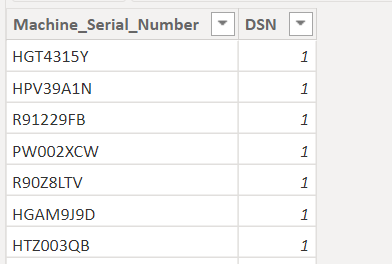
@danextian I used SUMMARIZE function to get count of Device IDs. Used it as a filter in my dashboard and the solution has worked.


- Mark as New
- Bookmark
- Subscribe
- Mute
- Subscribe to RSS Feed
- Permalink
- Report Inappropriate Content
hi @prasadhebbar315 ,
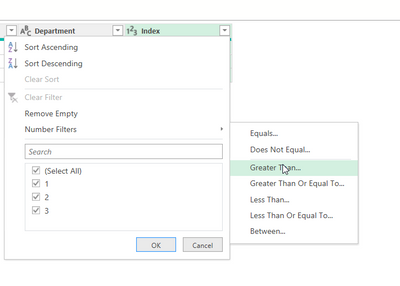
Is the count column already in the database? If so, you can just filter them out in Power Query
Dane Belarmino | Microsoft MVP | Proud to be a Super User!
Did I answer your question? Mark my post as a solution!
"Tell me and I’ll forget; show me and I may remember; involve me and I’ll understand."
Need Power BI consultation, get in touch with me on LinkedIn or hire me on UpWork.
Learn with me on YouTube @DAXJutsu or follow my page on Facebook @DAXJutsuPBI.
- Mark as New
- Bookmark
- Subscribe
- Mute
- Subscribe to RSS Feed
- Permalink
- Report Inappropriate Content
Count is not a column otherwise I would have used it as a filter. Thanks @danextian
- Mark as New
- Bookmark
- Subscribe
- Mute
- Subscribe to RSS Feed
- Permalink
- Report Inappropriate Content
Please see my other reply.
Dane Belarmino | Microsoft MVP | Proud to be a Super User!
Did I answer your question? Mark my post as a solution!
"Tell me and I’ll forget; show me and I may remember; involve me and I’ll understand."
Need Power BI consultation, get in touch with me on LinkedIn or hire me on UpWork.
Learn with me on YouTube @DAXJutsu or follow my page on Facebook @DAXJutsuPBI.
- Mark as New
- Bookmark
- Subscribe
- Mute
- Subscribe to RSS Feed
- Permalink
- Report Inappropriate Content
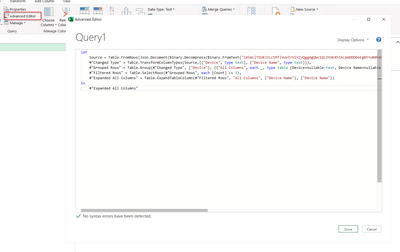
If the count column doesnt exist in the data source, you can use Table.Group to create such and then filter to exclude anything > 1. Try this sample code
let
    Source = Table.FromRows(Json.Document(Binary.Decompress(Binary.FromText("i45WclTSUXJJLctMTlVwVIrViVZyQgg4gQWcEQLOYAEXhIALWADDDDeEgBtYwB0h4E6kLa4IAVewgBdCwEspNhYA", BinaryEncoding.Base64), Compression.Deflate)), let _t = ((type nullable text) meta [Serialized.Text = true]) in type table [Device = _t, #"Device Name" = _t]),
    #"Changed Type" = Table.TransformColumnTypes(Source,{{"Device", type text}, {"Device Name", type text}}),
    #"Grouped Rows" = Table.Group(#"Changed Type", {"Device"}, {{"All Columns", each _, type table [Device=nullable text, Device Name=nullable text]}, {"Count", each Table.RowCount(_), Int64.Type}}),
    #"Filtered Rows" = Table.SelectRows(#"Grouped Rows", each [Count] <= 1),
    #"Expanded All Columns" = Table.ExpandTableColumn(#"Filtered Rows", "All Columns", {"Device Name"}, {"Device Name"})
in
    #"Expanded All Columns"
Dane Belarmino | Microsoft MVP | Proud to be a Super User!
Did I answer your question? Mark my post as a solution!
"Tell me and I’ll forget; show me and I may remember; involve me and I’ll understand."
Need Power BI consultation, get in touch with me on LinkedIn or hire me on UpWork.
Learn with me on YouTube @DAXJutsu or follow my page on Facebook @DAXJutsuPBI.
- Mark as New
- Bookmark
- Subscribe
- Mute
- Subscribe to RSS Feed
- Permalink
- Report Inappropriate Content
The below text is throwing error. How to eliminate them?
Source = Table.FromRows(Json.Document(Binary.Decompress(Binary.FromText("i45WclTSUXJJLctMTlVwVIrViVZyQgg4gQWcEQLOYAEXhIALWADDDDeEgBtYwB0h4E6kLa4IAVewgBdCwEspNhYA", BinaryEncoding.Base64), Compression.Deflate)), let _t = ((type nullable text) meta [Serialized.Text = true]) in type table [Device = _t, #"Device Name" = _t]),
- Mark as New
- Bookmark
- Subscribe
- Mute
- Subscribe to RSS Feed
- Permalink
- Report Inappropriate Content
What error are you getting. Tested just that line myself and it didnt' return an error
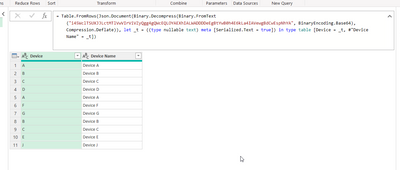
Also the whole script I gave you should be pasted in a blank query using the Advanced Editor. Be sure to delete everything else before pasting it.
Dane Belarmino | Microsoft MVP | Proud to be a Super User!
Did I answer your question? Mark my post as a solution!
"Tell me and I’ll forget; show me and I may remember; involve me and I’ll understand."
Need Power BI consultation, get in touch with me on LinkedIn or hire me on UpWork.
Learn with me on YouTube @DAXJutsu or follow my page on Facebook @DAXJutsuPBI.
- Mark as New
- Bookmark
- Subscribe
- Mute
- Subscribe to RSS Feed
- Permalink
- Report Inappropriate Content
@danextian I used SUMMARIZE function to get count of Device IDs. Used it as a filter in my dashboard and the solution has worked.

Helpful resources

Join our Community Sticker Challenge 2026
If you love stickers, then you will definitely want to check out our Community Sticker Challenge!

Power BI Monthly Update - January 2026
Check out the January 2026 Power BI update to learn about new features.

FabCon Atlanta 2026
Join us at FabCon Atlanta, March 16-20, for the ultimate Fabric, Power BI, AI and SQL community-led event. Save $200 with code FABCOMM.

| User | Count |
|---|---|
| 62 | |
| 59 | |
| 45 | |
| 21 | |
| 18 |


| User | Count |
|---|---|
| 121 | |
| 116 | |
| 37 | |
| 34 | |
| 30 |


