cancel
Showing results for 
Search instead for 
Did you mean: 

Get Fabric Certified for FREE during Fabric Data Days. Don't miss your chance! Request now

Reply
Anonymous
Not applicable

Urgent : Create filter from 2 columns conditions

Hi Everyone,


I would like to show indicators "co_indic" and "valeur" for differents stores. I would like to filter by section of store colonne "rayon".


My data :

Point de Ventecode_IndicateurValeurRayonTous rayons
ParisACT589600,8Femme0
ParisACT589600,5Homme0
ParisACT589600,75Enfant0
ParisACT589600,7tous rayons1
LilleACT589600,85Femme0
LilleACT589600,68Homme0
LilleACT589600,2Linge de maison0
LilleACT589600,6tous rayons1
LyonACT589600,25Linge de maison1
BordeauxACT589600,3Enfant1
ParisACT589631800Femme0
ParisACT58963956Homme0
ParisACT589636943Enfant0
ParisACT589639699tous rayons1
LilleACT58963200Femme0
LilleACT589631956Homme0
LilleACT589633943Linge de maison0
LilleACT589636099tous rayons1
LyonACT589636548Linge de maison1
BordeauxACT589632365Enfant1


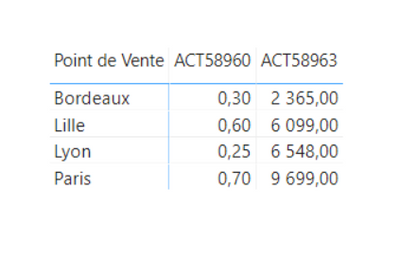
However, I want when "all sections" is selected to display indicators for stores, all departments. My Problem is that a store can only have one section and therefore the "tous rayons" line is that of the section. This line is indicated by the "Tous rayons" column which takes the value 1. How to do so that when I filter on the "tous rayons" value of the "rayon" column, we also display the stores which have only one single section. I have this:


Cmll_1-1627552760427.png


and I would like this:


Cmll_2-1627552799533.png


I have tried Hierachical Filter but it not resolved my problem, cause when I select "Enfant" Bordeaux store doesn't appear :

Cmll_0-1627552639573.png

Thank's for your help.


1 ACCEPTED SOLUTION
Anonymous
Not applicable

Hi @lbendlin ,


Thank's for your answer, 

I modified your proposal and like that I have no bug when "tous rayons" is selected:


Val2 =
IF (
HASONEFILTER ( Ref[Rayon] )
&& SELECTEDVALUE ( Ref[Rayon] ) == "tous rayons",
CALCULATE (
SUM ( commerce[Valeur] ),
ALL ( commerce[Rayon] ),
commerce[Tous rayons] = 1
),
CALCULATE ( SUM ( commerce[Valeur] ), TREATAS ( Ref, commerce[Rayon] ) )
)
 
Thank you

View solution in original post

2 REPLIES 2
lbendlin
Super User
Super User

The easiest approach would be to create a disconnected table with the Rayon values, use that to feed the slicer, and then create a measure that checks the SelectedValue  ( or FILTERS ) of that slicer's table.


Ref = VALUES(Table2[Rayon])


lbendlin_0-1627605199974.png

Note1: I know, there's a bug in the measure if tous rayons is selected together with another range.

Note2:  Be aware that the same result can be achieved by clearing the slicer selection, so "tous rayons" is not really required if you can educate your users.

Anonymous
Not applicable

Hi @lbendlin ,


Thank's for your answer, 

I modified your proposal and like that I have no bug when "tous rayons" is selected:


Val2 =
IF (
HASONEFILTER ( Ref[Rayon] )
&& SELECTEDVALUE ( Ref[Rayon] ) == "tous rayons",
CALCULATE (
SUM ( commerce[Valeur] ),
ALL ( commerce[Rayon] ),
commerce[Tous rayons] = 1
),
CALCULATE ( SUM ( commerce[Valeur] ), TREATAS ( Ref, commerce[Rayon] ) )
)
 
Thank you

Helpful resources

Announcements
Fabric Data Days Carousel

Fabric Data Days

Advance your Data & AI career with 50 days of live learning, contests, hands-on challenges, study groups & certifications and more!

October Power BI Update Carousel

Power BI Monthly Update - October 2025

Check out the October 2025 Power BI update to learn about new features.

FabCon Atlanta 2026 carousel

FabCon Atlanta 2026

Join us at FabCon Atlanta, March 16-20, for the ultimate Fabric, Power BI, AI and SQL community-led event. Save $200 with code FABCOMM.

Top Solution Authors