cancel
Showing results for 
Search instead for 
Did you mean: 

The Power BI Data Visualization World Championships is back! Get ahead of the game and start preparing now! Learn more

Reply
STIBBS_807
Resolver I
Resolver I

Update the Online Dataset with out having to save and publish the Desktop Power BI

I have a set of reports that are Excel spreadsheets with multiple tabs.  Once a month, I have to run the data,  transform it, refresh the Power BI reports, and republish Power BI.  I am not changing the Power BI report's structure; I am simply restoring the data to be reviewed on my Sharepoint Site.  I want to load/refresh the data set only.  Can this be done?


I have tried to load my Excel spreadsheet by importing them into Power BI online in the data set area, and the import will only load one tab of the spreadsheet.  How do I get a multiple-tab Excel Spreadsheet to load each tab in a dataset without having to open Desktop Power BI, refresh, and republish the whole thing again?  Do I need to separate each tab into a separate Excel WorkBook?  


Any suggestion will be useful.

1 ACCEPTED SOLUTION
amitchandak
Super User
Super User

@STIBBS_807 , I hope you want to combine all Excel sheets into one table. (In case Sharepoint flow might change a little bit)

Add the Excel sheet, remove all steps other than the first step 

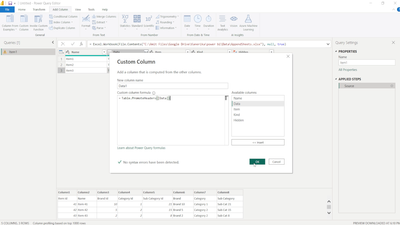
Add a new column

= Table.PromoteHeaders([Data])


amitchandak_0-1683323670642.png


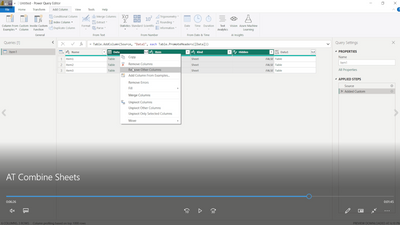
remove all other columns

amitchandak_1-1683323750496.png


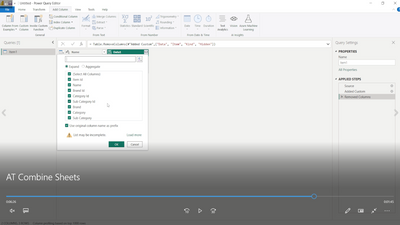
Exapnd

amitchandak_2-1683323768807.png


You should be able to configure refresh for this on power bi service

Share with Power BI Enthusiasts: Full Power BI Video (20 Hours) YouTube
Microsoft Fabric Series 60+ Videos YouTube
Microsoft Fabric Hindi End to End YouTube

View solution in original post

2 REPLIES 2
STIBBS_807
Resolver I
Resolver I

Thank you for the suggestion.  However, the tables do not have the same data fields so the data would become massive.  I guess the solution is to save each sheet separately.


amitchandak
Super User
Super User

@STIBBS_807 , I hope you want to combine all Excel sheets into one table. (In case Sharepoint flow might change a little bit)

Add the Excel sheet, remove all steps other than the first step 

Add a new column

= Table.PromoteHeaders([Data])


amitchandak_0-1683323670642.png


remove all other columns

amitchandak_1-1683323750496.png


Exapnd

amitchandak_2-1683323768807.png


You should be able to configure refresh for this on power bi service

Share with Power BI Enthusiasts: Full Power BI Video (20 Hours) YouTube
Microsoft Fabric Series 60+ Videos YouTube
Microsoft Fabric Hindi End to End YouTube

Helpful resources

Announcements
Power BI DataViz World Championships

Power BI Dataviz World Championships

The Power BI Data Visualization World Championships is back! Get ahead of the game and start preparing now!

November Power BI Update Carousel

Power BI Monthly Update - November 2025

Check out the November 2025 Power BI update to learn about new features.

FabCon Atlanta 2026 carousel

FabCon Atlanta 2026

Join us at FabCon Atlanta, March 16-20, for the ultimate Fabric, Power BI, AI and SQL community-led event. Save $200 with code FABCOMM.