Get certified for free when you join Fabric Data Days 2026 and dive into Fabric, Power BI, SQL, AI, and other essential data skills.
Join nowData Days is here! Join us now for 60+ days of learning, challenges, and connection. Learn more
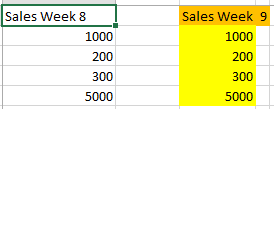
I need to update a matrix column with a variable value, as the screen shot showns, the column 1 has "Sales week 8", column 2 has "Sales week 9", notice that the last character has changes, Is there a way using ADX to change the column description, it will be the same column with the last charcter, in this sample is 9 but, it will be 10,11,12(This numbers represents month)
Solved! Go to Solution.
What I can think of is to use a measure that returns a value only if the value in a column is equal to the current month. By default, Power BI hides rows/columns with blank values.
PS: If you want to get better answers, please post an importable dummy data (not an image) that represents the structure of your table.
What I can think of is to use a measure that returns a value only if the value in a column is equal to the current month. By default, Power BI hides rows/columns with blank values.
PS: If you want to get better answers, please post an importable dummy data (not an image) that represents the structure of your table.
Don't miss out on Data Days, June 15 through August 7. Learn Fabric, Power BI, SQL, AI and more.
Check out the May 2026 Power BI update to learn about new features.
| User | Count |
|---|---|
| 23 | |
| 21 | |
| 20 | |
| 18 | |
| 13 |
| User | Count |
|---|---|
| 58 | |
| 51 | |
| 38 | |
| 31 | |
| 26 |