This time we’re going bigger than ever. Fabric, Power BI, SQL, AI and more. We're covering it all. You won't want to miss it.
Learn moreDid you hear? There's a new SQL AI Developer certification (DP-800). Start preparing now and be one of the first to get certified. Register now
Hi All,
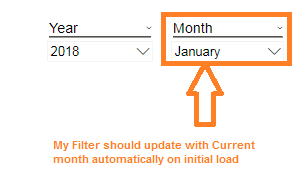
I have a report with Month ,Quarter and Weekly tabs with Month, Qurter and Week filters respectively. My report data will change based on the selected filter. My requirement is to show the report based on current Month/Qtr/Week on the initial load of report.
Could somebody help me on how to achieve the same.
My users are already subscribed to the reprots. They want to see the reprot with current Month/Qtr/Week selection by default.
Thanks & Regards,
Rajeev
Hi @Anonymous,
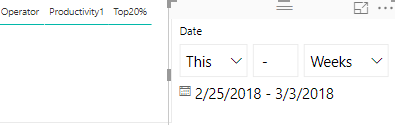
You could create a date Slicer and change the type of Slicer to Relative Slicer. You could choose This and Week, Month, Days but there is no Quarter, you will get the data of current date. You could have a reference of the picture below.
In Addition, if you need have the Quarter option, you could post a new idea in here.
Hope it can help you!
Best Regards,
Cherry
How does your Datamodel look like? Do you have a Separate Date Table?
Hi Sachy,
I'm using Azure analysis service cube and it is having Date dimension table which is joined to other dimension tables.
Thanks & Regards,
Rajeev
Can your client live with something like "Current Month" as a default?
Yes, how can I create that? Also you mean that can I set up a specific current month date/week witch update every day based on today's date?
Check out the April 2026 Power BI update to learn about new features.
Sign up to receive a private message when registration opens and key events begin.
If you have recently started exploring Fabric, we'd love to hear how it's going. Your feedback can help with product improvements.
| User | Count |
|---|---|
| 35 | |
| 32 | |
| 27 | |
| 23 | |
| 16 |
| User | Count |
|---|---|
| 65 | |
| 50 | |
| 30 | |
| 25 | |
| 24 |