cancel
Showing results for 
Search instead for 
Did you mean: 

Learn from the best! Meet the four finalists headed to the FINALS of the Power BI Dataviz World Championships! Register now

Reply
jimmybi
Frequent Visitor

Unpivot and append dynamically multiple columns

Hi guys,


I need a bit of Power Query magic. I have data from Excel files that has data for around many devices with time stamp. It looks something like this:


Timestamp    DeviceName EmptyColumn Timestamp1 ....

Unix time       Numbers        Nulll                Unix time


When I convert the Timestamp to Date/Time it works perfectly. And every Timestamp column has exactly the same value. So I need only 1 Timestamp column. What I need to do next is to unpivot the Device Name column so I would have it as a value next to the Timestamp and the numbers next to it. Essentially I need to have only 3 Columns: Timestamp with the time, Device Name with the list of the device names and the numbers collerating to the device on the 3rd column. Now I know that this can be done with unpivoting the columns. But I have 456 columns with every 3rd being empty. I also need to append the values after unpivoting them and this should be done dinamically (I really don't want to do this manually).


So far I have found that you can make something with List.Alternate, but I don't know how to append them, and how exactly it works. Any thoughts?


Thanks!


Jimmy 

2 REPLIES 2
v-cherch-msft
Microsoft Employee
Microsoft Employee

Hi @jimmybi


You may try to do it in Advanced Editor. Here are some references for you.

https://www.oraylis.de/blog/power-query-how-to-unpivot-a-dynamic-number-of-columns

https://wessexbi.wordpress.com/2014/02/27/unpivot-nested-headings-with-power-query/


Regards,

Cherie

Community Support Team _ Cherie Chen
If this post helps, then please consider Accept it as the solution to help the other members find it more quickly.

Hi Cherie,


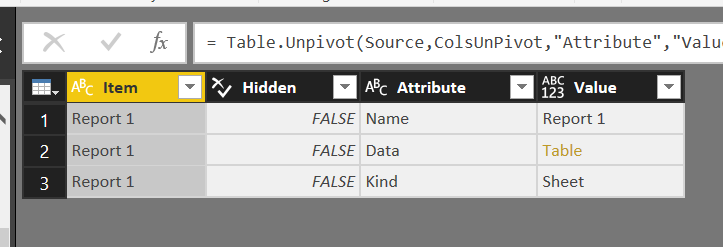
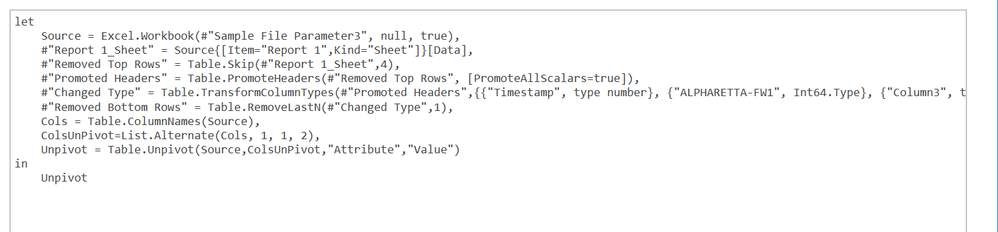
I saw those links and they are useful. That is where I got the List.Alternate idea from. However since I am using a folder as a source it gives me the folder column names. I tried to use them in the Advanced editor for the sample file and this is what I get: 

Edit Queries SnapshotEdit Queries Snapshot

And this is my M code:

Advanced editor.png


So my problem is where to get the list from at the moment. Any ideas?

Helpful resources

Announcements
Power BI DataViz World Championships carousel

Power BI DataViz World Championships - June 2026

A new Power BI DataViz World Championship is coming this June! Don't miss out on submitting your entry.

Join our Fabric User Panel

Join our Fabric User Panel

Share feedback directly with Fabric product managers, participate in targeted research studies and influence the Fabric roadmap.

March Power BI Update Carousel

Power BI Community Update - March 2026

Check out the March 2026 Power BI update to learn about new features.