Join us at FabCon Atlanta from March 16 - 20, 2026, for the ultimate Fabric, Power BI, AI and SQL community-led event. Save $200 with code FABCOMM.
Register now!The Power BI Data Visualization World Championships is back! Get ahead of the game and start preparing now! Learn more
Hi,
Iam having a challenge to transition data structure, I need the grey column (type of transactions: sales, debit, credit, etc.) become in columns, ao I am able to subtract some of those columns based on the attirbutes. How do I transition transaction type to columns:
For example:
Custome Product Date Transfer Debit Sales
this is what I currently have
Solved! Go to Solution.
Hi @Anonymous ,
I created a sample pbix file(see attachment), please check whether that is what you want.
let
Source = Table.FromRows(Json.Document(Binary.Decompress(Binary.FromText("rZNNC4IwGMe/iuys6DPf1jG06BAo6U08LFsUVBOdh759O4RSytjA097gx7P/73mqCm2P6e60z7K0QDYq6IP1cs350NxYbzkH2rZvq+RCXia8Y9b3RR7BBRd7GOTWISGq7T9W2dFXf2WdNg6POEzmuJSd70Kb5U+sYM5Khl7wpzYsGGGRP4flHb8MjX5p4URbKC2lgmmjohHlL6DMZMbKxIxlEmVmZjI3a8oEb1WbAOvpBLyiT1CPgLFQCJTTbmYUQuWsmyqNlF81zC1W9od5buSnQeoP", BinaryEncoding.Base64), Compression.Deflate)), let _t = ((type nullable text) meta [Serialized.Text = true]) in type table [#"Customer Group" = _t, Transaction = _t, #"LV2 PL" = _t, #"Product Group" = _t, Dates = _t, Value = _t]),
#"Changed Type" = Table.TransformColumnTypes(Source,{{"Customer Group", type text}, {"Transaction", type text}, {"LV2 PL", type text}, {"Product Group", type text}, {"Dates", type date}, {"Value", Int64.Type}}),
#"Unpivoted Columns" = Table.UnpivotOtherColumns(#"Changed Type", {"Customer Group", "LV2 PL", "Product Group", "Dates", "Value"}, "Attribute", "Transaction Type"),
#"Pivoted Column" = Table.Pivot(#"Unpivoted Columns", List.Distinct(#"Unpivoted Columns"[#"Transaction Type"]), "Transaction Type", "Attribute")
in
#"Pivoted Column"
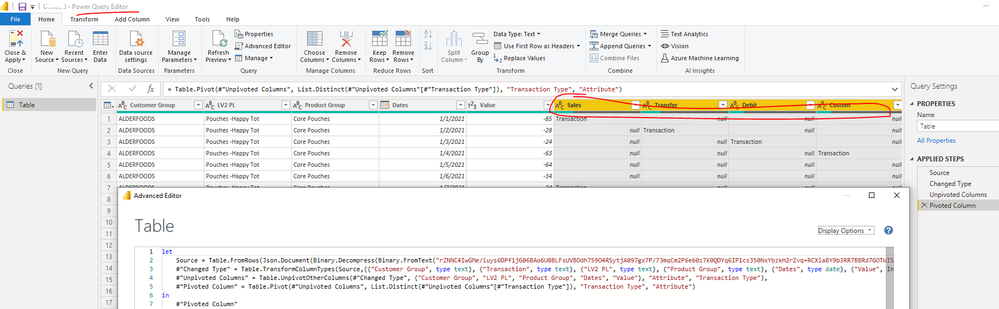
If the above one is not working for you, please provide more details on your requirement. Thank you.
Best Regards
Hi @Anonymous ,
I created a sample pbix file(see attachment), please check whether that is what you want.
let
Source = Table.FromRows(Json.Document(Binary.Decompress(Binary.FromText("rZNNC4IwGMe/iuys6DPf1jG06BAo6U08LFsUVBOdh759O4RSytjA097gx7P/73mqCm2P6e60z7K0QDYq6IP1cs350NxYbzkH2rZvq+RCXia8Y9b3RR7BBRd7GOTWISGq7T9W2dFXf2WdNg6POEzmuJSd70Kb5U+sYM5Khl7wpzYsGGGRP4flHb8MjX5p4URbKC2lgmmjohHlL6DMZMbKxIxlEmVmZjI3a8oEb1WbAOvpBLyiT1CPgLFQCJTTbmYUQuWsmyqNlF81zC1W9od5buSnQeoP", BinaryEncoding.Base64), Compression.Deflate)), let _t = ((type nullable text) meta [Serialized.Text = true]) in type table [#"Customer Group" = _t, Transaction = _t, #"LV2 PL" = _t, #"Product Group" = _t, Dates = _t, Value = _t]),
#"Changed Type" = Table.TransformColumnTypes(Source,{{"Customer Group", type text}, {"Transaction", type text}, {"LV2 PL", type text}, {"Product Group", type text}, {"Dates", type date}, {"Value", Int64.Type}}),
#"Unpivoted Columns" = Table.UnpivotOtherColumns(#"Changed Type", {"Customer Group", "LV2 PL", "Product Group", "Dates", "Value"}, "Attribute", "Transaction Type"),
#"Pivoted Column" = Table.Pivot(#"Unpivoted Columns", List.Distinct(#"Unpivoted Columns"[#"Transaction Type"]), "Transaction Type", "Attribute")
in
#"Pivoted Column"
If the above one is not working for you, please provide more details on your requirement. Thank you.
Best Regards
Pivot?
The Power BI Data Visualization World Championships is back! Get ahead of the game and start preparing now!
Check out the November 2025 Power BI update to learn about new features.
| User | Count |
|---|---|
| 59 | |
| 46 | |
| 42 | |
| 23 | |
| 18 |
| User | Count |
|---|---|
| 193 | |
| 124 | |
| 101 | |
| 67 | |
| 49 |