
cancel
Showing results for 
Search instead for 
Did you mean: 

Vote for your favorite vizzies from the Power BI Dataviz World Championship submissions. Vote now!

Reply
jmuehlenbrock
New Member

Unknown Data Type Icon

Hi folks,


I am pretty new to Power BI so this might be a very beginner question. When I tried to use PBI time functions like MONTH() in calculated fields (measures) I noticed that I cannot select any date fields within the formula. 

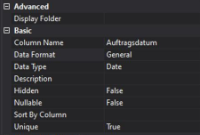
I am (live) connected to a SSAS cube with these settings for the field in question:

Visual Studio Data Field PropertiesVisual Studio Data Field Properties


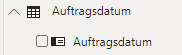
In Power BI I see the data field indicated with this small icon for which I cannot find any specification or description in the forums:

Bildschirmfoto 2020-01-16 um 13.52.22.png

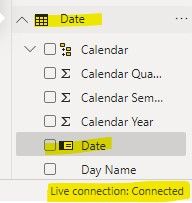
But what I found is a different icon in an Excel-based dataset where I defined the data type in Power BI modelling tab directly. See:

Bildschirmfoto 2020-01-16 um 13.54.53.png

What is the difference between these two icons? 


Any help appreciated!

jmuehlenbrock

1 ACCEPTED SOLUTION

Hi @jmuehlenbrock ,


Based on this document, This icon is mean: Identity field: Fields with this icon are unique fields, set to show all values, even if they have duplicates.


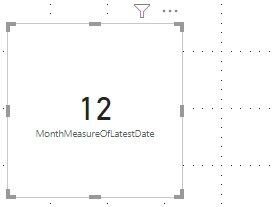
But if you want to create a measure, we cannot just use Month('Auftragsdatum'[Auftragsdatum]) to get the month, we need to get a certain value of this field such as following:


MonthMeasureOfLatestDate = MONTH(MAX('Auftragsdatum'[Auftragsdatum]))


1.jpg2.jpg


Best regards,


Community Support Team _ Dong Li
If this post helps, then please consider Accept it as the solution to help the other members find it more quickly.

View solution in original post

2 REPLIES 2
jmuehlenbrock
New Member

So what I have found after some further investigation is that the mentioned icon indicates a row level identifier. 


(src: https://community.powerbi.com/t5/Desktop/Field-list-question/td-p/17312)


But I still don't get why I cannot use this field in a formula where a date is needed. When I put this field to the filter pane it is possible to use relative date filters, so I guess that the field itself IS recongnized as a date. 

Hi @jmuehlenbrock ,


Based on this document, This icon is mean: Identity field: Fields with this icon are unique fields, set to show all values, even if they have duplicates.


But if you want to create a measure, we cannot just use Month('Auftragsdatum'[Auftragsdatum]) to get the month, we need to get a certain value of this field such as following:


MonthMeasureOfLatestDate = MONTH(MAX('Auftragsdatum'[Auftragsdatum]))


1.jpg2.jpg


Best regards,


Community Support Team _ Dong Li
If this post helps, then please consider Accept it as the solution to help the other members find it more quickly.

Helpful resources

Announcements
Power BI DataViz World Championships

Power BI Dataviz World Championships

Vote for your favorite vizzies from the Power BI World Championship submissions!

Sticker Challenge 2026 Carousel

Join our Community Sticker Challenge 2026

If you love stickers, then you will definitely want to check out our Community Sticker Challenge!

January Power BI Update Carousel

Power BI Monthly Update - January 2026

Check out the January 2026 Power BI update to learn about new features.

FabCon Atlanta 2026 carousel

FabCon Atlanta 2026

Join us at FabCon Atlanta, March 16-20, for the ultimate Fabric, Power BI, AI and SQL community-led event. Save $200 with code FABCOMM.