cancel
Showing results for 
Search instead for 
Did you mean: 

Vote for your favorite vizzies from the Power BI Dataviz World Championship submissions. Vote now!

Reply
dgenatossio
Frequent Visitor

Unique column values

I have read through dozens of posts and haven't found a post with an answer for the problem I'm encountering.


I have two data tables. One has Plan for the Year. The other has Results. I want to connect them using ID codes, which are a seven digit number.


I am very familiar with unique values and most of Power BI's functionality, but the error isn't making any sense.


I used reference to create a new Plan table and removed the other columns so all that was left was the ID codes. Then I used reference to create a new Results table and removed the other columns so only the ID column was left.


So to be perfectly clear, at this point I have two tables. One has a set of ID codes for Plan. The Other has a set of ID codes for Results. 


I then appended the tables as a new table, giving me one big list of Employee ID codes. Then I removed duplicates.


Now, I try and create a relationship between the original Results table and my new ID table. It gives me the unique values error. Same for when I try to connect the Plan table.


It doesn't make any sense to me. I have tried removing duplicates before appending tables, and then again when I append the tables. The ID columns are the same data type. Nothing seems to be off.


Keep in mind that it lets me create a relationship between the Plan table and the Plan ID table reference. I am also able to create a relationship between the Results table and the Results ID table.


Anyone have any idea what could be causing the error?

1 ACCEPTED SOLUTION
Eric_Zhang
Microsoft Employee
Microsoft Employee

@dgenatossio

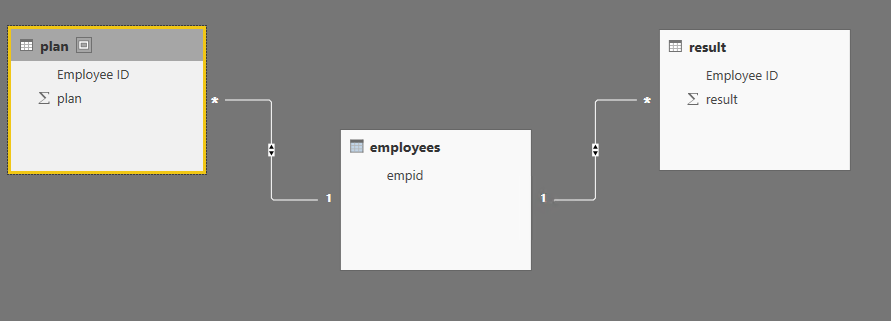
One way through DAX. Create the employee list as below. If it is not your case, please post some sample data and expected output.

employees =
DISTINCT (
    UNION (
        SELECTCOLUMNS ( plan, "empid", plan[Employee ID] ),
        SELECTCOLUMNS ( result, "empid2", result[Employee ID] )
    )
)

Capture.PNG

View solution in original post

3 REPLIES 3
ChrisSschmucekr
Regular Visitor

Try remove empty rows in Edit Queries.

Eric_Zhang
Microsoft Employee
Microsoft Employee

@dgenatossio

One way through DAX. Create the employee list as below. If it is not your case, please post some sample data and expected output.

employees =
DISTINCT (
    UNION (
        SELECTCOLUMNS ( plan, "empid", plan[Employee ID] ),
        SELECTCOLUMNS ( result, "empid2", result[Employee ID] )
    )
)

Capture.PNG

Thanks, this worked perfectly. And could you also tell me how to create a table with multiple columns? Say the employee's home state for example, which could be found on either the results table of the plan table. Is there a way to bring that data over as well?

Helpful resources

Announcements
Power BI DataViz World Championships

Power BI Dataviz World Championships

Vote for your favorite vizzies from the Power BI World Championship submissions!

Sticker Challenge 2026 Carousel

Join our Community Sticker Challenge 2026

If you love stickers, then you will definitely want to check out our Community Sticker Challenge!

January Power BI Update Carousel

Power BI Monthly Update - January 2026

Check out the January 2026 Power BI update to learn about new features.

FabCon Atlanta 2026 carousel

FabCon Atlanta 2026

Join us at FabCon Atlanta, March 16-20, for the ultimate Fabric, Power BI, AI and SQL community-led event. Save $200 with code FABCOMM.