FabCon is coming to Atlanta
Join us at FabCon Atlanta from March 16 - 20, 2026, for the ultimate Fabric, Power BI, AI and SQL community-led event. Save $200 with code FABCOMM.
Register now!- Power BI forums
- Get Help with Power BI
- Desktop
- Service
- Report Server
- Power Query
- Mobile Apps
- Developer
- DAX Commands and Tips
- Custom Visuals Development Discussion
- Health and Life Sciences
- Power BI Spanish forums
- Translated Spanish Desktop
- Training and Consulting
- Instructor Led Training
- Dashboard in a Day for Women, by Women
- Galleries
- Data Stories Gallery
- Themes Gallery
- Contests Gallery
- QuickViz Gallery
- Quick Measures Gallery
- Visual Calculations Gallery
- Notebook Gallery
- Translytical Task Flow Gallery
- TMDL Gallery
- R Script Showcase
- Webinars and Video Gallery
- Ideas
- Custom Visuals Ideas (read-only)
- Issues
- Issues
- Events
- Upcoming Events
The Power BI Data Visualization World Championships is back! Get ahead of the game and start preparing now! Learn more
- Power BI forums
- Forums
- Get Help with Power BI
- Desktop
- Re: Unexpected behawior of measure when filtering
- Subscribe to RSS Feed
- Mark Topic as New
- Mark Topic as Read
- Float this Topic for Current User
- Bookmark
- Subscribe
- Printer Friendly Page


- Mark as New
- Bookmark
- Subscribe
- Mute
- Subscribe to RSS Feed
- Permalink
- Report Inappropriate Content
Unexpected behawior of measure when filtering
Hi All
I struggle with an issue, which happens when filtering my table.
I have a table with top 20 brands filtered and few KPI's.
This seems to be ok...
The issue starts when I try to filter out marketing_concepts with names starting from "nivea cream all"
I am sure, these marketing_concepts corresponds to only one brand - NIVEA so there are no such concepts under any other brand. I expect only values for Nivea brand should change but (I marked it with red) all values for SALES $ (PY) and
SALES $ (vs PY) change too...
here is a syntax for SALES $ (PY):
SALES $ (PY) =
CALCULATE (
    [SALES $],
    FILTER (
        ALL ( AVON_NIELSEN_DATABASE[year] ),
        AVON_NIELSEN_DATABASE[year]
            = MAX ( AVON_NIELSEN_DATABASE[year] ) - 1
    )
)
and a samples of data (it is fake, do not worry):
Pbix file: link
Source table: link
My questions:
1) why does it happen?
2) how to make my measures working well in second scenraio?
Thanks in advance
Solved! Go to Solution.


- Mark as New
- Bookmark
- Subscribe
- Mute
- Subscribe to RSS Feed
- Permalink
- Report Inappropriate Content
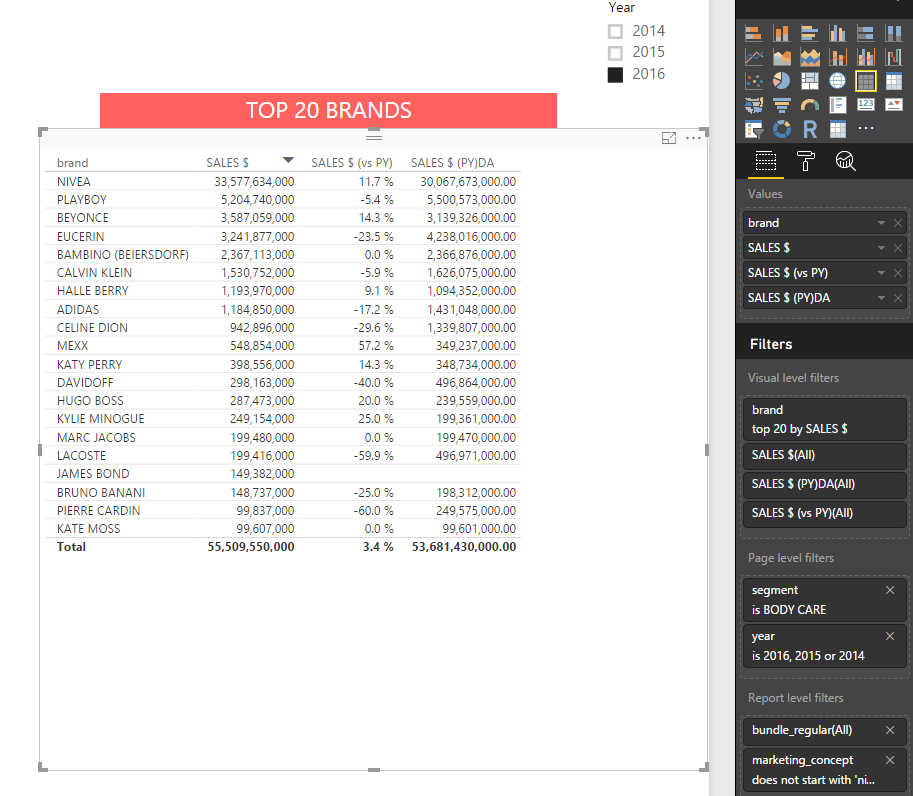
Remove the year of Page Filter and Add a Slicer with Date of DateTable (Herarchy - Year)
Lima - Peru
- Mark as New
- Bookmark
- Subscribe
- Mute
- Subscribe to RSS Feed
- Permalink
- Report Inappropriate Content
i make changes in your model:
Add a Calculated Column "DateREF" in your table:
-Dateref = DATE(AVON_NIELSEN_DATABASE[year],1,1)
Create a DateTable
-DateTable=DateTable = CALENDAR(MIN(AVON_NIELSEN_DATABASE[Dateref]),Max(AVON_NIELSEN_DATABASE[Dateref]))
Related both tables (Date-DateRef)
SALES $ (PY) = CALCULATE([SALES $],DATEADD(DateTable[Date].[Date],-1,YEAR))
The Visual look like this:
Lima - Peru
- Mark as New
- Bookmark
- Subscribe
- Mute
- Subscribe to RSS Feed
- Permalink
- Report Inappropriate Content
- Mark as New
- Bookmark
- Subscribe
- Mute
- Subscribe to RSS Feed
- Permalink
- Report Inappropriate Content
Remove the year of Page Filter and Add a Slicer with Date of DateTable (Herarchy - Year)
Lima - Peru
- Mark as New
- Bookmark
- Subscribe
- Mute
- Subscribe to RSS Feed
- Permalink
- Report Inappropriate Content
The error in your measure exactly don't know, but i recommend to use this functions or Time Intelligence Functions.
SamePeriodLastyear gives you in this case the same result.
Lima - Peru
- Mark as New
- Bookmark
- Subscribe
- Mute
- Subscribe to RSS Feed
- Permalink
- Report Inappropriate Content
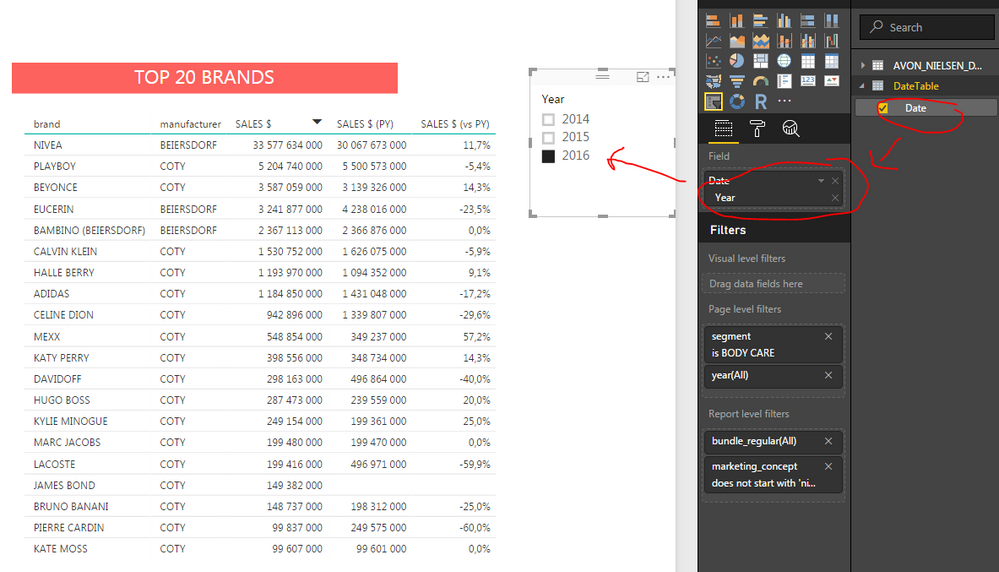
@ Victor
It is working now.
One more question. What if I do not want to use a slicer? May I do it different way?
- Mark as New
- Bookmark
- Subscribe
- Mute
- Subscribe to RSS Feed
- Permalink
- Report Inappropriate Content
In spite of there is a workaround for this issue I still consider this as a bug.
From final user perspective it may lead to serious misinterpretation data as it was in my case
@ PowerBI team
Can we expect to get it fixed?
Bartek

Helpful resources

Power BI Dataviz World Championships
The Power BI Data Visualization World Championships is back! Get ahead of the game and start preparing now!

Power BI Monthly Update - December 2025
Check out the December 2025 Power BI Holiday Recap!

FabCon Atlanta 2026
Join us at FabCon Atlanta, March 16-20, for the ultimate Fabric, Power BI, AI and SQL community-led event. Save $200 with code FABCOMM.

| User | Count |
|---|---|
| 38 | |
| 38 | |
| 37 | |
| 28 | |
| 28 |


| User | Count |
|---|---|
| 124 | |
| 89 | |
| 73 | |
| 66 | |
| 65 |


