cancel
Showing results for 
Search instead for 
Did you mean: 

The Power BI Data Visualization World Championships is back! Get ahead of the game and start preparing now! Learn more

Reply
Bartosz
Advocate IV
Advocate IV

Unexpected behawior of measure when filtering

Hi All


I struggle with an issue, which happens when filtering my table.

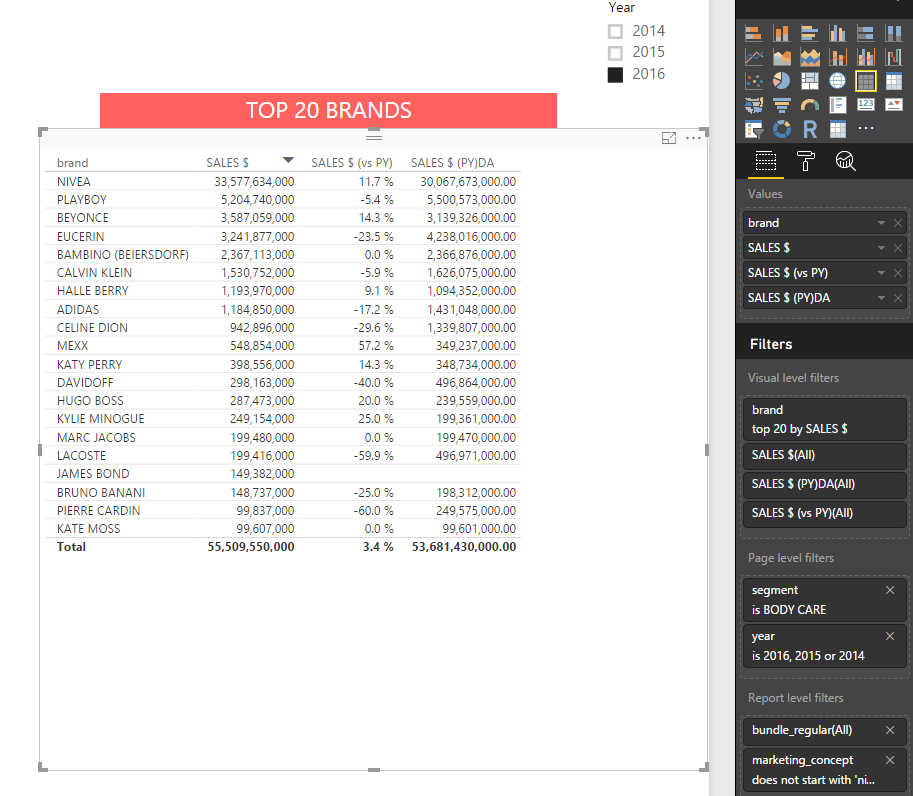
I have a table with top 20 brands filtered and few KPI's.

This seems to be ok...

The issue starts when I try to filter out marketing_concepts with names starting from "nivea cream all"

I am sure, these marketing_concepts corresponds to only one brand - NIVEA so there are no such concepts under any other brand. I expect only values for Nivea brand should change but (I marked it with red) all values for SALES $ (PY) and

SALES $ (vs PY) change too...


here is a syntax for SALES $ (PY):

SALES $ (PY) =
CALCULATE (
    [SALES $],
    FILTER (
        ALL ( AVON_NIELSEN_DATABASE[year] ),
        AVON_NIELSEN_DATABASE[year]
            = MAX ( AVON_NIELSEN_DATABASE[year] ) - 1
    )
)

and a samples of data (it is fake, do not worry):


Pbix file:  link

Source table: link


My questions:

1) why does it happen?

2) how to make my measures working well in second scenraio?


Thanks in advance

1 ACCEPTED SOLUTION
Vvelarde
Community Champion
Community Champion

@Bartosz


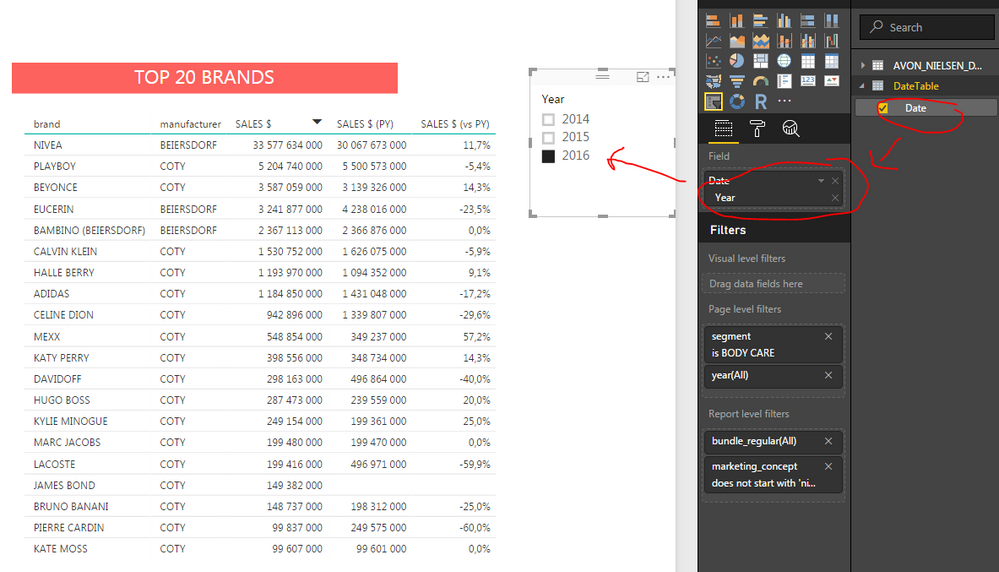
Remove the year of Page Filter and Add a Slicer with Date of DateTable (Herarchy - Year)


Lima - Peru

View solution in original post

6 REPLIES 6
Vvelarde
Community Champion
Community Champion

@Bartosz


i make changes in your model:


Add a Calculated Column "DateREF" in your table:


-Dateref = DATE(AVON_NIELSEN_DATABASE[year],1,1)


Create a DateTable 


-DateTable=DateTable = CALENDAR(MIN(AVON_NIELSEN_DATABASE[Dateref]),Max(AVON_NIELSEN_DATABASE[Dateref]))


Related both tables (Date-DateRef)


SALES $ (PY) = CALCULATE([SALES $],DATEADD(DateTable[Date].[Date],-1,YEAR))


The Visual look like this:


Brands.png


Lima - Peru

@Vvelarde

Thanks. I have followed your instruction step by step and got blanks in the final measure:


My latest Pbix file: (Sales vs PY issue v3): link


Am I doing sth wrong?

Could you please explain why original filters do not work? Is it a bug? 

Now I feel unsure using Power BI filters


B

Vvelarde
Community Champion
Community Champion

@Bartosz


Remove the year of Page Filter and Add a Slicer with Date of DateTable (Herarchy - Year)


Lima - Peru

@Bartosz


The error in your measure exactly don't know, but i recommend to use this functions or Time Intelligence Functions.


SamePeriodLastyear gives you in this case the same result.


Lima - Peru

@ Victor


It is working now. 

One more question. What if I do not want to use a slicer? May I do it different way?


issue4.PNG


In spite of there is a workaround for this issue I still consider this as a bug.

From final user perspective it may lead to serious misinterpretation data as it was in my case

@ PowerBI team 

Can we expect to get it fixed?


Bartek

Helpful resources

Announcements
Power BI DataViz World Championships

Power BI Dataviz World Championships

The Power BI Data Visualization World Championships is back! Get ahead of the game and start preparing now!

November Power BI Update Carousel

Power BI Monthly Update - November 2025

Check out the November 2025 Power BI update to learn about new features.

FabCon Atlanta 2026 carousel

FabCon Atlanta 2026

Join us at FabCon Atlanta, March 16-20, for the ultimate Fabric, Power BI, AI and SQL community-led event. Save $200 with code FABCOMM.