Get certified for free when you join Fabric Data Days 2026 and dive into Fabric, Power BI, SQL, AI, and other essential data skills.
Join nowJuly 7 - July 17 | Round 2 of the Power BI Dataviz World Championships. Don't miss your chance! Learn more
I'm trying to create a new table of time intelligence calculations, but it does not seem to be working. I am using the SUMMARIZE function to groupby three different columns and perform the time intelligencence calculations.
If I try something like:
SUMMARIZE(
Table,
'Date'[Date], Table[Category], Table[Subcategory],
"Last Year", CALCULATE(COUNT('Table'[Subcategory]), DATEADD('Date'[Date], -1, YEAR))
)The groupby works fine, but I do not return any values for my "Last Year" column - my result would look something like:
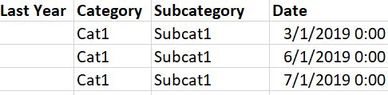
However, the same time intelligence calculation works perfectly fine as a measure.. just not in this context?
Additionally if I try another expression in place of the time intelligence calculation, I get the result I would expect.
For example, the following works perfectly fine with no blank values:
SUMMARIZE(
Table,
'Date'[Date], Table[Category], Table[Subcategory],
"Last Year", COUNT('Table'[Subcategory])
)I'm not quite sure why this works, but the first one doesn't... especially when the same time intelligence expression works perfectly fine as a stand-alone measure.
Is there anything I can do to modify my expression to get this to work?
@markmess77 - Hmm, yeah, you stray outside the lines with the time "intelligence" functions and things start to break. You may find this helpful - https://community.powerbi.com/t5/Community-Blog/To-bleep-With-Time-Intelligence/ba-p/1260000
Also, see if my Time Intelligence the Hard Way provides a different way of accomplishing what you are going for.
https://community.powerbi.com/t5/Quick-Measures-Gallery/Time-Intelligence-quot-The-Hard-Way-quot-TIT...
@Greg_Deckler That's unfortunate. Wish that these time intelligence functions worked better lol
I had a second approach I had in mind to accomplish what I need. It's not as clean as what I'm trying here, but it should return the same thing.
I'll also give a deeper look into your links, seems interesting!
Thanks!
Join us in Barcelona for FabCon and SQLCon, the Fabric, Power BI, SQL, and AI community event. Save €200 with code FABCMTY200.
Join Data Days 2026: 60 days of free live/on-demand sessions, challenges, study groups, and certification opportunities.
| User | Count |
|---|---|
| 30 | |
| 28 | |
| 26 | |
| 23 | |
| 17 |
| User | Count |
|---|---|
| 57 | |
| 45 | |
| 38 | |
| 25 | |
| 21 |