cancel
Showing results for 
Search instead for 
Did you mean: 

The Power BI Data Visualization World Championships is back! Get ahead of the game and start preparing now! Learn more

Reply
Anonymous
Not applicable

Unable to open Power BI Desktop

Hi All,


I need help on power bi desktop related issue. I haved installed Power BI Desktop from microsoft store.


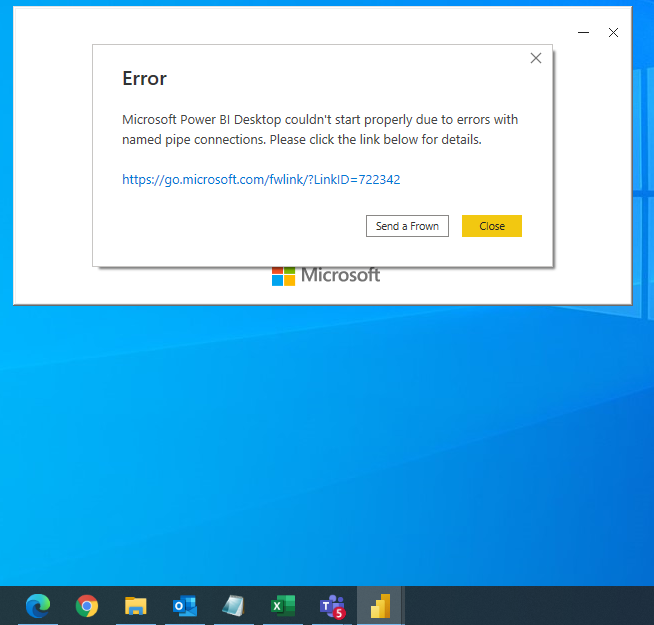
While opening the file I am getting some unknown error.Power BI Error.PNG


Error Message: "Microsoft Power BI Desktop couldn't start properly due to errors with named pipe connections."

1 ACCEPTED SOLUTION
Anonymous
Not applicable

Hi,

Now, issue is fixed.

It was fixed by performing below steps.

1. Press Win + R and type: services.msc
2. Check if you have BitLocker Enablement Tool Service and Bit Locker Drive Encryptation Service running.
3. If you have both, you should ask to the IT team that disable the BitLocker Enablement Tool.

View solution in original post

4 REPLIES 4
Anonymous
Not applicable

Hi,

Now, issue is fixed.

It was fixed by performing below steps.

1. Press Win + R and type: services.msc
2. Check if you have BitLocker Enablement Tool Service and Bit Locker Drive Encryptation Service running.
3. If you have both, you should ask to the IT team that disable the BitLocker Enablement Tool.

Anonymous
Not applicable

Hi @Anonymous 

I am glad that you could solve your problem. Please kindly Accept your workaround as the solution. More people will benefit from it.


Best Regards,
Rico Zhou


If this post helps, then please consider Accept it as the solution to help the other members find it more quickly.

Anonymous
Not applicable

Hi Rico,


Thanks for your response. I got the admin access as well. But issue is not fixed after that also.


Thanks & Regards

Chandan Kumar

Anonymous
Not applicable

Hi @Anonymous 

My Power BI Desktop works well, so I couldn't reproduce the same issue in my side. Here I will give you some advices.

1. Please try to run Power BI Desktop with administrator privilege.


2. Please check the version of your Power BI Desktop. The latest version should be 2.98.683.0 published on 10/12/2021. You can download the latest version from website instead of Microsoft store and try again.

For reference: Download


3. You may refer to this offical blog to learn more details about how to get desktop and the limitation.


Best Regards,
Rico Zhou


If this post helps, then please consider Accept it as the solution to help the other members find it more quickly.

Helpful resources

Announcements
Power BI DataViz World Championships

Power BI Dataviz World Championships

The Power BI Data Visualization World Championships is back! Get ahead of the game and start preparing now!

December 2025 Power BI Update Carousel

Power BI Monthly Update - December 2025

Check out the December 2025 Power BI Holiday Recap!

FabCon Atlanta 2026 carousel

FabCon Atlanta 2026

Join us at FabCon Atlanta, March 16-20, for the ultimate Fabric, Power BI, AI and SQL community-led event. Save $200 with code FABCOMM.