cancel
Showing results for 
Search instead for 
Did you mean: 

The Power BI Data Visualization World Championships is back! Get ahead of the game and start preparing now! Learn more

Reply
Anonymous
Not applicable

Unable to calculate % of row

Hello,

I'm trying to calculate the percentage value of one column compared to another one.
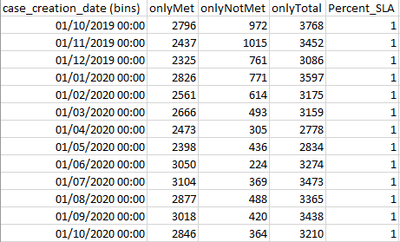
Here is a table that will illustrate my challenge.


PowerBIUserUKB_0-1606478569197.png


When II try to achieve this in Power BI I obtain the following:


PowerBIUserUKB_1-1606478606067.png


I've tried to understand if any filters could be affecting the result but I just cannot get my head around this.

All measures come from the same table.


onlyMet = SUMX(FILTER(sla,sla[SLA_MetNumber]=1),sla[SLA_MetNumber])
onlyNotMet = COUNTX(FILTER(sla,sla[SLA_MetNumber]=0),sla[SLA_MetNumber])
onlyTotal = [onlyMet] + [onlyNotMet]
Percent_SLA = CALCULATE([onlyMet] /[onlyTotal])
 
I'm pretty sure I'm missing something fundamental but cannot see it.
Any help would be much appreciated!


2 ACCEPTED SOLUTIONS
amitchandak
Super User
Super User

@Anonymous , Prefer using divide

like

Percent_SLA = divide([onlyMet] ,[onlyTotal])


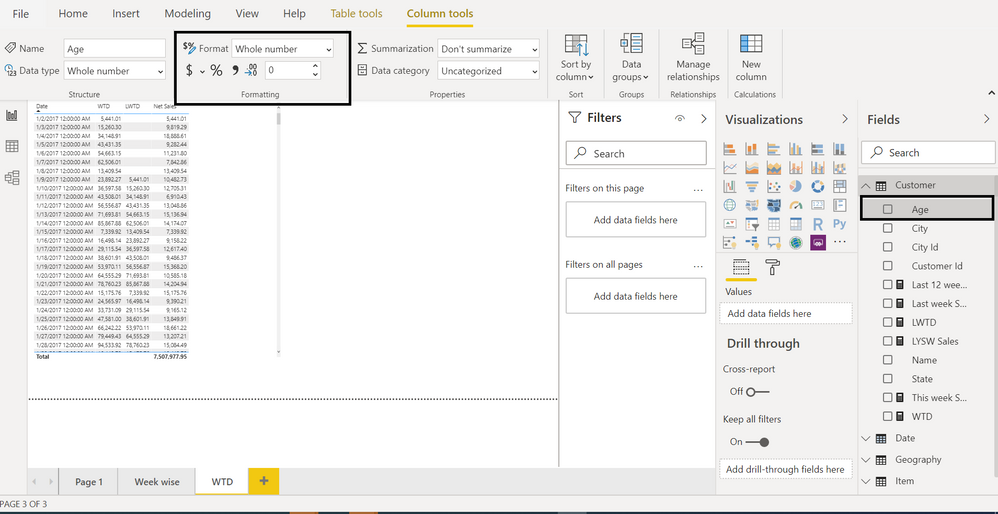
Make it decimal with 2 decimal place and Mark as % column (in measure tool)


Data Format New Rib.png

Share with Power BI Enthusiasts: Full Power BI Video (20 Hours) YouTube
Microsoft Fabric Series 60+ Videos YouTube
Microsoft Fabric Hindi End to End YouTube

View solution in original post

Anonymous
Not applicable

Thank you very much for the prompt reply; it solved my problem!

So the lack of decimal places rounded up all results to 1?

Is that all that I was missing?

View solution in original post

2 REPLIES 2
amitchandak
Super User
Super User

@Anonymous , Prefer using divide

like

Percent_SLA = divide([onlyMet] ,[onlyTotal])


Make it decimal with 2 decimal place and Mark as % column (in measure tool)


Data Format New Rib.png

Share with Power BI Enthusiasts: Full Power BI Video (20 Hours) YouTube
Microsoft Fabric Series 60+ Videos YouTube
Microsoft Fabric Hindi End to End YouTube
Anonymous
Not applicable

Thank you very much for the prompt reply; it solved my problem!

So the lack of decimal places rounded up all results to 1?

Is that all that I was missing?

Helpful resources

Announcements
Power BI DataViz World Championships

Power BI Dataviz World Championships

The Power BI Data Visualization World Championships is back! Get ahead of the game and start preparing now!

November Power BI Update Carousel

Power BI Monthly Update - November 2025

Check out the November 2025 Power BI update to learn about new features.

FabCon Atlanta 2026 carousel

FabCon Atlanta 2026

Join us at FabCon Atlanta, March 16-20, for the ultimate Fabric, Power BI, AI and SQL community-led event. Save $200 with code FABCOMM.