cancel
Showing results for 
Search instead for 
Did you mean: 

We've captured the moments from FabCon & SQLCon that everyone is talking about, and we are bringing them to the community, live and on-demand. Starts on April 14th. Register now

Reply
stephensamperi
Frequent Visitor

Unable to Sort by Column

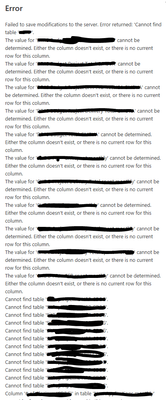
I have exhausted troubleshooting how to "Sort by Column" and no matter what I do I get the same huge error message which makes me think there is something my PBI file does not like about Data permissions I may have changed recently or with the PBI table i created. What does an error like this that references many irrelevant tables/columns/measures really mean?

Large Table (supported by a SharePoint file with Organizational data permission)

Workflow    Order

A                   1

B                    2

C                    3           


Small Table   (custom table manually created in PBI file)

Worflow      Index (created as index column in edit query and is whole number format)

A                   1

B                   2

C                   3


When i select the Workflow column on the Large Table > Sort by column > then I select Order > i then receive the very long error shown below:

stephensamperi_0-1660149643986.png

What am I doing wrong?

1 ACCEPTED SOLUTION
v-jianboli-msft
Community Support
Community Support

Hi @stephensamperi ,


What is the connection mode of your data? Which version of Desktop are you using? If you are using the latest version of Desktop, please try to use previous version.

You can find some previous versions here Previous monthly updates to Power BI Desktop and the Power BI service - Power BI | Microsoft Docs


Best Regards,

Jianbo Li

If this post helps, then please consider Accept it as the solution to help the other members find it more quickly.

View solution in original post

4 REPLIES 4
v-jianboli-msft
Community Support
Community Support

Hi @stephensamperi ,


What is the connection mode of your data? Which version of Desktop are you using? If you are using the latest version of Desktop, please try to use previous version.

You can find some previous versions here Previous monthly updates to Power BI Desktop and the Power BI service - Power BI | Microsoft Docs


Best Regards,

Jianbo Li

If this post helps, then please consider Accept it as the solution to help the other members find it more quickly.

My version is:

Version: 2.108.825.0 64-bit (August 2022)


I may try another version and raise a ticket for this issue which seems to have started right after my desktop was automatically updated to the latest August 2022 version. Thanks.

lbendlin
Super User
Super User

yeah, that's a nasty one.  You probably already cleared all the caches etc.

If you have a Pro license you can consider raising a Pro ticket at https://powerbi.microsoft.com/en-us/support/pro/

I clicked on three different "clear cache" buttons but that did not help. I don't have a PRO license.

Helpful resources

Announcements
New to Fabric survey Carousel

New to Fabric Survey

If you have recently started exploring Fabric, we'd love to hear how it's going. Your feedback can help with product improvements.

Power BI DataViz World Championships carousel

Power BI DataViz World Championships - June 2026

A new Power BI DataViz World Championship is coming this June! Don't miss out on submitting your entry.

Join our Fabric User Panel

Join our Fabric User Panel

Share feedback directly with Fabric product managers, participate in targeted research studies and influence the Fabric roadmap.

March Power BI Update Carousel

Power BI Community Update - March 2026

Check out the March 2026 Power BI update to learn about new features.