Join us at FabCon Atlanta from March 16 - 20, 2026, for the ultimate Fabric, Power BI, AI and SQL community-led event. Save $200 with code FABCOMM.
Register now!The Power BI Data Visualization World Championships is back! It's time to submit your entry. Live now!
Hi,
I have created a measure that looks like
Solved! Go to Solution.
Hi @PowerBIWhat ,
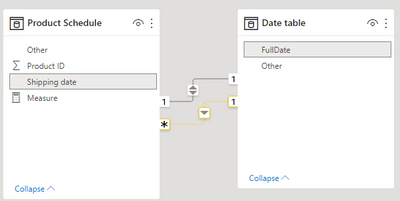
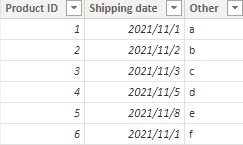
According to your description, I create a sample, the relationship of Shipping date and FullDate is inactive.
This is the measure code:
Measure = CALCULATE(
COUNT('Product Schedule'[Product ID]),
USERELATIONSHIP('Product Schedule'[Shipping date],'Date table'[FullDate])
)
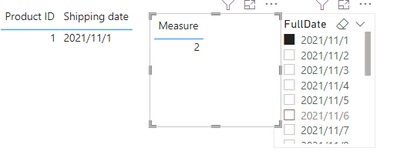
When I don’t put measure into the product visual, it only show the first product as you say.
When I put them in the same visual, it get the correct result, I think it’s because the relationship is only active with the measure, so it has to be putted in.
I attach my sample below for reference.
Best Regards,
Community Support Team _ kalyj
If this post helps, then please consider Accept it as the solution to help the other members find it more quickly.
Hi @PowerBIWhat ,
According to your description, I create a sample, the relationship of Shipping date and FullDate is inactive.
This is the measure code:
Measure = CALCULATE(
COUNT('Product Schedule'[Product ID]),
USERELATIONSHIP('Product Schedule'[Shipping date],'Date table'[FullDate])
)
When I don’t put measure into the product visual, it only show the first product as you say.
When I put them in the same visual, it get the correct result, I think it’s because the relationship is only active with the measure, so it has to be putted in.
I attach my sample below for reference.
Best Regards,
Community Support Team _ kalyj
If this post helps, then please consider Accept it as the solution to help the other members find it more quickly.
CALCULATE(count([product id]), USERELATIONSHIP(productschedule[shipping date], Date table[FullDate]))
Did I answer your question? If so, please mark my post as a solution!
Proud to be a Super User!
This didn't work. Does it make a difference using only the column name in the count?
That is the only difference I could spot. Unless I'm being blind.
The Power BI Data Visualization World Championships is back! It's time to submit your entry.
Check out the January 2026 Power BI update to learn about new features.
| User | Count |
|---|---|
| 63 | |
| 43 | |
| 31 | |
| 27 | |
| 23 |
| User | Count |
|---|---|
| 134 | |
| 114 | |
| 58 | |
| 39 | |
| 35 |