For the god sake, help!
I have a table called 'Grade Checkin' and in this table there is this columns [Serviço], [Data], [Serviço.ID1] and [Serviço.ID2].
[Serviço] should be a number, but is possible to get 2 numbers in this value between a "/". The value "123/456" is a kind of. If it is 123/456 in [Serviço] and date is [05/28/2019], we got "05/28/2019-123" as [Serviço.ID1] and "05/28/2019-456" as [Serviço.ID2].
In my second table called ' Passagens Sing' I have a column named [Serviço.ID].
In this case, there is always only one number in column [Serviço], so we have just a [Serviço.ID] column. We might have a row with value "05/28/2019-123" and a row with value "05/28/2019-456" in the same column.
Values in 'Passagens Sing'[Serviço.ID] can match with [Serviço.ID1] or [Serviço.ID2] in 'Grade Checkin" table. These tables are not related.
I need a measure in 'Grade Checkin' that count rows in 'Passagens Sing' wich match values in this way: [Serviço.ID] is equal to [Serviço.ID1] or equal to [Serviço.ID2]
I have this:
.Checkin Etrip = CALCULATE(
    CALCULATE(
    COUNTROWS(
        FILTER(
        'Passagens Sing';
        [Check-in]="Checkin e-trip"
    ));
    USERELATIONSHIP('Grade Checkin'[Serviço.ID1];'Passagens Sing'[Serviço.ID]);
    ALL('Grade Checkin'[Lançamento])
);
USERELATIONSHIP('Grade Checkin'[Serviço.ID2];'Passagens Sing'[Serviço.ID])
)
But if I use this in a table with [Serviço] I don't get a correct result. Table total is correct, but row values is not. In rows table the only values showed is for [Serviço.ID1].
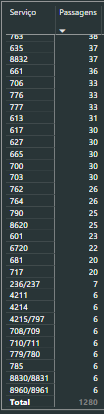
For example: Serviço value 236/237 should result in 31. 7 for 236 plus 24 for 237.
Please.


