cancel
Showing results for 
Search instead for 
Did you mean: 

View all the Fabric Data Days sessions on demand. View schedule

Reply
Anonymous
Not applicable

USERELATIONSHIP issue

Hello Community  -  I'm confused as to why I am not seeing the results I expected.  


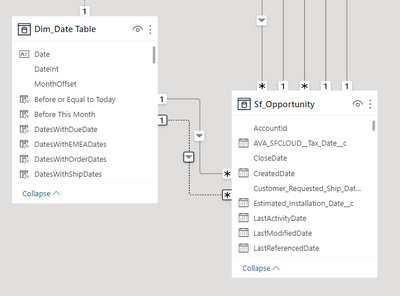
I have a dim date table and a salesforce opportunity table.   I have an active relationship between close date, and an inactive one with customer requested ship date.     I want to sum up the opportunity value of ONLY the open opportunities, but based on the customer requested ship date (which has an inactive relationship with the date table).   Per below. 


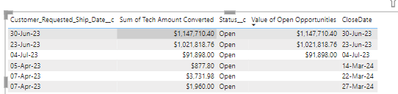
I had thought that by using the date table columns (Month and Year for example) in a table, and then adding this measure, that I would get back results that matched the requested ship date months.   Instead, all I am getting back are dates that match the same time frame as the closed date (the active relationship).   See example below. 


Doesn't the additon of the "userelationship" function overide this behavior?   If I use the actual "requested ship date" column by itself, I get the correct results, but again, I thought I could just go ahead and use the date table and have the correct results returned since the formula accounts for inactive relationship.  


Value of Open Opportunities =
CALCULATE (
    [Sum of Tech Amount Converted],
    USERELATIONSHIP(Sf_Opportunity[Customer_Requested_Ship_Date__c],'Dim_Date Table'[Date]),
    FILTER (
        Sf_Opportunity,
        Sf_Opportunity[Status__c] = "Open"
    )
)


texmexdragon2_1-1680707330854.png


texmexdragon2_0-1680706686292.png


1 ACCEPTED SOLUTION
johnt75
Super User
Super User

I think the problem is that the FILTER argument is being calculated before the REMOVEFILTERS is applied, so the only rows which will be visible are the ones which match the date using the active relationship.

Try

Value of Open Opportunities =
CALCULATE (
    [Sum of Tech Amount Converted],
    USERELATIONSHIP ( Sf_Opportunity[Customer_Requested_Ship_Date__c], 'Dim_Date Table'[Date] ),
    Sf_Opportunity[Status__c] = "Open"
)

View solution in original post

4 REPLIES 4
johnt75
Super User
Super User

I think the problem is that the FILTER argument is being calculated before the REMOVEFILTERS is applied, so the only rows which will be visible are the ones which match the date using the active relationship.

Try

Value of Open Opportunities =
CALCULATE (
    [Sum of Tech Amount Converted],
    USERELATIONSHIP ( Sf_Opportunity[Customer_Requested_Ship_Date__c], 'Dim_Date Table'[Date] ),
    Sf_Opportunity[Status__c] = "Open"
)
Anonymous
Not applicable

@johnt75    Fantastic...that worked perfectly.  

I might add for those that see this post that the formula I orginally used was created by ChatGPT 3.5.   And even after telling it several times that I was not getting the correct results, and explaining the problem, it still was apparently not able to correct it.    

amitchandak
Super User
Super User

@Anonymous , refer the formula here


Power BI: HR Analytics - Employees as on Date : https://youtu.be/e6Y-l_JtCq4
https://community.powerbi.com/t5/Community-Blog/HR-Analytics-Active-Employee-Hire-and-Termination-trend/ba-p/882970

Share with Power BI Enthusiasts: Full Power BI Video (20 Hours) YouTube
Microsoft Fabric Series 60+ Videos YouTube
Microsoft Fabric Hindi End to End YouTube
Anonymous
Not applicable

@amitchandak   Thanks Amit.   Fortunately the solution was much simpler and solved by the other poster.  

Helpful resources

Announcements
November Power BI Update Carousel

Power BI Monthly Update - November 2025

Check out the November 2025 Power BI update to learn about new features.

Fabric Data Days Carousel

Fabric Data Days

Advance your Data & AI career with 50 days of live learning, contests, hands-on challenges, study groups & certifications and more!

FabCon Atlanta 2026 carousel

FabCon Atlanta 2026

Join us at FabCon Atlanta, March 16-20, for the ultimate Fabric, Power BI, AI and SQL community-led event. Save $200 with code FABCOMM.

Top Solution Authors
Top Kudoed Authors