This time we’re going bigger than ever. Fabric, Power BI, SQL, AI and more. We're covering it all. You won't want to miss it.
Learn moreLevel up your Power BI skills this month - build one visual each week and tell better stories with data! Get started
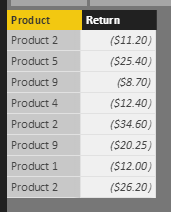
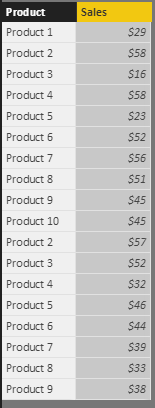
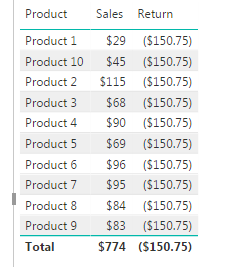
Hi - I have two tables. Sales and Return tables that show sales and return amt for different products. I want to show (or chart) in a table, the total sales and return cost for each item. When I do that, the sales amt is shown correctly but the return amt is shown as one single figure. I don't have any relationship defined between these two tables.
How do I do this correctly?
Solved! Go to Solution.
Hi @Anonymous,
Create a summary table based on Product Return table.
Summary Product Return = SUMMARIZE ( 'Product Return', 'Product Return'[Product], "Return Total", SUM ( 'Product Return'[Return] ) )
In Product Sales table, add a new calculated column using LookUpValue.
return = LOOKUPVALUE ( 'Summary Product Return'[Return Total], 'Summary Product Return'[Product], 'Product Sales'[Product] )
Then, add columns [Product], [Sales] and [return] from 'Product Sales' into table visual. Please note that when you add [return] into table visual, you should choose 'Don't summarize ' option.
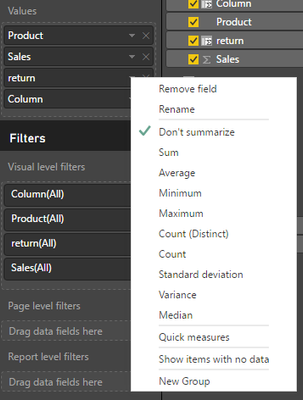
If you need to show total values for this column, that is to say, you want it to be summed. Please use this formula instead:
return2 = LOOKUPVALUE ( 'Summary Product Return'[Return Total], 'Summary Product Return'[Product], 'Product Sales'[Product] ) / CALCULATE ( COUNT ( 'Product Sales'[Product] ), ALLEXCEPT ( 'Product Sales', 'Product Sales'[Product] ) )
You can see the difference between above two formulas.
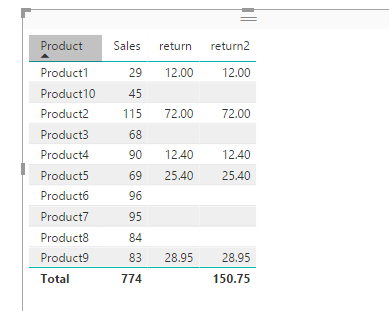
Best regards,
Yuliana Gu
Hi @Anonymous,
Create a summary table based on Product Return table.
Summary Product Return = SUMMARIZE ( 'Product Return', 'Product Return'[Product], "Return Total", SUM ( 'Product Return'[Return] ) )
In Product Sales table, add a new calculated column using LookUpValue.
return = LOOKUPVALUE ( 'Summary Product Return'[Return Total], 'Summary Product Return'[Product], 'Product Sales'[Product] )
Then, add columns [Product], [Sales] and [return] from 'Product Sales' into table visual. Please note that when you add [return] into table visual, you should choose 'Don't summarize ' option.
If you need to show total values for this column, that is to say, you want it to be summed. Please use this formula instead:
return2 = LOOKUPVALUE ( 'Summary Product Return'[Return Total], 'Summary Product Return'[Product], 'Product Sales'[Product] ) / CALCULATE ( COUNT ( 'Product Sales'[Product] ), ALLEXCEPT ( 'Product Sales', 'Product Sales'[Product] ) )
You can see the difference between above two formulas.
Best regards,
Yuliana Gu
Thanks Yuliana !!
Hi, check this
https://msdn.microsoft.com/en-us/library/gg492170.aspx and this https://msdn.microsoft.com/en-us/library/ee634551.aspx
Use Earlier function to lookup a value for any single row...
The output in your case should be
1. Add a new column in "Sales" table, you can give it a name "Return"
2. Insert this formula in "Sales" table", column "Return"
LOOKUPVALUE('Table in whis the return is'[Return],'Table in which the return is'[Product],earlier[Product])
Check out the April 2026 Power BI update to learn about new features.
Sign up to receive a private message when registration opens and key events begin.
If you have recently started exploring Fabric, we'd love to hear how it's going. Your feedback can help with product improvements.
| User | Count |
|---|---|
| 28 | |
| 23 | |
| 22 | |
| 16 | |
| 16 |
| User | Count |
|---|---|
| 61 | |
| 35 | |
| 29 | |
| 23 | |
| 22 |