Get Fabric or SQL Certified for Free.
Get certified for free when you join Fabric Data Days 2026 and dive into Fabric, Power BI, SQL, AI, and other essential data skills.
Join now- Power BI forums
- Get Help with Power BI
- Desktop
- Service
- Report Server
- Power Query
- Mobile Apps
- Developer
- DAX Commands and Tips
- Custom Visuals Development Discussion
- Health and Life Sciences
- Power BI Spanish forums
- Translated Spanish Desktop
- Training and Consulting
- Instructor Led Training
- Dashboard in a Day for Women, by Women
- Galleries
- Data Stories Gallery
- Themes Gallery
- Contests Gallery
- QuickViz Gallery
- Quick Measures Gallery
- Visual Calculations Gallery
- Notebook Gallery
- Translytical Task Flow Gallery
- TMDL Gallery
- R Script Showcase
- Webinars and Video Gallery
- Ideas
- Custom Visuals Ideas (read-only)
- Issues
- Issues
- Events
- Upcoming Events
July 7 - July 17 | Round 2 of the Power BI Dataviz World Championships. Don't miss your chance! Learn more
- Power BI forums
- Forums
- Get Help with Power BI
- Desktop
- Advanced Filtering and Custom Formulae
- Subscribe to RSS Feed
- Mark Topic as New
- Mark Topic as Read
- Float this Topic for Current User
- Bookmark
- Subscribe
- Printer Friendly Page


- Mark as New
- Bookmark
- Subscribe
- Mute
- Subscribe to RSS Feed
- Permalink
- Report Inappropriate Content
Advanced Filtering and Custom Formulae
Hi,
I have some project data in Excel that I report on using PowerBI.
Here's a snippet of the data and some information on what I wish to do:-
Requirement: Duration Days excluding 'Pushout'. For example, Task Title 'ABC', I want to calculate all Duration days but exclude #=2 (which is a repeat) and any occurance of 'Pushout'. So, for Task Title: ABC, 32 - 24 = 8 days. How do I write a formula to get 8 days?
I look forward to your response.
Thank you.
Sachin
| ID | Date of Export | # | Task Mode | Cost | % Complete | Task Title | Task Name | Duration | Start | Finish | Predecessors |
| 260 | 04/09/2017 | 1 | Auto Scheduled | £3,850.00 | 0% | ABC | ABC | 32 days | Wed 23/08/17 | Thu 05/10/17 | |
| 261 | 04/09/2017 | 2 | Auto Scheduled | £3,850.00 | 0% | ABC | ABC | 32 days | Wed 23/08/17 | Thu 05/10/17 | |
| 262 | 04/09/2017 | 3 | Auto Scheduled | £0.00 | 0% | ABC | Pushout | 24 days | Wed 23/08/17 | Mon 25/09/17 | |
| 263 | 04/09/2017 | 4 | Auto Scheduled | £850.00 | 0% | ABC | SCOPE | 1 day | Tue 26/09/17 | Tue 26/09/17 | 2 |
| 264 | 04/09/2017 | 5 | Auto Scheduled | £0.00 | 0% | ABC | INVOICE | 3 days | Wed 27/09/17 | Fri 29/09/17 | 3 |
| 265 | 04/09/2017 | 6 | Auto Scheduled | £1,700.00 | 0% | ABC | BUILD | 2 days | Mon 02/10/17 | Tue 03/10/17 | 4 |
| 266 | 04/09/2017 | 7 | Auto Scheduled | £450.00 | 0% | ABC | TEST | 1 day | Wed 04/10/17 | Wed 04/10/17 | 5 |
| 267 | 04/09/2017 | 8 | Auto Scheduled | £850.00 | 0% | ABC | DEPLOY | 1 day | Thu 05/10/17 | Thu 05/10/17 | 6 |
| 268 | 04/09/2017 | 1 | Auto Scheduled | £24,350.00 | 0% | DVC | DVC | 68 days | Wed 23/08/17 | Fri 24/11/17 | |
| 269 | 04/09/2017 | 2 | Auto Scheduled | £24,350.00 | 0% | DVC | DVC | 68 days | Wed 23/08/17 | Fri 24/11/17 | |
| 270 | 04/09/2017 | 3 | Auto Scheduled | £0.00 | 0% | DVC | Pushout | 35 days | Wed 23/08/17 | Tue 10/10/17 | |
| 271 | 04/09/2017 | 4 | Auto Scheduled | £0.00 | 0% | DVC | SCOPE | 1 day | Wed 11/10/17 | Wed 11/10/17 | 2 |
| 272 | 04/09/2017 | 5 | Auto Scheduled | £0.00 | 0% | DVC | INVOICE | 1 day | Thu 12/10/17 | Thu 12/10/17 | 3 |
| 273 | 04/09/2017 | 6 | Auto Scheduled | £21,250.00 | 0% | DVC | BUILD | 25 days | Fri 13/10/17 | Thu 16/11/17 | 4 |
| 274 | 04/09/2017 | 7 | Auto Scheduled | £2,250.00 | 0% | DVC | TEST | 5 days | Fri 17/11/17 | Thu 23/11/17 | 5 |
| 275 | 04/09/2017 | 8 | Auto Scheduled | £850.00 | 0% | DVC | DEPLOY | 1 day | Fri 24/11/17 | Fri 24/11/17 | 6 |
Solved! Go to Solution.
- Mark as New
- Bookmark
- Subscribe
- Mute
- Subscribe to RSS Feed
- Permalink
- Report Inappropriate Content
I worked in the end. Rubbish PowerBI - the visual I had didn't work, so I created a new one and it worked. Please fix this in the next release of PowerBi as it was driving me insane! Thanks for your help.


- Mark as New
- Bookmark
- Subscribe
- Mute
- Subscribe to RSS Feed
- Permalink
- Report Inappropriate Content
Hi @SachinC,
Try this formula please. I didn't find out what kind of characters ahead some of the "Task Name". So I used a function "Right".
Measure =
VAR allDuration =
    CALCULATE ( SUM ( Table1[Duration.1] ), 'Table1'[#] = 1 )
VAR Pushout =
    CALCULATE (
        SUM ( Table1[Duration.1] ),
        RIGHT ( 'Table1'[Task Name], 7 ) = "Pushout"
    )
RETURN
    allDuration - Pushout
The Duration isn't numbers. We need to transfer it first.
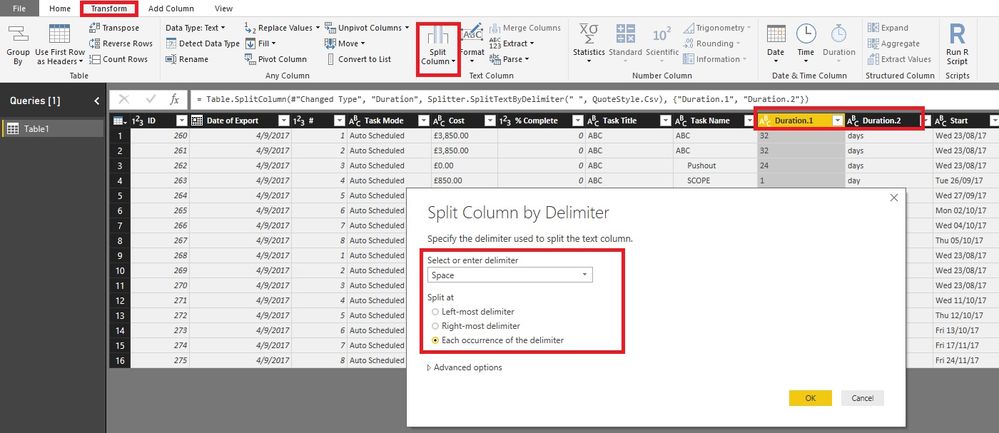
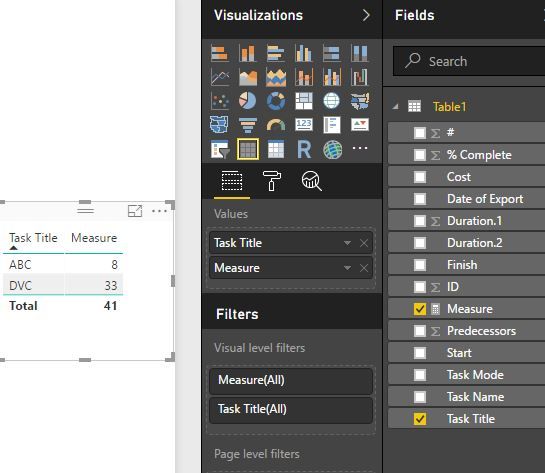
Best Regards!
Dale
If this post helps, then please consider Accept it as the solution to help the other members find it more quickly.
- Mark as New
- Bookmark
- Subscribe
- Mute
- Subscribe to RSS Feed
- Permalink
- Report Inappropriate Content
Hi Dale,
Good suggestions - however it's not doing the trick. I need to also negate #=2 as this is a repeat for #=1 - does that make sense?
I look forward to your response.
Regards,
S
- Mark as New
- Bookmark
- Subscribe
- Mute
- Subscribe to RSS Feed
- Permalink
- Report Inappropriate Content
Hi @SachinC,
I kick the #=2 out in the formula directly. So we don't need to care #=2. What's your idea? You can try one and see the result.
Best Regards!
Dale
If this post helps, then please consider Accept it as the solution to help the other members find it more quickly.
- Mark as New
- Bookmark
- Subscribe
- Mute
- Subscribe to RSS Feed
- Permalink
- Report Inappropriate Content
Yes _ i know you strip out #=2, however it's not working for me still. Let me have another try again, but thanks for your help.
I'm just wondering what checking routine, via formulae, I can plug in to test? Can you help me with this?
Thank you.
- Mark as New
- Bookmark
- Subscribe
- Mute
- Subscribe to RSS Feed
- Permalink
- Report Inappropriate Content
Quick question: It's not doing this: right ( Sheet1[Task Name], 4 ) = "Test") (I replaced 'Pushout' to 'Test') and it's not working. Help please? Thanks.
- Mark as New
- Bookmark
- Subscribe
- Mute
- Subscribe to RSS Feed
- Permalink
- Report Inappropriate Content
I worked in the end. Rubbish PowerBI - the visual I had didn't work, so I created a new one and it worked. Please fix this in the next release of PowerBi as it was driving me insane! Thanks for your help.
- Mark as New
- Bookmark
- Subscribe
- Mute
- Subscribe to RSS Feed
- Permalink
- Report Inappropriate Content
Quick question: It's not doing this: right ( Sheet1[Task Name], 4 ) = "Test") (I replaced 'Pushout' to 'Test') and it's not working. Help please? Thanks.

Helpful resources

FabCon & SQLCon – Barcelona 2026
Join us in Barcelona for FabCon and SQLCon, the Fabric, Power BI, SQL, and AI community event. Save €200 with code FABCMTY200.

Data Days 2026
Join Data Days 2026: 60 days of free live/on-demand sessions, challenges, study groups, and certification opportunities.

Power BI DataViz World Championships - June 2026
A new Power BI DataViz World Championship is coming this June! Don't miss out on submitting your entry.

| User | Count |
|---|---|
| 28 | |
| 23 | |
| 18 | |
| 18 | |
| 15 |


| User | Count |
|---|---|
| 49 | |
| 44 | |
| 42 | |
| 39 | |
| 32 |


