
cancel
Showing results for 
Search instead for 
Did you mean: 

The Power BI Data Visualization World Championships is back! Get ahead of the game and start preparing now! Learn more

Reply
Anusha_Banda
Regular Visitor

Two rules for a KPI

Hello beautiful people, 
I have a scenario, not sure how to proceed further.

I have a KPI which changes its color depending upon the value (Green if positive and red for negative). Now I have a toggle, X and Y and the KPI has to behave differently (changing its color) when switch these toggles.
For Example, Sales KPI should be in Green color when I chose Y filter measure and the same KPI should be in Red when I select X filter measure, basically having two rules for the same KPI. Any leads how do I go about this ?

Anusha_Banda_0-1673869944858.png


1 ACCEPTED SOLUTION
Anonymous
Not applicable

Hi @analytics-ecoma ,


Please try it:

color = SWITCH(TRUE(),
MAX('Table'[sales])>0 && SELECTEDVALUE('Table'[type])="x","green",
MAX('Table'[sales])<0 && SELECTEDVALUE('Table'[type])="x","red",
MAX('Table'[sales])>0 && SELECTEDVALUE('Table'[type])="y","red",
MAX('Table'[sales])<0 && SELECTEDVALUE('Table'[type])="y","green",
"white")


Best Regards,

Neeko Tang

If this post  helps, then please consider Accept it as the solution  to help the other members find it more quickly. 

View solution in original post

4 REPLIES 4
analytics-ecoma
Frequent Visitor

Thanks Niko for your quick response 🙂 
I should've been more clear about the problem. 
So there needs to be two rules for the KPI. In your example,
1. X : Cell should be green if sales is positive and red if negative
2. Y : Cell should be red if sales is positive and green if negative.

Anonymous
Not applicable

Hi @analytics-ecoma ,


Please try it:

color = SWITCH(TRUE(),
MAX('Table'[sales])>0 && SELECTEDVALUE('Table'[type])="x","green",
MAX('Table'[sales])<0 && SELECTEDVALUE('Table'[type])="x","red",
MAX('Table'[sales])>0 && SELECTEDVALUE('Table'[type])="y","red",
MAX('Table'[sales])<0 && SELECTEDVALUE('Table'[type])="y","green",
"white")


Best Regards,

Neeko Tang

If this post  helps, then please consider Accept it as the solution  to help the other members find it more quickly. 

Thanks Neeko, this solution worked. Thank you so much 🙂  

Anonymous
Not applicable

Hi @Anusha_Banda ,


According to your description, here are my steps you can follow as a solution.

(1) This is my test data.  

vtangjiemsft_0-1673934079954.png

(2) We can create a measure. 


color = IF(MAX('Table'[sales])>0 && SELECTEDVALUE('Table'[type])="y","green","red")

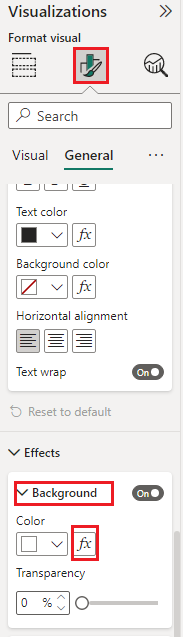
(3)Set the conditional formatting as shown in the following figure.

Picture1.pngPicture2.png


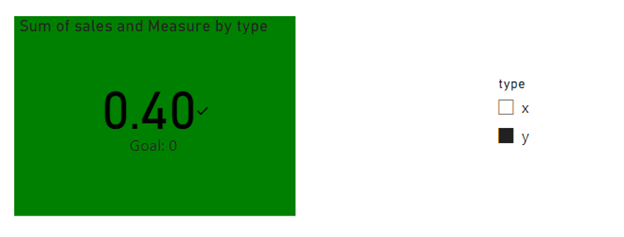
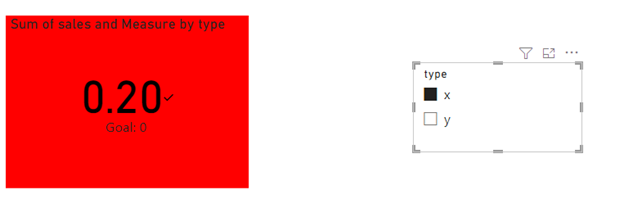
(3) Then the result is as follows.

Picture3.pngPicture4.png

Best Regards,

Neeko Tang

If this post  helps, then please consider Accept it as the solution  to help the other members find it more quickly. 

Helpful resources

Announcements
Power BI DataViz World Championships

Power BI Dataviz World Championships

The Power BI Data Visualization World Championships is back! Get ahead of the game and start preparing now!

December 2025 Power BI Update Carousel

Power BI Monthly Update - December 2025

Check out the December 2025 Power BI Holiday Recap!

FabCon Atlanta 2026 carousel

FabCon Atlanta 2026

Join us at FabCon Atlanta, March 16-20, for the ultimate Fabric, Power BI, AI and SQL community-led event. Save $200 with code FABCOMM.