FabCon is coming to Atlanta
Join us at FabCon Atlanta from March 16 - 20, 2026, for the ultimate Fabric, Power BI, AI and SQL community-led event. Save $200 with code FABCOMM.
Register now!- Power BI forums
- Get Help with Power BI
- Desktop
- Service
- Report Server
- Power Query
- Mobile Apps
- Developer
- DAX Commands and Tips
- Custom Visuals Development Discussion
- Health and Life Sciences
- Power BI Spanish forums
- Translated Spanish Desktop
- Training and Consulting
- Instructor Led Training
- Dashboard in a Day for Women, by Women
- Galleries
- Data Stories Gallery
- Themes Gallery
- Contests Gallery
- QuickViz Gallery
- Quick Measures Gallery
- Visual Calculations Gallery
- Notebook Gallery
- Translytical Task Flow Gallery
- TMDL Gallery
- R Script Showcase
- Webinars and Video Gallery
- Ideas
- Custom Visuals Ideas (read-only)
- Issues
- Issues
- Events
- Upcoming Events
The Power BI Data Visualization World Championships is back! Get ahead of the game and start preparing now! Learn more
- Power BI forums
- Forums
- Get Help with Power BI
- Desktop
- Re: Trying to calculate most recent classification
- Subscribe to RSS Feed
- Mark Topic as New
- Mark Topic as Read
- Float this Topic for Current User
- Bookmark
- Subscribe
- Printer Friendly Page


- Mark as New
- Bookmark
- Subscribe
- Mute
- Subscribe to RSS Feed
- Permalink
- Report Inappropriate Content
Trying to calculate most recent classification
Suppose there are three columns:
CLIENT | Classification | Date
1 | A | 1/1/2016
1 | A | 1/1/2016
1 | B | 2/1/2016
1 | C | 3/1/2016
1 | A | 4/1/2016
2 | B | 1/1/2016
2 | B | 2/1/2016
2 | A | 3/1/2016
2 | A | 3/1/2016
2 | C | 4/1/2016
How would I grab the most recent Classification for each client to output:
Client | Classification
1 | A
2 | C
I've tried multiple things but everything always returns all combinations e.g.
1 | A
1 | B
1 | C
2 | A
2 | B
2 | C
Any help?
Solved! Go to Solution.


- Mark as New
- Bookmark
- Subscribe
- Mute
- Subscribe to RSS Feed
- Permalink
- Report Inappropriate Content
How about this?
Classification on Last Date =
IF (
    HASONEVALUE ( 'Table'[Client] ),
    CALCULATE (
        LASTNONBLANK ( 'Table'[Classification], 1 ),
        LASTDATE ( 'Table'[Date] )
    ),
    BLANK ()
)
Good Luck! 

- Mark as New
- Bookmark
- Subscribe
- Mute
- Subscribe to RSS Feed
- Permalink
- Report Inappropriate Content
- Mark as New
- Bookmark
- Subscribe
- Mute
- Subscribe to RSS Feed
- Permalink
- Report Inappropriate Content
Hi Vvelarde,
That won't work as the rest of the values in the table require aggregation across a range of dates.
As such the |Date| column can't be a part of the visual
Thanks for the attempt!
- Mark as New
- Bookmark
- Subscribe
- Mute
- Subscribe to RSS Feed
- Permalink
- Report Inappropriate Content
try with this:
LastClassification = CALCULATE(VALUES(Table2[Classification]),LASTDATE(Table2[Date]))
Lima - Peru
- Mark as New
- Bookmark
- Subscribe
- Mute
- Subscribe to RSS Feed
- Permalink
- Report Inappropriate Content
That will return a multiple values error (even if i add distinct).
- Mark as New
- Bookmark
- Subscribe
- Mute
- Subscribe to RSS Feed
- Permalink
- Report Inappropriate Content
Can you have different classification in same day for a client?
Using your sample Data i have this result
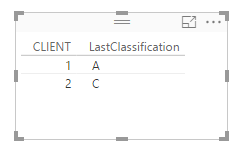
Lima - Peru
- Mark as New
- Bookmark
- Subscribe
- Mute
- Subscribe to RSS Feed
- Permalink
- Report Inappropriate Content
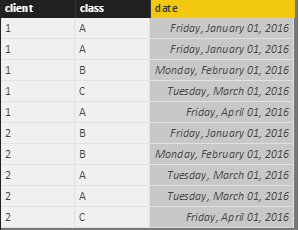
Well this is odd, are you sure you copied in the duplicate dates?
I am also using the sample data and I recieve the multiple values error.
the measure:
class2 = CALCULATE(VALUES(Testtable[class]),LASTDATE(Testtable[date]))
the data: Testtable
- Mark as New
- Bookmark
- Subscribe
- Mute
- Subscribe to RSS Feed
- Permalink
- Report Inappropriate Content
To solve the error you can put the Table's Total OFF.
The error appears because in totals, you have 2 or more rows with last date (Example: 4/1/16). If you don't want to switch off the totals you need to add to dax formula:
Class2 = IF(HasOneValue(Testtable[client]),CALCULATE(VALUES(Testtable[class]),LASTDATE(Testtable[date])))
Lima - Peru
- Mark as New
- Bookmark
- Subscribe
- Mute
- Subscribe to RSS Feed
- Permalink
- Report Inappropriate Content
Ah the problem was in the "totals" option again, why must that be turned to off for this to work?
- Mark as New
- Bookmark
- Subscribe
- Mute
- Subscribe to RSS Feed
- Permalink
- Report Inappropriate Content
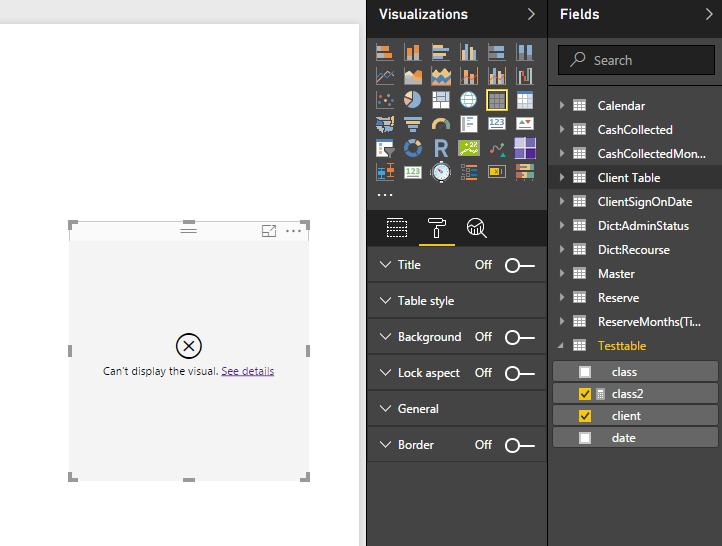
For some reason when i try to use this solution with my real data the "General" section of format is not available? so i can't turn off totals.
- Mark as New
- Bookmark
- Subscribe
- Mute
- Subscribe to RSS Feed
- Permalink
- Report Inappropriate Content
Why can i not turn off totals in the table as suggested?
- Mark as New
- Bookmark
- Subscribe
- Mute
- Subscribe to RSS Feed
- Permalink
- Report Inappropriate Content
- Mark as New
- Bookmark
- Subscribe
- Mute
- Subscribe to RSS Feed
- Permalink
- Report Inappropriate Content
How about this?
Classification on Last Date =
IF (
    HASONEVALUE ( 'Table'[Client] ),
    CALCULATE (
        LASTNONBLANK ( 'Table'[Classification], 1 ),
        LASTDATE ( 'Table'[Date] )
    ),
    BLANK ()
)
Good Luck!
- Mark as New
- Bookmark
- Subscribe
- Mute
- Subscribe to RSS Feed
- Permalink
- Report Inappropriate Content
Sean,
That works perfectly!
I tried to use LastnonBlank in my original attempts but was lacking an expression.
I was unaware you could put "1" for an expression, what does that mean?
VVlarde thanks for your help as well!
- Mark as New
- Bookmark
- Subscribe
- Mute
- Subscribe to RSS Feed
- Permalink
- Report Inappropriate Content
"placing 1 as the second parameter has the same effect as just ignoring this parameter"
You can read more about it here...
http://exceleratorbi.com.au/lastnonblank-explained/

Helpful resources

Power BI Dataviz World Championships
The Power BI Data Visualization World Championships is back! Get ahead of the game and start preparing now!

Power BI Monthly Update - December 2025
Check out the December 2025 Power BI Holiday Recap!

FabCon Atlanta 2026
Join us at FabCon Atlanta, March 16-20, for the ultimate Fabric, Power BI, AI and SQL community-led event. Save $200 with code FABCOMM.

| User | Count |
|---|---|
| 41 | |
| 38 | |
| 33 | |
| 29 | |
| 24 |


| User | Count |
|---|---|
| 126 | |
| 115 | |
| 85 | |
| 69 | |
| 69 |


