Background: We are developing a report that can be customized by viewers. This includes allowing the viewer to custom the vertical axis and legend in the line chart.
(In consideration of compliance, part of the information in the picture is hidden)
Problems:
In a line chart with legends, if there are many values for the legend, PowerBI will automatically truncate the legends in alphabetical order, and only display the legend and the corresponding line in the alphabetical order, which will significantly mislead the viewer. Legends with lower rankings may not be displayed at all even if they have larger values as below.
There is a metrix "Value" we want to show by "Calendar" and "SomeMetrix" which is lengends in this line chart. The pie chart on the right shows the percentage of each legend, where the "R..."s has the max percentage for Value. But PowerBI will automatically truncate the legends in alphabetical order, and only display the legend and the corresponding line in the alphabetical order. So the linechart even doesn't show the line for "R..."s.
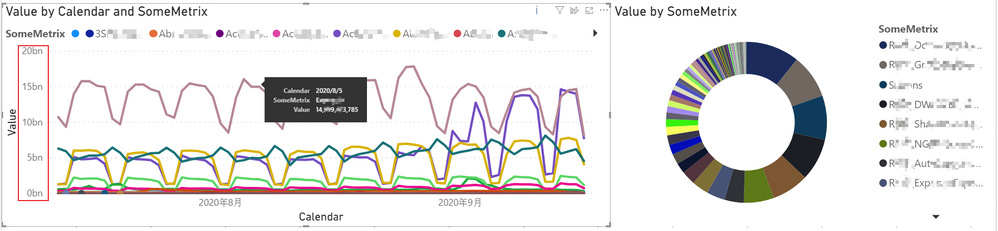
I know that by setting a filter on the line chart, only the legend that makes the vertical axis sort Top N can be displayed.

But in our scenario, when viewers watch in PowerBI Service, we want them to customize the vertical axis and the legend. The custom of this filter requires every viewer to have editing permissions, which is unrealistic for us.
Therefore, our needs can be summarized as:
(1) Is there a way to configure PowerBI to make the line chart display all the legends and the corresponding line, even if the legend has many values?
(2) If truncation cannot be avoided, is there a way to configure PowerBI so that the line chart can automatically select the legend with the larger vertical axis instead of truncating according to the alphabetical order.


