Don't miss your chance to take exam DP-600 or DP-700 on us!
Request nowLearn from the best! Meet the four finalists headed to the FINALS of the Power BI Dataviz World Championships! Register now
Hello,
I am attempting to use the "SAMEPERIODLASTYEAR" function in my report but can't seem to get it to work correctly. My sample data set is below (The table name is FACT). My Formula is
| YEAR | QUARTER | MONTH | DATE | UNITS | CATEGORY |
| 2020 | Q1 | 1 | Saturday, January 4, 2020 | 300 | Juice |
| 2020 | Q1 | 1 | Saturday, January 11, 2020 | 200 | Juice |
| 2020 | Q1 | 1 | Saturday, January 18, 2020 | 400 | Juice |
| 2020 | Q1 | 1 | Saturday, January 25, 2020 | 100 | Juice |
| 2019 | Q1 | 1 | Saturday, January 5, 2019 | 100 | Juice |
| 2019 | Q1 | 1 | Saturday, January 12, 2019 | 400 | Juice |
| 2019 | Q1 | 1 | Saturday, January 19, 2019 | 600 | Juice |
| 2019 | Q1 | 1 | Saturday, January 26, 2019 | 200 | Juice |
| 2020 | Q1 | 1 | Saturday, January 4, 2020 | 3000 | Soda |
| 2019 | Q1 | 1 | Saturday, January 5, 2019 | 2000 | Soda |
Solved! Go to Solution.
Hi @BH22One ,
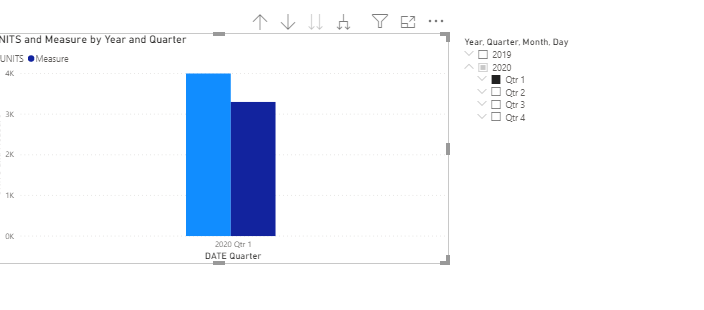
After my test, the date in the data you provided is different every year, which is the reason for the blank value. But the calculation performs well in the bar chart.
Or you can customize time intelligence functions like this:
Result =
VAR Previous_Year =
DATE ( YEAR ( MAX ( 'Table'[DATE] ) ) - 1, MONTH ( MAX ( 'Table'[DATE] ) ), DAY ( MAX ( 'Table'[DATE] ) ) + 1 )
RETURN
CALCULATE (
SUM ( 'Table'[UNITS] ),
FILTER (
ALLEXCEPT ( 'Table', 'Table'[CATEGORY] ),
'Table'[DATE] = Previous_Year
)
)
Best Regards,
Liang
If this post helps, then please consider Accept it as the solution to help the other members find it more quickly.
Hi @BH22One ,
After my test, the date in the data you provided is different every year, which is the reason for the blank value. But the calculation performs well in the bar chart.
Or you can customize time intelligence functions like this:
Result =
VAR Previous_Year =
DATE ( YEAR ( MAX ( 'Table'[DATE] ) ) - 1, MONTH ( MAX ( 'Table'[DATE] ) ), DAY ( MAX ( 'Table'[DATE] ) ) + 1 )
RETURN
CALCULATE (
SUM ( 'Table'[UNITS] ),
FILTER (
ALLEXCEPT ( 'Table', 'Table'[CATEGORY] ),
'Table'[DATE] = Previous_Year
)
)
Best Regards,
Liang
If this post helps, then please consider Accept it as the solution to help the other members find it more quickly.
@V-lianl-msft Thanks for your input. This solution works perfectly in my report. I did however make a few tweaks to get it to work the way I anticipated. Instead of using a Max Date as a variable, I used the max year - 1 as a variable. This allows me to do a YoY comparison for multiple years.
@BH22One , Always date calendar in such case
Other options
YTD Sales = CALCULATE(SUM(Sales[Sales Amount]),DATESYTD(('Date'[Date]),"12/31"))
This Sales = CALCULATE(SUM(Sales[Sales Amount]),DATESYTD((ENDOFYEAR('Date'[Date])),"12/31"))
Last YTD Sales = CALCULATE(SUM(Sales[Sales Amount]),DATESYTD(dateadd('Date'[Date],-1,Year),"12/31"))
Last YTD complete Sales = CALCULATE(SUM(Sales[Sales Amount]),DATESYTD(ENDOFYEAR(dateadd('Date'[Date],-1,Year)),"12/31"))
Last to last YTD Sales = CALCULATE(SUM(Sales[Sales Amount]),DATESYTD(dateadd('Date'[Date],-2,Year),"12/31"))
Year behind Sales = CALCULATE(SUM(Sales[Sales Amount]),dateadd('Date'[Date],-1,Year))
To get the best of the time intelligence function. Make sure you have a date calendar and it has been marked as the date in model view. Also, join it with the date column of your fact/s. Refer :
https://radacad.com/creating-calendar-table-in-power-bi-using-dax-functions
https://www.archerpoint.com/blog/Posts/creating-date-table-power-bi
https://www.sqlbi.com/articles/creating-a-simple-date-table-in-dax/
See if my webinar on Time Intelligence can help: https://community.powerbi.com/t5/Webinars-and-Video-Gallery/PowerBI-Time-Intelligence-Calendar-WTD-Y...
Appreciate your Kudos.
Share feedback directly with Fabric product managers, participate in targeted research studies and influence the Fabric roadmap.
Check out the February 2026 Power BI update to learn about new features.
| User | Count |
|---|---|
| 53 | |
| 49 | |
| 33 | |
| 16 | |
| 15 |
| User | Count |
|---|---|
| 85 | |
| 70 | |
| 38 | |
| 28 | |
| 25 |