cancel
Showing results for 
Search instead for 
Did you mean: 

Next up in the FabCon + SQLCon recap series: The roadmap for Microsoft SQL and Maximizing Developer experiences in Fabric. All sessions are available on-demand after the live show. Register now

Reply
FinanceIntern
New Member

Trouble with Data Count

I have a large database with various financial metrics including stock price. I want to show the trend of the stock price over time, however the line chart is displaying the count of stock price and I cannot figure out how to change this. The table below gives a basic idea of what the data looks like. Any suggestions?


DateCompany A
09/24/200740.87
09/25/200740.13
09/26/200740.4
09/27/200740.75
1 ACCEPTED SOLUTION
Anonymous
Not applicable

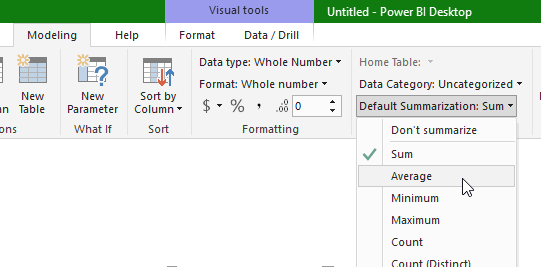
Change it to "Sum" or "Average" or any of the other aggregate measures; since you only have one value per date, "Sum" will work just fine.


In your case, "Average" might be the most prudent measure that you'd use in other visualizations, so I'd recommend you change the default aggregation. Select your Stock Price column and you'll find the option in the Modeling tab at the top. See screenshot:


PBIDesktop_2017-11-01_10-22-59.png

View solution in original post

5 REPLIES 5
mikeborg82
Advocate II
Advocate II

if the values are formatted as decimals not text, you should just be able to put date into axis and company into values.

fhill
Resident Rockstar
Resident Rockstar

I have this problem when PowerBI see's my numeric values at Text or another format.  Make sure the column is formatted as Decimal Number or another numeric like value.  FOrrest


Did I answer your question, or help you along the way?
Please give Kudos or Mark as a Solution!


https://www.linkedin.com/in/forrest-hill-04480730/

Proud to give back to the community!
Thank You!


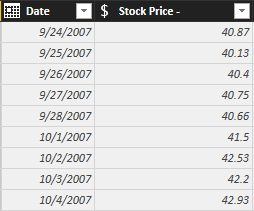
I appreciate the response, however I am still having trouble. I have formatted the stock  price column as fixed decimal (see picture below). When I add the stock pric to the line chart, it immediatley changes to 'count of stock price'. What do you think the issue is? Could it simply be due to the large data set?

Untitled.png

Anonymous
Not applicable

Change it to "Sum" or "Average" or any of the other aggregate measures; since you only have one value per date, "Sum" will work just fine.


In your case, "Average" might be the most prudent measure that you'd use in other visualizations, so I'd recommend you change the default aggregation. Select your Stock Price column and you'll find the option in the Modeling tab at the top. See screenshot:


PBIDesktop_2017-11-01_10-22-59.png

pxg08680
Resolver III
Resolver III

Out of my understanding, you need Company A values as a Line against the dates.


Just drop the Date column into axis field(remove date hierarchy and select Date) and Company A into values field.

Capture.PNG

Helpful resources

Announcements
New to Fabric survey Carousel

New to Fabric Survey

If you have recently started exploring Fabric, we'd love to hear how it's going. Your feedback can help with product improvements.

Power BI DataViz World Championships carousel

Power BI DataViz World Championships - June 2026

A new Power BI DataViz World Championship is coming this June! Don't miss out on submitting your entry.

Join our Fabric User Panel

Join our Fabric User Panel

Share feedback directly with Fabric product managers, participate in targeted research studies and influence the Fabric roadmap.

March Power BI Update Carousel

Power BI Community Update - March 2026

Check out the March 2026 Power BI update to learn about new features.