cancel
Showing results for 
Search instead for 
Did you mean: 

The Power BI Data Visualization World Championships is back! Get ahead of the game and start preparing now! Learn more

Reply
Anonymous
Not applicable

Tricky Aggregation - Matrix like with nulls

 
1 ACCEPTED SOLUTION
v-yulgu-msft
Microsoft Employee
Microsoft Employee

Hi @Anonymous ,

I would like to get count of non null names per each i.e.

BU1   5           6            3

BU2     4          4           5

BU3

BU4

BU5

         Skill 1  Skill 2 Skill 3 


But on the graph...

for example one as above on screenshot but with the colour dots representing skill and cound and X axis being BU1...5


I am not very clear about your requirement. Please provide more detailed description about the desired output. What does 5, 6, 3 in the first "BU1" row represent? And What does Skill mentioned here mean?


Since you said "I can analyse 1 BU and see count of names per category. But I can't seem to get them all at one graph.", maybe you could try to Unpivot source table to convert "bu1", "bu2", "bu3", "bu4" and "bu5" from column headers into a single column.


Regards,

Yuliana Gu

Community Support Team _ Yuliana Gu
If this post helps, then please consider Accept it as the solution to help the other members find it more quickly.

View solution in original post

3 REPLIES 3
Anonymous
Not applicable

Hi 

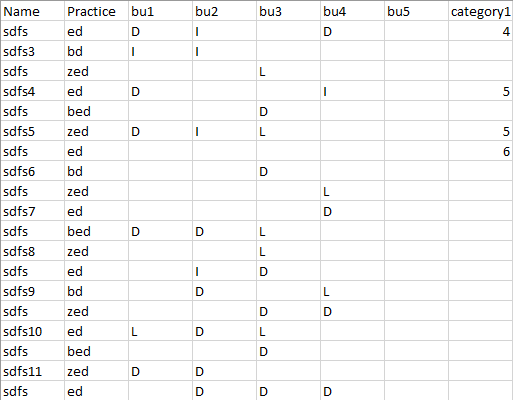
My data is as per the picture below.

5 Columns "BUx" with 3 possible categories (and nulls)


Capture.PNG

I can analyse 1 BU and see the count of names per category.

But I can't seem to get them all at one graph.

All graphs when adding rows/columns turn on drill function. 


Capture2.PNG


I would like to get count of non null names per each i.e.

BU1   5           6            3

BU2     4          4           5

BU3

BU4

BU5

         Skill 1  Skill 2 Skill 3 


But on the graph...

for example one as above on screenshot but with the colour dots representing skill and count and X-axis being BU1...5


Hope thats clear


Regards

Dom

v-yulgu-msft
Microsoft Employee
Microsoft Employee

Hi @Anonymous ,

I would like to get count of non null names per each i.e.

BU1   5           6            3

BU2     4          4           5

BU3

BU4

BU5

         Skill 1  Skill 2 Skill 3 


But on the graph...

for example one as above on screenshot but with the colour dots representing skill and cound and X axis being BU1...5


I am not very clear about your requirement. Please provide more detailed description about the desired output. What does 5, 6, 3 in the first "BU1" row represent? And What does Skill mentioned here mean?


Since you said "I can analyse 1 BU and see count of names per category. But I can't seem to get them all at one graph.", maybe you could try to Unpivot source table to convert "bu1", "bu2", "bu3", "bu4" and "bu5" from column headers into a single column.


Regards,

Yuliana Gu

Community Support Team _ Yuliana Gu
If this post helps, then please consider Accept it as the solution to help the other members find it more quickly.
Anonymous
Not applicable


Helpful resources

Announcements
Power BI DataViz World Championships

Power BI Dataviz World Championships

The Power BI Data Visualization World Championships is back! Get ahead of the game and start preparing now!

December 2025 Power BI Update Carousel

Power BI Monthly Update - December 2025

Check out the December 2025 Power BI Holiday Recap!

FabCon Atlanta 2026 carousel

FabCon Atlanta 2026

Join us at FabCon Atlanta, March 16-20, for the ultimate Fabric, Power BI, AI and SQL community-led event. Save $200 with code FABCOMM.