Don't miss your chance to take the Fabric Data Engineer (DP-600) exam for FREE! Find out how by attending the DP-600 session on April 23rd (pacific time), live or on-demand.
Learn moreNext up in the FabCon + SQLCon recap series: The roadmap for Microsoft SQL and Maximizing Developer experiences in Fabric. All sessions are available on-demand after the live show. Register now
Hi @Anonymous ,
I would like to get count of non null names per each i.e.
BU1 5 6 3
BU2 4 4 5
BU3
BU4
BU5
Skill 1 Skill 2 Skill 3
But on the graph...
for example one as above on screenshot but with the colour dots representing skill and cound and X axis being BU1...5
I am not very clear about your requirement. Please provide more detailed description about the desired output. What does 5, 6, 3 in the first "BU1" row represent? And What does Skill mentioned here mean?
Since you said "I can analyse 1 BU and see count of names per category. But I can't seem to get them all at one graph.", maybe you could try to Unpivot source table to convert "bu1", "bu2", "bu3", "bu4" and "bu5" from column headers into a single column.
Regards,
Yuliana Gu
Hi
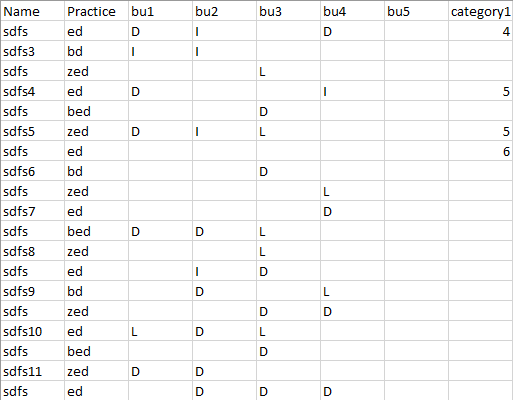
My data is as per the picture below.
5 Columns "BUx" with 3 possible categories (and nulls)
I can analyse 1 BU and see the count of names per category.
But I can't seem to get them all at one graph.
All graphs when adding rows/columns turn on drill function.
I would like to get count of non null names per each i.e.
BU1 5 6 3
BU2 4 4 5
BU3
BU4
BU5
Skill 1 Skill 2 Skill 3
But on the graph...
for example one as above on screenshot but with the colour dots representing skill and count and X-axis being BU1...5
Hope thats clear
Regards
Dom
Hi @Anonymous ,
I would like to get count of non null names per each i.e.
BU1 5 6 3
BU2 4 4 5
BU3
BU4
BU5
Skill 1 Skill 2 Skill 3
But on the graph...
for example one as above on screenshot but with the colour dots representing skill and cound and X axis being BU1...5
I am not very clear about your requirement. Please provide more detailed description about the desired output. What does 5, 6, 3 in the first "BU1" row represent? And What does Skill mentioned here mean?
Since you said "I can analyse 1 BU and see count of names per category. But I can't seem to get them all at one graph.", maybe you could try to Unpivot source table to convert "bu1", "bu2", "bu3", "bu4" and "bu5" from column headers into a single column.
Regards,
Yuliana Gu
If you have recently started exploring Fabric, we'd love to hear how it's going. Your feedback can help with product improvements.
A new Power BI DataViz World Championship is coming this June! Don't miss out on submitting your entry.
Experience the highlights from FabCon & SQLCon, available live and on-demand starting April 14th.
| User | Count |
|---|---|
| 47 | |
| 43 | |
| 40 | |
| 20 | |
| 15 |
| User | Count |
|---|---|
| 70 | |
| 67 | |
| 32 | |
| 27 | |
| 25 |