Don't miss your chance to take the Fabric Data Engineer (DP-700) exam on us!
Learn moreNext up in the FabCon + SQLCon recap series: The roadmap for Microsoft SQL and Maximizing Developer experiences in Fabric. All sessions are available on-demand after the live show. Register now
Hi @Anonymous ,
I would like to get count of non null names per each i.e.
BU1 5 6 3
BU2 4 4 5
BU3
BU4
BU5
Skill 1 Skill 2 Skill 3
But on the graph...
for example one as above on screenshot but with the colour dots representing skill and cound and X axis being BU1...5
I am not very clear about your requirement. Please provide more detailed description about the desired output. What does 5, 6, 3 in the first "BU1" row represent? And What does Skill mentioned here mean?
Since you said "I can analyse 1 BU and see count of names per category. But I can't seem to get them all at one graph.", maybe you could try to Unpivot source table to convert "bu1", "bu2", "bu3", "bu4" and "bu5" from column headers into a single column.
Regards,
Yuliana Gu
Hi
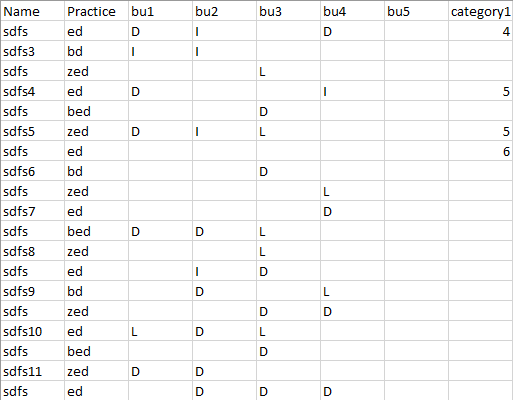
My data is as per the picture below.
5 Columns "BUx" with 3 possible categories (and nulls)
I can analyse 1 BU and see the count of names per category.
But I can't seem to get them all at one graph.
All graphs when adding rows/columns turn on drill function.
I would like to get count of non null names per each i.e.
BU1 5 6 3
BU2 4 4 5
BU3
BU4
BU5
Skill 1 Skill 2 Skill 3
But on the graph...
for example one as above on screenshot but with the colour dots representing skill and count and X-axis being BU1...5
Hope thats clear
Regards
Dom
Hi @Anonymous ,
I would like to get count of non null names per each i.e.
BU1 5 6 3
BU2 4 4 5
BU3
BU4
BU5
Skill 1 Skill 2 Skill 3
But on the graph...
for example one as above on screenshot but with the colour dots representing skill and cound and X axis being BU1...5
I am not very clear about your requirement. Please provide more detailed description about the desired output. What does 5, 6, 3 in the first "BU1" row represent? And What does Skill mentioned here mean?
Since you said "I can analyse 1 BU and see count of names per category. But I can't seem to get them all at one graph.", maybe you could try to Unpivot source table to convert "bu1", "bu2", "bu3", "bu4" and "bu5" from column headers into a single column.
Regards,
Yuliana Gu
If you have recently started exploring Fabric, we'd love to hear how it's going. Your feedback can help with product improvements.
A new Power BI DataViz World Championship is coming this June! Don't miss out on submitting your entry.
Share feedback directly with Fabric product managers, participate in targeted research studies and influence the Fabric roadmap.
| User | Count |
|---|---|
| 53 | |
| 45 | |
| 44 | |
| 20 | |
| 19 |
| User | Count |
|---|---|
| 73 | |
| 71 | |
| 34 | |
| 33 | |
| 31 |