cancel
Showing results for 
Search instead for 
Did you mean: 

The Power BI Data Visualization World Championships is back! Get ahead of the game and start preparing now! Learn more

Reply
Anonymous
Not applicable

Trending Graph - Help!

Hi, first time poster - I have given up after 8 hours of trial and error and youtube tutorials. Maybe I'm not cut from the right cloth 😞 


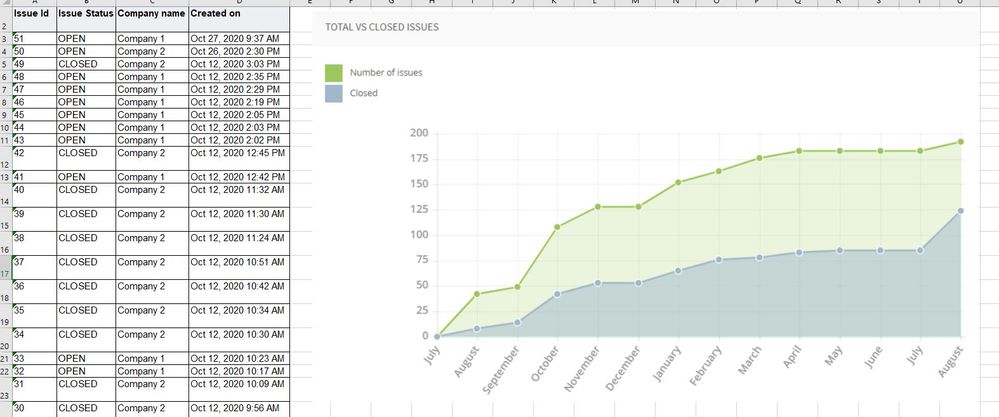
Basically, I have some data (attached) which I'd like to create a trending graph from. I need the graph to show the total number of active issues (open + closed) cumlatively growing over the month as each is created.  I also need the same but only showing the 'closed' issues growing over the month. 


The result will be a graph (similar to that shown in example) showing the active number of issues being followed by issues closed out. the difference between the two line will be the otustanding issues. 


Any help is apprecaited, I'm hopnig this is a really simple answer for someone who actually knows what they are doing! 


Thanks 


Stephen ExampleExample

1 ACCEPTED SOLUTION
Anonymous
Not applicable

@Stephen239
Check pbix if necessary, here are the 2 measurements with your sample data.

All issues = CALCULATE(COUNT('Report Content'[Id]),FILTER(ALLSELECTED('Report Content'),[Created on]<=MAX([Created on])))

Closed issues = CALCULATE(COUNT([Id]),FILTER(ALLSELECTED('Report Content'),[Created on]<=MAX([Created on]) && [Status]="CLOSED"))

all and closed issues.JPG

Paul Zheng _ Community Support Team
If this post helps, please accept it as the solution to help the other members find it faster.

View solution in original post

5 REPLIES 5
amitchandak
Super User
Super User

@Anonymous , looking at data not able to find a way to know both open and close dates. If you have that we can follow the current employee approach or HR :  https://community.powerbi.com/t5/Community-Blog/HR-Analytics-Active-Employee-Hire-and-Termination-trend/ba-p/882970


Can you share sample data and sample output in table format? Or a sample pbix after removing sensitive data.

Share with Power BI Enthusiasts: Full Power BI Video (20 Hours) YouTube
Microsoft Fabric Series 60+ Videos YouTube
Microsoft Fabric Hindi End to End YouTube
Anonymous
Not applicable

Hi, thanks for your response. See link below to data in its native format. 


 https://robertsongroup-my.sharepoint.com/:f:/g/personal/s_king_robertson_co_uk/EsxU0vrCZq1Ij4i19CnSk...


Anonymous
Not applicable

@Stephen239
Check pbix if necessary, here are the 2 measurements with your sample data.

All issues = CALCULATE(COUNT('Report Content'[Id]),FILTER(ALLSELECTED('Report Content'),[Created on]<=MAX([Created on])))

Closed issues = CALCULATE(COUNT([Id]),FILTER(ALLSELECTED('Report Content'),[Created on]<=MAX([Created on]) && [Status]="CLOSED"))

all and closed issues.JPG

Paul Zheng _ Community Support Team
If this post helps, please accept it as the solution to help the other members find it faster.

Anonymous
Not applicable

Hi, is it possbile to change the trending style for the closed issues? At the moment it looks like when issues are created there is also issues closed at the same time wich is incorrect. I think its becasue the field being used in closed issues is [created on].  There is also a data field titled [updated on] which can be used as the issue closed date. I thought it would simply be a case with replacing the [created on] field with [updated on] so the trending line for closed issues is refelctive of when they are closed but it doesnt seem to work.


Any help is appreciated 

Anonymous
Not applicable

Thank you very much, this is perfect!

Helpful resources

Announcements
Power BI DataViz World Championships

Power BI Dataviz World Championships

The Power BI Data Visualization World Championships is back! Get ahead of the game and start preparing now!

December 2025 Power BI Update Carousel

Power BI Monthly Update - December 2025

Check out the December 2025 Power BI Holiday Recap!

FabCon Atlanta 2026 carousel

FabCon Atlanta 2026

Join us at FabCon Atlanta, March 16-20, for the ultimate Fabric, Power BI, AI and SQL community-led event. Save $200 with code FABCOMM.