This time we’re going bigger than ever. Fabric, Power BI, SQL, AI and more. We're covering it all. You won't want to miss it.
Learn moreDid you hear? There's a new SQL AI Developer certification (DP-800). Start preparing now and be one of the first to get certified. Register now
Hi Team,
I am looking to implement a visual where I can choose the different values to display for a set of employees based on the Month.
I want to display the trends on a single graph but for multiple values. I can make the selection for a particular value on a single graph rather than multiple visuals.
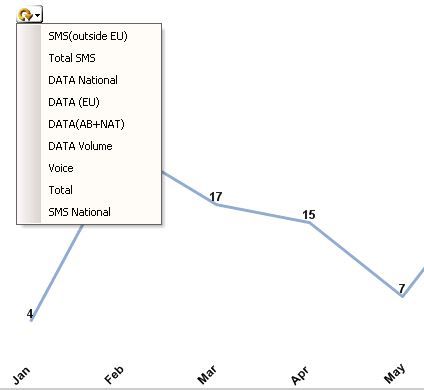
But in Power BI I can't do the same. In QlikView I can make cycling to choose the value for which I need to view the trend. Attaching the screenshot from QV.
Is it possible to do same in Power BI.
Thanks
QV Trend
Solved! Go to Solution.
@anmsharma you need a dynamic slicer for your measures
http://visualbi.com/blogs/powerbi/dynamic-measure-selection-power-bi/
Proud to be a Super User!
@anmsharma you need a dynamic slicer for your measures
http://visualbi.com/blogs/powerbi/dynamic-measure-selection-power-bi/
Proud to be a Super User!
Hi @vanessafvg,
Thanks for the help.
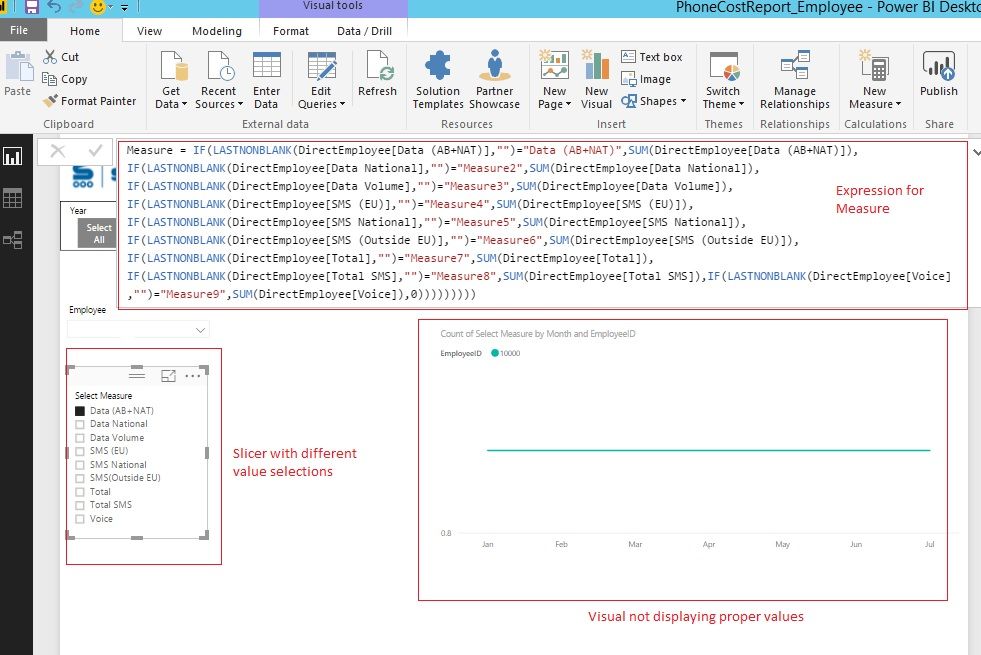
I did something but couldn't receive the desired results. Could you please help me what's wrong from the screenshot below.
Thanks Again.
Hi @anmsharma,
From the screenshot you shared above, I find that you're using the column "Select Measure"(Count) as Value on the Chart, which is not right. Instead, you should use the measure "Measure" as Value on the Chart to get the proper result in your scenario. ![]()
Regards
Thanks for the solution.
Implemented and figured out the issue and it's working fine.
Thanks Again
Anmol
Hi @anmsharma,
Great to hear the problem got resolved! Could you accept corresponding reply as solution to close this thread? ![]()
Regards
@anmsharma and have you tested the measures that they working outside of this particular method?
Proud to be a Super User!
Check out the April 2026 Power BI update to learn about new features.
Sign up to receive a private message when registration opens and key events begin.
If you have recently started exploring Fabric, we'd love to hear how it's going. Your feedback can help with product improvements.
| User | Count |
|---|---|
| 34 | |
| 31 | |
| 30 | |
| 21 | |
| 16 |
| User | Count |
|---|---|
| 61 | |
| 50 | |
| 30 | |
| 23 | |
| 23 |