
Join us at FabCon Atlanta from March 16 - 20, 2026, for the ultimate Fabric, Power BI, AI and SQL community-led event. Save $200 with code FABCOMM.
Register now!The Power BI Data Visualization World Championships is back! Get ahead of the game and start preparing now! Learn more
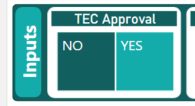
Hello Comunnity, I have a doubt about the Treemap Filter. I need to sort it by words, so in my case, I need the word "YES" to be in the left and the word "NO" to be in the right:
¿Do you know if this is possible in PBI?
Kind regards.
Solved! Go to Solution.
Hi @Anonymous,
This may not be the best way to get the result you are looking for but I tend to find sorting in a treemap can be a bit of a pain.
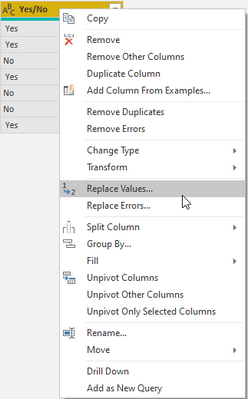
But a quick way to get it to show Yes then No would be to transform the yes or no column.
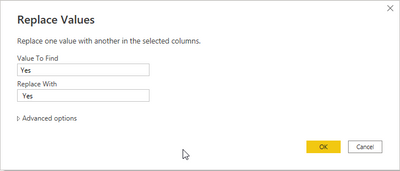
If you replace all of the Yes values with a space in front of it then it will sort the treemap with yes then no.
As I said this is by no means the cleanest option and it may not be a viable option depending on how your report looks but I hope this may be able to help if there are no better alternatives.
Hi @Anonymous,
This may not be the best way to get the result you are looking for but I tend to find sorting in a treemap can be a bit of a pain.
But a quick way to get it to show Yes then No would be to transform the yes or no column.
If you replace all of the Yes values with a space in front of it then it will sort the treemap with yes then no.
As I said this is by no means the cleanest option and it may not be a viable option depending on how your report looks but I hope this may be able to help if there are no better alternatives.
Thank you Seanan!! It worked 🙂
The Power BI Data Visualization World Championships is back! Get ahead of the game and start preparing now!
| User | Count |
|---|---|
| 53 | |
| 42 | |
| 34 | |
| 33 | |
| 21 |
| User | Count |
|---|---|
| 140 | |
| 121 | |
| 100 | |
| 80 | |
| 57 |