Get Fabric or SQL Certified for Free.
Get certified for free when you join Fabric Data Days 2026 and dive into Fabric, Power BI, SQL, AI, and other essential data skills.
Join now- Power BI forums
- Get Help with Power BI
- Desktop
- Service
- Report Server
- Power Query
- Mobile Apps
- Developer
- DAX Commands and Tips
- Custom Visuals Development Discussion
- Health and Life Sciences
- Power BI Spanish forums
- Translated Spanish Desktop
- Training and Consulting
- Instructor Led Training
- Dashboard in a Day for Women, by Women
- Galleries
- Data Stories Gallery
- Themes Gallery
- Contests Gallery
- QuickViz Gallery
- Quick Measures Gallery
- Visual Calculations Gallery
- Fabric Apps Gallery
- Notebook Gallery
- Translytical Task Flow Gallery
- TMDL Gallery
- R Script Showcase
- Webinars and Video Gallery
- Ideas
- Custom Visuals Ideas (read-only)
- Issues
- Issues
- Events
- Upcoming Events
July 28 - August 9 | Final Round of the Power BI Dataviz World Championships. This is your chance. Learn more
- Power BI forums
- Forums
- Get Help with Power BI
- Desktop
- Re: Transpose in visualization alone
- Subscribe to RSS Feed
- Mark Topic as New
- Mark Topic as Read
- Float this Topic for Current User
- Bookmark
- Subscribe
- Printer Friendly Page

- Mark as New
- Bookmark
- Subscribe
- Mute
- Subscribe to RSS Feed
- Permalink
- Report Inappropriate Content
Transpose in visualization alone
Hi All,
I would like to have Column header to be displayed in First Column and its values to be displayed in second column.
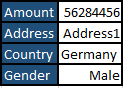
We can do transpose in Edit Queries but i want to change my visualization part alone.
Thanks in Advance
Solved! Go to Solution.


- Mark as New
- Bookmark
- Subscribe
- Mute
- Subscribe to RSS Feed
- Permalink
- Report Inappropriate Content
Hi @Anonymous ,
Then you need first create a table ,and put all the column headers into one column,such as below:
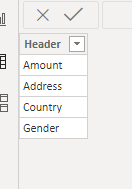
Then you need a measure as below:
Measure =
SWITCH (
    TRUE (),
    SELECTEDVALUE ( 'Table (4)'[Header] ) = "Address", SELECTEDVALUE ( 'Table (2)'[Address] ),
    SELECTEDVALUE ( 'Table (4)'[Header] ) = "Amount", SELECTEDVALUE ( 'Table (2)'[Amount] ),
    SELECTEDVALUE ( 'Table (4)'[Header] ) = "Country", SELECTEDVALUE ( 'Table (2)'[Country] ),
    SELECTEDVALUE ( 'Table (4)'[Header] ) = "Gender", SELECTEDVALUE ( 'Table (2)'[Gender] )
)
Finally in the new table ,put column and measure into a matrix as below:
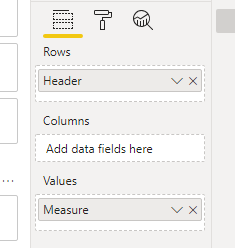
And you will see:
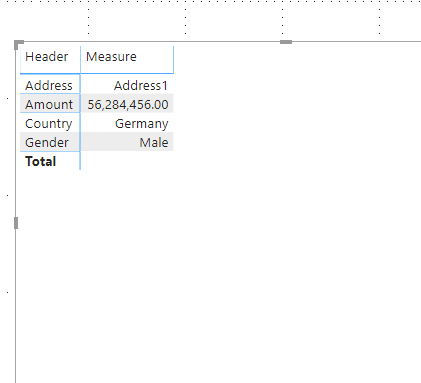
For the related .pbix file,pls click here.
Best Regards,
Kelly


- Mark as New
- Bookmark
- Subscribe
- Mute
- Subscribe to RSS Feed
- Permalink
- Report Inappropriate Content
Hi @Anonymous
you can use the next technique with creating new calculated table. the exactly solution depends on your data model and aggregation business logic
Table2 =
UNION(
    ROW("Field"; "Amount"; "Value"; SUM(Table1[Amount]));
    ROW("Field"; "Address"; "Value"; FIRSTNONBLANK('Table1'[Address];1));
    ROW("Field"; "Country"; "Value"; FIRSTNONBLANK('Table1'[Country];1))
)
do not hesitate to give a kudo to useful posts and mark solutions as solution
- Mark as New
- Bookmark
- Subscribe
- Mute
- Subscribe to RSS Feed
- Permalink
- Report Inappropriate Content
Hi @az38 ,
I tried your suggestion but i am not getting it properly. Can you explain it in more detaild manner. I assume i am getting confused by the delimiters present in the code which you sent. ( ; , )
Thanks
- Mark as New
- Bookmark
- Subscribe
- Mute
- Subscribe to RSS Feed
- Permalink
- Report Inappropriate Content
@Anonymous
delimiter depends on your system localization settings.
you can just to replace ";" to "," in my statement
do not hesitate to give a kudo to useful posts and mark solutions as solution
- Mark as New
- Bookmark
- Subscribe
- Mute
- Subscribe to RSS Feed
- Permalink
- Report Inappropriate Content
Hi @az38 ,
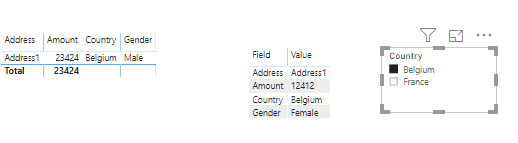
It is almost working but when i select anything in filter then because of firstnonblank function it is not assciating properly.
Thanks


- Mark as New
- Bookmark
- Subscribe
- Mute
- Subscribe to RSS Feed
- Permalink
- Report Inappropriate Content
In matrix visualization, you have the option Show on Row. That will move you measure on the row.
Appreciate your Kudos. In case, this is the solution you are looking for, mark it as the Solution. In case it does not help, please provide additional information and mark me with @
Thanks. My Recent Blog -
Winner-Topper-on-Map-How-to-Color-States-on-a-Map-with-Winners , HR-Analytics-Active-Employee-Hire-and-Termination-trend
Power-BI-Working-with-Non-Standard-Time-Periods And Comparing-Data-Across-Date-Ranges
Connect on Linkedin
- Mark as New
- Bookmark
- Subscribe
- Mute
- Subscribe to RSS Feed
- Permalink
- Report Inappropriate Content
Hi @amitchandak ,
Can you explain in more detail on hoe to get that in matrix.
Original dataset

Expected Output
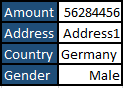
Thanks
- Mark as New
- Bookmark
- Subscribe
- Mute
- Subscribe to RSS Feed
- Permalink
- Report Inappropriate Content
Hi @Anonymous ,
Go to "edit queries">select all columns>"Transform">"Unpivot columns":

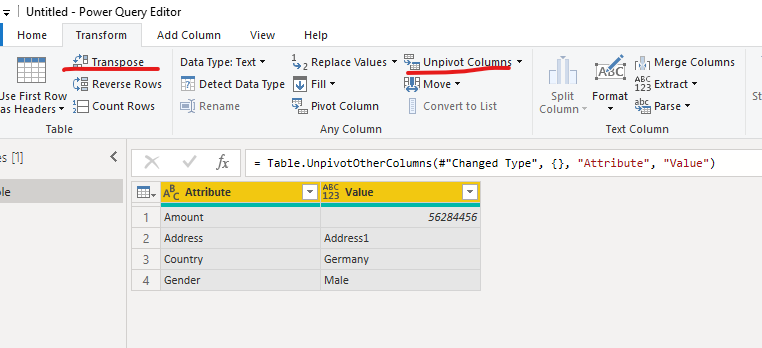
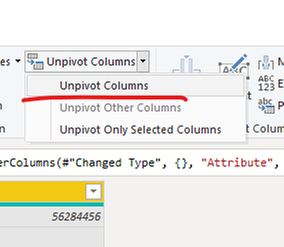
Then choose "Use first row as headers":
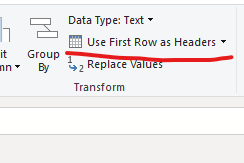
Choose "close and apply",then you will see :

Best Regards,
Kelly
- Mark as New
- Bookmark
- Subscribe
- Mute
- Subscribe to RSS Feed
- Permalink
- Report Inappropriate Content
Thanks for your response but do we have any other way to do it without using Query editor and Edit Queries section. i.e., in front end itself or just creating a measure or calculated column?
Thanks
- Mark as New
- Bookmark
- Subscribe
- Mute
- Subscribe to RSS Feed
- Permalink
- Report Inappropriate Content
Hi @Anonymous ,
Then you need first create a table ,and put all the column headers into one column,such as below:
Then you need a measure as below:
Measure =
SWITCH (
    TRUE (),
    SELECTEDVALUE ( 'Table (4)'[Header] ) = "Address", SELECTEDVALUE ( 'Table (2)'[Address] ),
    SELECTEDVALUE ( 'Table (4)'[Header] ) = "Amount", SELECTEDVALUE ( 'Table (2)'[Amount] ),
    SELECTEDVALUE ( 'Table (4)'[Header] ) = "Country", SELECTEDVALUE ( 'Table (2)'[Country] ),
    SELECTEDVALUE ( 'Table (4)'[Header] ) = "Gender", SELECTEDVALUE ( 'Table (2)'[Gender] )
)
Finally in the new table ,put column and measure into a matrix as below:
And you will see:
For the related .pbix file,pls click here.
Best Regards,
Kelly
- Mark as New
- Bookmark
- Subscribe
- Mute
- Subscribe to RSS Feed
- Permalink
- Report Inappropriate Content
Hi @v-kelly-msft ,
Let us assume out of these 4 column we have 1 as a measure then how to give that measure value?
Thanks
Helpful resources

FabCon & SQLCon – Barcelona 2026
Join us in Barcelona for FabCon and SQLCon, the Fabric, Power BI, SQL, and AI community event. Save €200 with code FABCMTY200.

Fabric Community Sticker Challenge - Barcelona 2026
If you love stickers, then you will definitely want to check out our community sticker challenge, Barcelona edition!

Power BI Monthly Update - July 2026
Check out the July 2026 Power BI update to learn about new features.

Power BI DataViz World Championships - June 2026
A new Power BI DataViz World Championship is coming this June! Don't miss out on submitting your entry.

| User | Count |
|---|---|
| 25 | |
| 23 | |
| 22 | |
| 17 | |
| 14 |


| User | Count |
|---|---|
| 27 | |
| 24 | |
| 20 | |
| 20 | |
| 19 |


