cancel
Showing results for 
Search instead for 
Did you mean: 

Data Days is here! Join us now for 60+ days of learning, challenges, and connection. Learn more

Reply
CharlotteCity12
Microsoft Employee
Microsoft Employee

Transpose, Pivot

Have data that looks like this:


Year

2016

2016


QTR

1

2


PG

PGName

Sales

Sales

1

A

100

300

2

B

200

400

3

C

300

500


Want the data to look like this:


PG

PGName

Year

QTR

Sales

1

A

2016

1

100

1

A

2016

2

300

2

B

2016

1

200

2

B

2016

2

400

3

C

2016

1

300

3

C

2016

2

500

1 ACCEPTED SOLUTION
Anonymous
Not applicable

I attached the pbix file below since this was done in power query and you would probably want to be able to step through it.  But quick overview:

  • After loading the main table, duplicate this table twice. One to get the Year and the Quarter. These steps are hardcoded since I didnt know the exact set up of the file, so if the file structure changes you would probably want to make that more dynamic.  Dont need this two tables (Year and Qtr) to be loaded
  • Added and index column starting at 1 for each of those tables
  • Back in the main table
    • Removed the top rows where the year and quarter data was
    • Promoted headers, and unpivoted other columns while selecting PG and PGName
    • Grouped this table by PG and PG Name and then aggregating using All Rows
    • Added an index column to each sub-table like we did to Year and Qtr
    • Then joined the main table with the Year and Qtr table based on the Index column
    • Remove the other columns, and expanded the table out
    • Then expanded year and qtr tables from the merge
    • Reordered the columns, set data types and renames some columsn

Final Result:
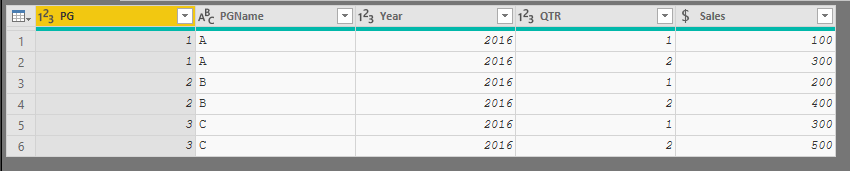
Final Result.png

M-Code:

let
    Source = Table.FromRows(Json.Document(Binary.Decompress(Binary.FromText("i45WUtJRMjIwNENQSrE60UqRqYlFIDYEgUSAdGBIEJA0BCmFCSEpCHAHsgLc/RJzU4GM4MSc1GI4DZIH6XME6TcwAJLGQBIkagRkO4EtB4maQEWNgWxnqCodJVOQaCwA", BinaryEncoding.Base64), Compression.Deflate)), let _t = ((type text) meta [Serialized.Text = true]) in type table [Column1 = _t, Column2 = _t, Column3 = _t, Column4 = _t]),
    #"Removed Top Rows" = Table.Skip(Source,4),
    #"Promoted Headers" = Table.PromoteHeaders(#"Removed Top Rows", [PromoteAllScalars=true]),
    #"Unpivoted Other Columns" = Table.UnpivotOtherColumns(#"Promoted Headers", {"PG", "PGName"}, "Attribute", "Value"),
    #"Grouped Rows" = Table.Group(#"Unpivoted Other Columns", {"PG", "PGName"}, {{"Data", each _, type table [PG=text, PGName=text, Attribute=text, Value=text]}}),
    #"Added Custom" = Table.AddColumn(#"Grouped Rows", "Custom", each Table.AddIndexColumn(
    [Data],"Index",1,1)),
    #"Added Custom1" = Table.AddColumn(#"Added Custom", "Custom.1", each Table.NestedJoin(
    [Custom], {"Index"},
    Year, {"Index"}, "Year",JoinKind.LeftOuter)),
    #"Added Custom2" = Table.AddColumn(#"Added Custom1", "Custom.2", each Table.NestedJoin(
    [Custom.1], {"Index"},
    Qtr, {"Index"}, "Qtr",JoinKind.LeftOuter)),
    #"Removed Other Columns" = Table.SelectColumns(#"Added Custom2",{"Custom.2"}),
    #"Expanded Custom.2" = Table.ExpandTableColumn(#"Removed Other Columns", "Custom.2", {"PG", "PGName", "Value", "Year", "Qtr"}, {"PG", "PGName", "Value", "Year", "Qtr"}),
    #"Expanded Year" = Table.ExpandTableColumn(#"Expanded Custom.2", "Year", {"Year"}, {"Year"}),
    #"Expanded Qtr" = Table.ExpandTableColumn(#"Expanded Year", "Qtr", {"QTR"}, {"QTR"}),
    #"Reordered Columns" = Table.ReorderColumns(#"Expanded Qtr",{"PG", "PGName", "Year", "QTR", "Value"}),
    #"Changed Type" = Table.TransformColumnTypes(#"Reordered Columns",{{"PG", Int64.Type}, {"PGName", type text}, {"Year", Int64.Type}, {"QTR", Int64.Type}, {"Value", Currency.Type}}),
    #"Renamed Columns" = Table.RenameColumns(#"Changed Type",{{"Value", "Sales"}})
in
    #"Renamed Columns"

Pbix file:

https://1drv.ms/u/s!Amqd8ArUSwDS1SckTQPBDPrH1uZz

View solution in original post

1 REPLY 1
Anonymous
Not applicable

I attached the pbix file below since this was done in power query and you would probably want to be able to step through it.  But quick overview:

  • After loading the main table, duplicate this table twice. One to get the Year and the Quarter. These steps are hardcoded since I didnt know the exact set up of the file, so if the file structure changes you would probably want to make that more dynamic.  Dont need this two tables (Year and Qtr) to be loaded
  • Added and index column starting at 1 for each of those tables
  • Back in the main table
    • Removed the top rows where the year and quarter data was
    • Promoted headers, and unpivoted other columns while selecting PG and PGName
    • Grouped this table by PG and PG Name and then aggregating using All Rows
    • Added an index column to each sub-table like we did to Year and Qtr
    • Then joined the main table with the Year and Qtr table based on the Index column
    • Remove the other columns, and expanded the table out
    • Then expanded year and qtr tables from the merge
    • Reordered the columns, set data types and renames some columsn

Final Result:

Final Result.png

M-Code:

let
    Source = Table.FromRows(Json.Document(Binary.Decompress(Binary.FromText("i45WUtJRMjIwNENQSrE60UqRqYlFIDYEgUSAdGBIEJA0BCmFCSEpCHAHsgLc/RJzU4GM4MSc1GI4DZIH6XME6TcwAJLGQBIkagRkO4EtB4maQEWNgWxnqCodJVOQaCwA", BinaryEncoding.Base64), Compression.Deflate)), let _t = ((type text) meta [Serialized.Text = true]) in type table [Column1 = _t, Column2 = _t, Column3 = _t, Column4 = _t]),
    #"Removed Top Rows" = Table.Skip(Source,4),
    #"Promoted Headers" = Table.PromoteHeaders(#"Removed Top Rows", [PromoteAllScalars=true]),
    #"Unpivoted Other Columns" = Table.UnpivotOtherColumns(#"Promoted Headers", {"PG", "PGName"}, "Attribute", "Value"),
    #"Grouped Rows" = Table.Group(#"Unpivoted Other Columns", {"PG", "PGName"}, {{"Data", each _, type table [PG=text, PGName=text, Attribute=text, Value=text]}}),
    #"Added Custom" = Table.AddColumn(#"Grouped Rows", "Custom", each Table.AddIndexColumn(
    [Data],"Index",1,1)),
    #"Added Custom1" = Table.AddColumn(#"Added Custom", "Custom.1", each Table.NestedJoin(
    [Custom], {"Index"},
    Year, {"Index"}, "Year",JoinKind.LeftOuter)),
    #"Added Custom2" = Table.AddColumn(#"Added Custom1", "Custom.2", each Table.NestedJoin(
    [Custom.1], {"Index"},
    Qtr, {"Index"}, "Qtr",JoinKind.LeftOuter)),
    #"Removed Other Columns" = Table.SelectColumns(#"Added Custom2",{"Custom.2"}),
    #"Expanded Custom.2" = Table.ExpandTableColumn(#"Removed Other Columns", "Custom.2", {"PG", "PGName", "Value", "Year", "Qtr"}, {"PG", "PGName", "Value", "Year", "Qtr"}),
    #"Expanded Year" = Table.ExpandTableColumn(#"Expanded Custom.2", "Year", {"Year"}, {"Year"}),
    #"Expanded Qtr" = Table.ExpandTableColumn(#"Expanded Year", "Qtr", {"QTR"}, {"QTR"}),
    #"Reordered Columns" = Table.ReorderColumns(#"Expanded Qtr",{"PG", "PGName", "Year", "QTR", "Value"}),
    #"Changed Type" = Table.TransformColumnTypes(#"Reordered Columns",{{"PG", Int64.Type}, {"PGName", type text}, {"Year", Int64.Type}, {"QTR", Int64.Type}, {"Value", Currency.Type}}),
    #"Renamed Columns" = Table.RenameColumns(#"Changed Type",{{"Value", "Sales"}})
in
    #"Renamed Columns"

Pbix file:

https://1drv.ms/u/s!Amqd8ArUSwDS1SckTQPBDPrH1uZz

Helpful resources

Announcements
Fabric Data Days is here Carousel

Fabric Data Days 2026

Don't miss out on Data Days, June 15 through August 7. Learn Fabric, Power BI, SQL, AI and more.

May Power BI Update Carousel

Power BI Monthly Update - May 2026

Check out the May 2026 Power BI update to learn about new features.

Power BI DataViz World Championships carousel

Power BI DataViz World Championships - June 2026

A new Power BI DataViz World Championship is coming this June! Don't miss out on submitting your entry.