cancel
Showing results for 
Search instead for 
Did you mean: 

The Power BI Data Visualization World Championships is back! Get ahead of the game and start preparing now! Learn more

Reply
zenonsbelskiss
Frequent Visitor

Translate calculated column into a measure

Hello PowerBi Guru's!


I have created a calculated column for later use in a different measure. However, I quickly came to a conclusion that this calculated column does not change when a filter is applied (a manager is selected in my situation).  Here is my calculated column which sums up the sales for a month each year for a certain product (I have many products, many months and many years):

Total value by product Monthly = 
var product = [Products]
var monthno = [Month No]
var yearno = [Year No]
return
CALCULATE(SUM(SALES[Sales in units]), filter(sales, [Products] = product), FILTER(sales, [Month No] = monthno), filter(sales, [Year No] = yearno))

The 'sales' table represents all unique invoices and dates.

Is there a way for me to translate this dax expression to be used as a measure and display the same values, but when I select a manager (not all products of the same type are sold by one manager) the values adapt to display a correct sum of sales in units monthly next to the product.


P.S. if you have some kind of tutorial that explains this phenomenon then please send it . I still do not understand fully how to make measures for certain totals.


Huge thanks for spending your time on my seemingly simple problem,

Zenons Belskis

1 ACCEPTED SOLUTION

@zenonsbelskiss , my Bad. Check


Total value by product Monthly = 
var product = max(Table[Products])
var monthno = max(Table[Month No])
var yearno = max(Table[Year No])
return
CALCULATE(SUM(SALES[Sales in units]), filter(allselected(sales), [Products] = product && [Month No] = monthno && [Year No] = yearno))
Share with Power BI Enthusiasts: Full Power BI Video (20 Hours) YouTube
Microsoft Fabric Series 60+ Videos YouTube
Microsoft Fabric Hindi End to End YouTube

View solution in original post

3 REPLIES 3
amitchandak
Super User
Super User

@zenonsbelskiss , Try a measure like

Total value by product Monthly = 
var product = max(Table[Products])
var monthno = max(Table[Month No])
var yearno = max(Table[Year No])
return
CALCULATE(SUM(SALES[Sales in units]), filter(sales, [Products] = product && [Month No] = monthno && [Year No] = yearno))
Share with Power BI Enthusiasts: Full Power BI Video (20 Hours) YouTube
Microsoft Fabric Series 60+ Videos YouTube
Microsoft Fabric Hindi End to End YouTube

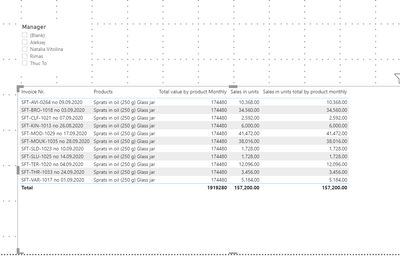
@amitchandak The measure that you suggested (I renamed it a sales in units total by product monthly) just displays the same values as just sales in units, not the sum. 😞

zenonsbelskiss_0-1606836008387.png


@zenonsbelskiss , my Bad. Check


Total value by product Monthly = 
var product = max(Table[Products])
var monthno = max(Table[Month No])
var yearno = max(Table[Year No])
return
CALCULATE(SUM(SALES[Sales in units]), filter(allselected(sales), [Products] = product && [Month No] = monthno && [Year No] = yearno))
Share with Power BI Enthusiasts: Full Power BI Video (20 Hours) YouTube
Microsoft Fabric Series 60+ Videos YouTube
Microsoft Fabric Hindi End to End YouTube

Helpful resources

Announcements
Power BI DataViz World Championships

Power BI Dataviz World Championships

The Power BI Data Visualization World Championships is back! Get ahead of the game and start preparing now!

November Power BI Update Carousel

Power BI Monthly Update - November 2025

Check out the November 2025 Power BI update to learn about new features.

FabCon Atlanta 2026 carousel

FabCon Atlanta 2026

Join us at FabCon Atlanta, March 16-20, for the ultimate Fabric, Power BI, AI and SQL community-led event. Save $200 with code FABCOMM.