cancel
Showing results for 
Search instead for 
Did you mean: 

The Power BI Data Visualization World Championships is back! Get ahead of the game and start preparing now! Learn more

Reply
Jaydis
Regular Visitor

Transforming sharepoint list survey results

Hi,


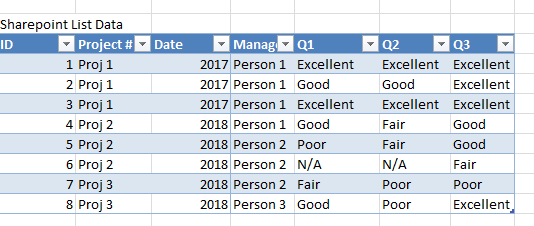
I am anaylzing results from a survey which are pulled into power bi through a sharepoint list. The format of the sharepoint list is as follows:

sharepointdata.PNG


I would like to graph the results on a stacked bar chart - yaxis being the questions and xaxis being the % answered of each type (Excellent, good, fair, poor, n/a), also being able to filter by project #, date, manager.


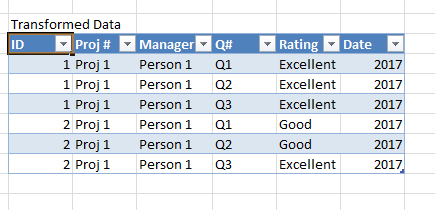
I believe the easiest way to do that would be to get my data in the following format:

TransformedData.PNG


How would I use power bi to transform the data this way? (Or is there a better way to format the data to get the resultant graph?) 

Thanks so much!

1 ACCEPTED SOLUTION
MarkLaf
Super User
Super User

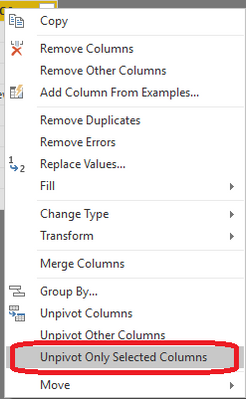
In query editor, select Q1, Q2, Q3 columns, right click, and click 'Unpivot Only Selected Columns':


image.png

View solution in original post

2 REPLIES 2
MarkLaf
Super User
Super User

In query editor, select Q1, Q2, Q3 columns, right click, and click 'Unpivot Only Selected Columns':


image.png

Anonymous
Not applicable

When selecting unpivot only selected columns, all the columns display "error". 

The error message is:


DataSource.Error: We couldn't parse OData response result. Error: A value without a type name was found and no expected type is available. When the model is specified, each value in the payload must have a type which can be either specified in the payload, explicitly by the caller or implicitly inferred from the parent value.
Details:
DataSourceKind=SharePoint
DataSourcePath=https://mytentnat.sharepoint.com/sites/qa/_api/Web/Lists(guid'542c4b4b-f41d-472b-a401-8e0768adc2d8')...


Helpful resources

Announcements
Power BI DataViz World Championships

Power BI Dataviz World Championships

The Power BI Data Visualization World Championships is back! Get ahead of the game and start preparing now!

November Power BI Update Carousel

Power BI Monthly Update - November 2025

Check out the November 2025 Power BI update to learn about new features.

FabCon Atlanta 2026 carousel

FabCon Atlanta 2026

Join us at FabCon Atlanta, March 16-20, for the ultimate Fabric, Power BI, AI and SQL community-led event. Save $200 with code FABCOMM.