Don't miss your chance to take the Fabric Data Engineer (DP-600) exam for FREE! Find out how by attending the DP-600 session on April 23rd (pacific time), live or on-demand.
Learn moreNext up in the FabCon + SQLCon recap series: The roadmap for Microsoft SQL and Maximizing Developer experiences in Fabric. All sessions are available on-demand after the live show. Register now
Hello,
I have the following table:
| Area | Year | Quarter | Cat1 | Cat2 | Cat3 |
| a1 | 2022 | 1 | 1 | 1 | 1 |
| a1 | 2023 | 2 | 3 | 2 | 1 |
| a2 | 2022 | 4 | 2 | 4 | 5 |
I want to transform it to the following:
| Category | Value | Area | Year | Quarter |
| Cat1 | 1 | a1 | 2022 | 1 |
| Cat1 | 3 | a1 | 2023 | 2 |
| Cat1 | 2 | a2 | 2022 | 4 |
| Cat2 | 1 | a1 | 2022 | 1 |
| Cat2 | 2 | a1 | 2023 | 2 |
| Cat2 | 4 | a2 | 2022 | 4 |
| Cat3 | 1 | a1 | 2022 | 1 |
| Cat3 | 1 | a1 | 2023 | 2 |
| Cat3 | 5 | a2 | 2022 | 4 |
So basically transpose column Cat1, Cat2, Cat3 from table1 and create a separated line for each combination of Area, Year.
How can I do it? Thanks a lot, I am trying this for hours now.
Solved! Go to Solution.
Hi @Marcel1989
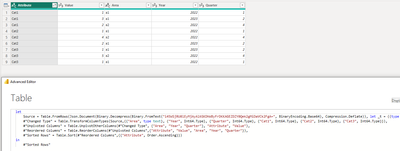
Select three columns(cat1,cat2, cat3) together and the unpivot to get the desired result.
Also, PFB the M code (Advance Editor)
let
Source = Table.FromRows(Json.Document(Binary.Decompress(Binary.FromText("i45WSjRU0lEyMjAyAlKGKDhWByFrDKKAGEZDZY0Qek2gMiDaVCk2FgA=", BinaryEncoding.Base64), Compression.Deflate)), let _t = ((type nullable text) meta [Serialized.Text = true]) in type table [Area = _t, Year = _t, Quarter = _t, Cat1 = _t, Cat2 = _t, Cat3 = _t]),
#"Changed Type" = Table.TransformColumnTypes(Source,{{"Area", type text}, {"Year", Int64.Type}, {"Quarter", Int64.Type}, {"Cat1", Int64.Type}, {"Cat2", Int64.Type}, {"Cat3", Int64.Type}}),
#"Unpivoted Columns" = Table.UnpivotOtherColumns(#"Changed Type", {"Area", "Year", "Quarter"}, "Attribute", "Value"),
#"Reordered Columns" = Table.ReorderColumns(#"Unpivoted Columns",{"Attribute", "Value", "Area", "Year", "Quarter"}),
#"Sorted Rows" = Table.Sort(#"Reordered Columns",{{"Attribute", Order.Ascending}})
in
#"Sorted Rows"
Hi @Marcel1989
Select three columns(cat1,cat2, cat3) together and the unpivot to get the desired result.
Also, PFB the M code (Advance Editor)
let
Source = Table.FromRows(Json.Document(Binary.Decompress(Binary.FromText("i45WSjRU0lEyMjAyAlKGKDhWByFrDKKAGEZDZY0Qek2gMiDaVCk2FgA=", BinaryEncoding.Base64), Compression.Deflate)), let _t = ((type nullable text) meta [Serialized.Text = true]) in type table [Area = _t, Year = _t, Quarter = _t, Cat1 = _t, Cat2 = _t, Cat3 = _t]),
#"Changed Type" = Table.TransformColumnTypes(Source,{{"Area", type text}, {"Year", Int64.Type}, {"Quarter", Int64.Type}, {"Cat1", Int64.Type}, {"Cat2", Int64.Type}, {"Cat3", Int64.Type}}),
#"Unpivoted Columns" = Table.UnpivotOtherColumns(#"Changed Type", {"Area", "Year", "Quarter"}, "Attribute", "Value"),
#"Reordered Columns" = Table.ReorderColumns(#"Unpivoted Columns",{"Attribute", "Value", "Area", "Year", "Quarter"}),
#"Sorted Rows" = Table.Sort(#"Reordered Columns",{{"Attribute", Order.Ascending}})
in
#"Sorted Rows"
Hi @Anonymous
thank you, your solution works perfectly. I think my understanding of unipivot was wrong, but I thanks to your answer I fully understand now.
If you have recently started exploring Fabric, we'd love to hear how it's going. Your feedback can help with product improvements.
A new Power BI DataViz World Championship is coming this June! Don't miss out on submitting your entry.
| User | Count |
|---|---|
| 47 | |
| 44 | |
| 39 | |
| 20 | |
| 15 |
| User | Count |
|---|---|
| 70 | |
| 68 | |
| 32 | |
| 27 | |
| 25 |