Join us at FabCon Atlanta from March 16 - 20, 2026, for the ultimate Fabric, Power BI, AI and SQL community-led event. Save $200 with code FABCOMM.
Register now!The Power BI Data Visualization World Championships is back! It's time to submit your entry. Live now!
Hello community,
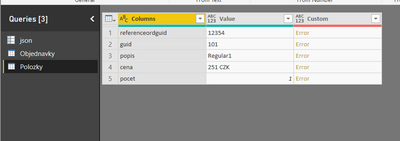
I have the following JSON structure:
It is hierarchy structure which I want to convert to a flat structure in Excel.
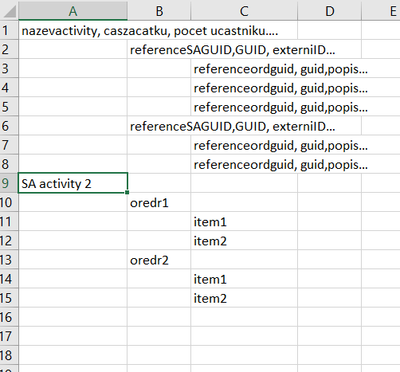
The final structure should be like this:
I found this thread: https://community.powerbi.com/t5/Integrations-with-Files-and/Multi-Dimensional-Json-file-to-Table/td...
I followed the solution @Anonymous mentioned there until the step 4. Where I do not know how to map/link the higher level of the JSON file.
Can you please help me to understand how can I link different levels of the JSON hierarchy and export it to the Excel file?
Thank you
Ondrej
Solved! Go to Solution.
Hi @Anonymous
You may try to create a matrix visual.Then you may use 'Expend' feature to achieve that.
Regards,
Hi @Anonymous
Please have a look at below articles to check if they could help.
https://www.mssqltips.com/sqlservertip/4621/using-power-bi-with-json-data-sources-and-files/
https://www.howtoexcel.org/power-query/how-to-access-a-json-api-with-power-query/
For 3rd party Links:
Please understand that this link is provided “AS IS” with no warranties or guarantees of content changes, and confers no rights.
Regards,
Hello @v-cherch-msft ,
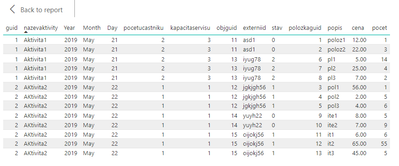
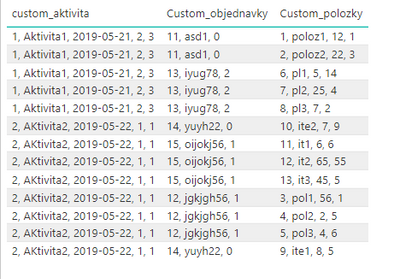
Thank you for your post. I decided to move the data to the database as it is more natural to me. Then I was able to create the following table:
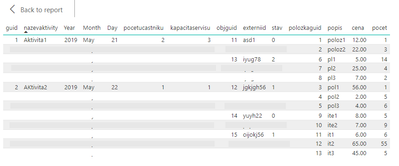
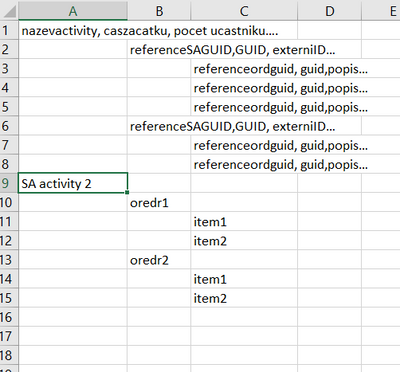
But I would like to have lit like this:
Can you please advice how to do that? All the guides I found finished with a full table with all values in place, but I need all values there just once and in this hierarchical structure. And even better... Would be possible to indent each level like this?
I found e.g.:
- https://community.powerbi.com/t5/Desktop/show-grand-totals-top-bottom-of-matrix/m-p/408946#M187480
But it is done for just one column (and inside) and not for a set of columns.
I have another idea... I can concatenate data from each table to one column:
But In this case, I need it with the intent...
Can you please advise which way would be better?
Thank you
Ondrej
Hi @Anonymous
You may try to create a matrix visual.Then you may use 'Expend' feature to achieve that.
Regards,
The Power BI Data Visualization World Championships is back! It's time to submit your entry.
Check out the January 2026 Power BI update to learn about new features.
| User | Count |
|---|---|
| 61 | |
| 47 | |
| 39 | |
| 24 | |
| 23 |
| User | Count |
|---|---|
| 144 | |
| 106 | |
| 63 | |
| 38 | |
| 31 |