Share feedback directly with Fabric product managers, participate in targeted research studies and influence the Fabric roadmap.
Sign up nowGet Fabric certified for FREE! Don't miss your chance! Learn more
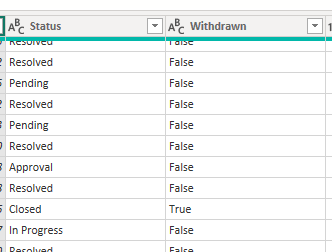
I have these 2 columns. I want to change the value of [Status] to "Withdrawn" if [Withdrawn] = "True"
I have written this code
= Table.TransformColumns(#"Added Conditional Column", {{"Status", each if [Withdrawn] = "True" then "Withdrawn" else [Status], type text}})
but I am getting this error
Expression.Error: We cannot apply field access to the type Text.
Details:
Value=Assigned
Key=Withdrawn
What is the reason for the error ?
Solved! Go to Solution.
Hey @gancw1 ,
I don't think it will work with with the Table.TransformColumns function.
But you can easily do that with the Table.ReplaceValues function.
The following code should do it:
= Table.ReplaceValue(#"Added Conditional Column", each [Status], each if [Withdrawn] = "True" then "Withdrawn" else [Status], Replacer.ReplaceText,{"Status"})
Otherwise you can just add a conditional column and then delete the original.
If you need any help please let me know.
If I answered your question I would be happy if you could mark my post as a solution ✔️ and give it a thumbs up 👍
Best regards
Denis
Blog: WhatTheFact.bi
Follow me: twitter.com/DenSelimovic
Thanks that works !
Hey @gancw1 ,
I don't think it will work with with the Table.TransformColumns function.
But you can easily do that with the Table.ReplaceValues function.
The following code should do it:
= Table.ReplaceValue(#"Added Conditional Column", each [Status], each if [Withdrawn] = "True" then "Withdrawn" else [Status], Replacer.ReplaceText,{"Status"})
Otherwise you can just add a conditional column and then delete the original.
If you need any help please let me know.
If I answered your question I would be happy if you could mark my post as a solution ✔️ and give it a thumbs up 👍
Best regards
Denis
Blog: WhatTheFact.bi
Follow me: twitter.com/DenSelimovic
If you love stickers, then you will definitely want to check out our Community Sticker Challenge!
Check out the January 2026 Power BI update to learn about new features.
| User | Count |
|---|---|
| 65 | |
| 65 | |
| 45 | |
| 21 | |
| 18 |
| User | Count |
|---|---|
| 115 | |
| 114 | |
| 38 | |
| 36 | |
| 26 |