Don't miss your chance to take exam DP-600 or DP-700 on us!
Request nowLearn from the best! Meet the four finalists headed to the FINALS of the Power BI Dataviz World Championships! Register now
Hi all,
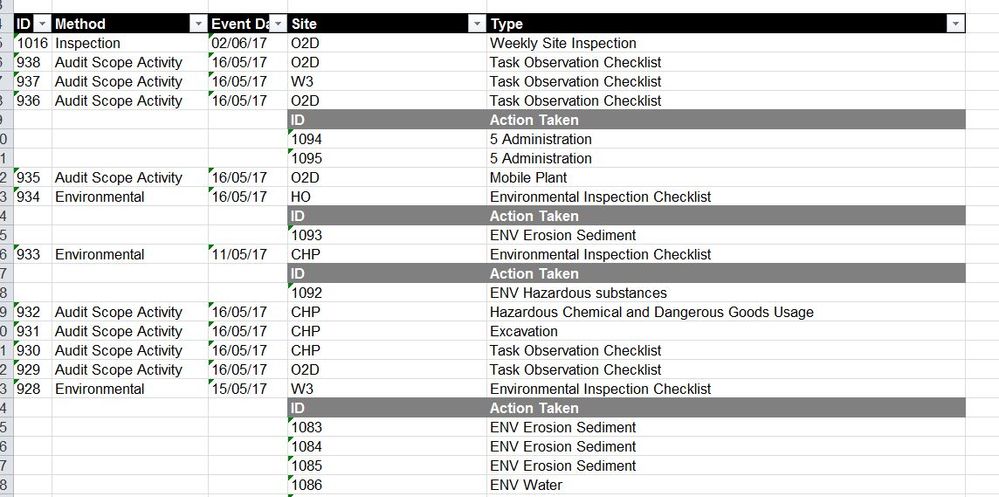
I have a table which consists of inspection event details, and some inspections include nested information (actions raised during the inspections). Is there are way that I can clean this table or export the nested rows of actions into a related query, so that I can use the nested information?
The table currently looks like this:
Very new to this, so any help is greatly appreciated!
Solved! Go to Solution.
Hi,
It would help if you also explain what the result should look like.
I assumed it shoud be something like this, with left MasterTable and right ActionTable (just a few rows):
Queries (you can copy and paste in the Advanced Query edtor, accessible via "Edit Query"):
Both queries are generated using standard menu options in the Query Editor.
MasterTable:
let
Source = Table1,
#"Filtered Rows" = Table.SelectRows(Table1, each ([ID] <> null))
in
#"Filtered Rows"ActionTable:
let
Source = Table1,
#"Filled Down" = Table.FillDown(Source,{"ID"}),
#"Filtered Rows" = Table.SelectRows(#"Filled Down", each ([Method] = null)),
#"Renamed Columns" = Table.RenameColumns(#"Filtered Rows",{{"Site", "ActionID"}, {"Type", "Action Taken"}}),
#"Filtered Rows1" = Table.SelectRows(#"Renamed Columns", each ([ActionID] <> "ID")),
#"Removed Columns" = Table.RemoveColumns(#"Filtered Rows1",{"Method", "Event Date"})
in
#"Removed Columns"
Hi,
It would help if you also explain what the result should look like.
I assumed it shoud be something like this, with left MasterTable and right ActionTable (just a few rows):
Queries (you can copy and paste in the Advanced Query edtor, accessible via "Edit Query"):
Both queries are generated using standard menu options in the Query Editor.
MasterTable:
let
Source = Table1,
#"Filtered Rows" = Table.SelectRows(Table1, each ([ID] <> null))
in
#"Filtered Rows"ActionTable:
let
Source = Table1,
#"Filled Down" = Table.FillDown(Source,{"ID"}),
#"Filtered Rows" = Table.SelectRows(#"Filled Down", each ([Method] = null)),
#"Renamed Columns" = Table.RenameColumns(#"Filtered Rows",{{"Site", "ActionID"}, {"Type", "Action Taken"}}),
#"Filtered Rows1" = Table.SelectRows(#"Renamed Columns", each ([ActionID] <> "ID")),
#"Removed Columns" = Table.RemoveColumns(#"Filtered Rows1",{"Method", "Event Date"})
in
#"Removed Columns"
Of course! thanks so much. I was over-thinking it, when all I had to do was duplicate the table and filter accordingly.
Share feedback directly with Fabric product managers, participate in targeted research studies and influence the Fabric roadmap.
Check out the February 2026 Power BI update to learn about new features.
| User | Count |
|---|---|
| 51 | |
| 40 | |
| 37 | |
| 14 | |
| 14 |
| User | Count |
|---|---|
| 84 | |
| 69 | |
| 38 | |
| 29 | |
| 27 |